Need help?
Do you have a question about the enphase Envoy R Standard and is the answer not in the manual?
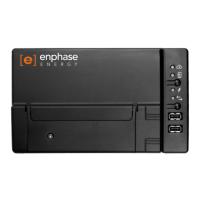
Connect the Envoy R via Ethernet to your router/modem and wait for IP address confirmation.
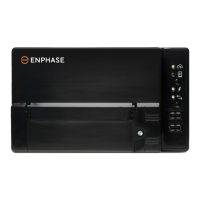
Connect the Envoy S via Ethernet to your router/modem and wait for the top LED to turn solid green.
Connect Envoy R using WPS: press MENU, select "Enable Wi-Fi WPS", then press router WPS.
Connect Envoy S using WPS: hold top button 5s, wait for LED flash, then press router WPS.
Select your network, enter password, and configure settings in "Current Wi-Fi Settings".
Click "Test Connection", then "Join Network". Troubleshoot if necessary.
Wait up to 10 minutes and check for "+Web" and a new IP address.
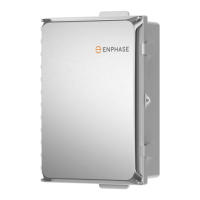
The Enphase Envoy is a critical component in a solar energy system, acting as the communication gateway between the microinverters on your roof and the Enphase Enlighten monitoring software. Its primary function is to collect performance data from each microinverter, such as energy production, and then transmit this data to the cloud for remote monitoring and analysis. This allows system owners and installers to track the system's performance, identify potential issues, and ensure optimal energy generation. The Envoy also facilitates firmware updates for the microinverters, ensuring they always operate with the latest features and efficiencies.
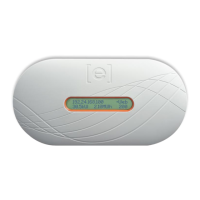
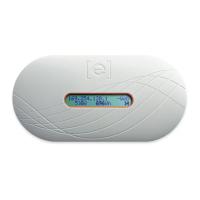
There are several models of the Enphase Envoy, each offering slightly different features and connectivity options. The Envoy R, for instance, is an earlier model that typically relies on a separate Wi-Fi adapter for wireless internet connectivity. This adapter plugs into a USB port on the Envoy R, enabling it to join a local Wi-Fi network. The Envoy R also supports wired Ethernet connections, providing flexibility for installations where a stable wired connection is preferred or available. The device features a small display screen that provides real-time information, such as its IP address and connection status, which is particularly useful during initial setup and troubleshooting. The "+Web" indicator on the display is a quick visual cue that the Envoy R has successfully established an internet connection and is communicating with the Enphase cloud.
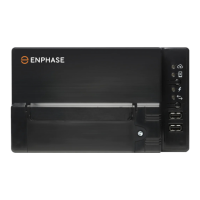
The Envoy S series, which includes both "Standard" and "Metered" versions, represents a more advanced generation of the Enphase gateway. These models often integrate Wi-Fi capabilities directly into the unit, eliminating the need for an external adapter in many cases. The Envoy S - Standard primarily focuses on monitoring energy production from the microinverters. The Envoy S - Metered, on the other hand, offers enhanced functionality by incorporating revenue-grade metering. This means it can precisely measure both the energy produced by the solar array and the energy consumed by the household, providing a comprehensive view of the home's energy profile. This additional metering capability is crucial for homeowners who want to maximize self-consumption, participate in demand-response programs, or simply gain deeper insights into their energy usage patterns. Both Envoy S models feature LED indicators that provide status updates, such as network connectivity and system health. A solid green LED next to the cloud icon, for example, signifies a successful internet connection.
Setting up an Envoy for internet connectivity can be achieved through various methods, catering to different network environments and user preferences. The simplest and most recommended approach is the WPS (Wi-Fi Protected Setup) method, available for all Envoy models that support Wi-Fi. This method involves pressing a WPS button on both the Envoy (or its Wi-Fi adapter) and the router, allowing them to establish a secure wireless connection automatically. This eliminates the need for manual password entry and simplifies the setup process significantly. For the Envoy R, this involves holding down a "MENU" button until "Enable Wi-Fi WPS" appears on its screen, while for the Envoy S, it typically involves pressing a dedicated button on the unit itself.
When WPS is not feasible or preferred, manual configuration methods are available. These methods often involve connecting a computer or mobile device directly to the Envoy's own Wi-Fi access point, which the Envoy creates for local configuration. Once connected to this Envoy-specific Wi-Fi network (identifiable by "ENVOY_xxxxxx" where "xxxxxx" are the last six digits of the Envoy's serial number), users can access a web-based interface by typing a specific IP address (e.g., "172.30.1.1" or "169.254.120.1") into a web browser. This interface provides a graphical user interface for configuring network settings, including selecting the home's Wi-Fi network from a list of available networks and entering the corresponding password. For security, this interface typically requires a login, with "admin" as the username and "admin" (for Envoy R) or the last six digits of the Envoy's serial number (for Envoy S) as the password.
Maintenance of the Enphase Envoy primarily involves ensuring its continuous internet connectivity. A stable internet connection is vital for the Envoy to upload data to Enlighten and receive firmware updates. If the internet connection is lost, the Envoy will store the production data locally, but it will not be accessible remotely until connectivity is restored. Troubleshooting connectivity issues often involves checking the physical connections (for wired setups), verifying Wi-Fi network settings, and ensuring the Envoy is within range of the Wi-Fi router. The web-based interface provides diagnostic tools and status indicators that can help pinpoint the cause of connectivity problems. In some cases, manually reconfiguring the Wi-Fi settings or attempting a different connection method (e.g., switching from Wi-Fi to Ethernet or vice-versa) may be necessary. Regular monitoring through the Enlighten platform allows users to quickly identify if the Envoy is offline and take corrective action. The design of the Envoy units, particularly the Envoy S models, often includes cable trays to help manage and protect the power and Ethernet cables, contributing to a tidy and robust installation. The serial number label, often located on the device, is important for identification and support purposes.
 General
| Category | Gateway |
|---|---|
| Model | Envoy R Standard |
| Manufacturer | Enphase Energy |
| Communication | Ethernet, Wi-Fi |
| Compatibility | Enphase microinverters |
| Power Supply | 100-240 VAC |
| Operating Temperature | -40°C to 60°C |


 To Next Page