16
Inserting a Memory Card
This Computer accepts microSD memory cards. This allows you to increase the memory capacity of your Computer and
also to play media les that are stored on the memory card (e.g. music, photos or video les).
To insert a memory card:
• Align the memory card with the microSD slot. The metal poron of the memory card should be facing away from the
screen.
• Push the card into the slot, unl you hear a click. This signies that the card is clicked into place.
Do not aempt to insert objects other than a SD card into the card slot. A compable memory card should t easily into the card slot. If the card will
not easily t, check the alignment of the card. Do not aempt to force it into the slot. Avoid touching the metallic contacts of the memory card.
Formatting a microSD card
Note: Formang an SD card will wipe any and all data from the SD card’s storage. If
you wish to retain any les please transfer then onto a Computer or other device before
formang.
• Please ensure the correct drive is selected before formang. Once
formaed this cannot be undone.
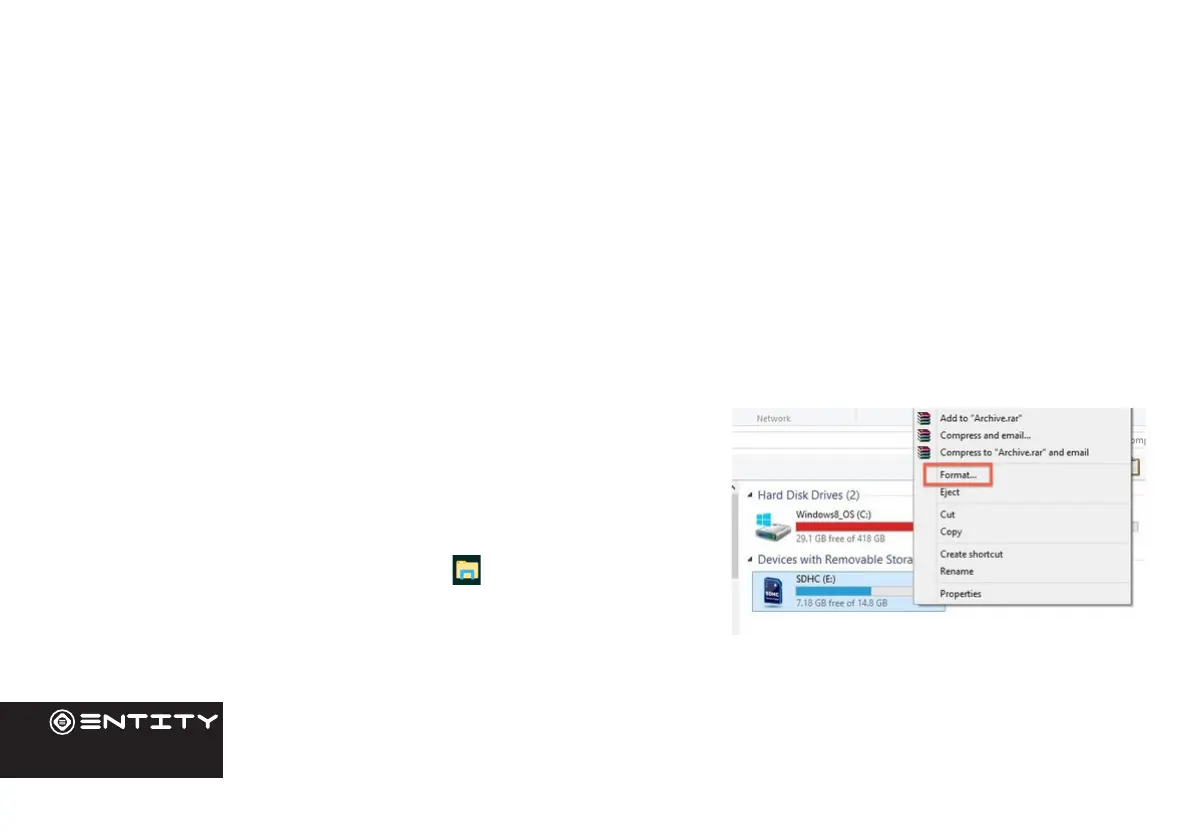
• Open File Explorer by clicking on the icon on the task bar and
navigate to “This PC”
• Find the drive where your SD Card is Located
• Right-click, and when the menu appears click Format.
External Storage


 To Next Page