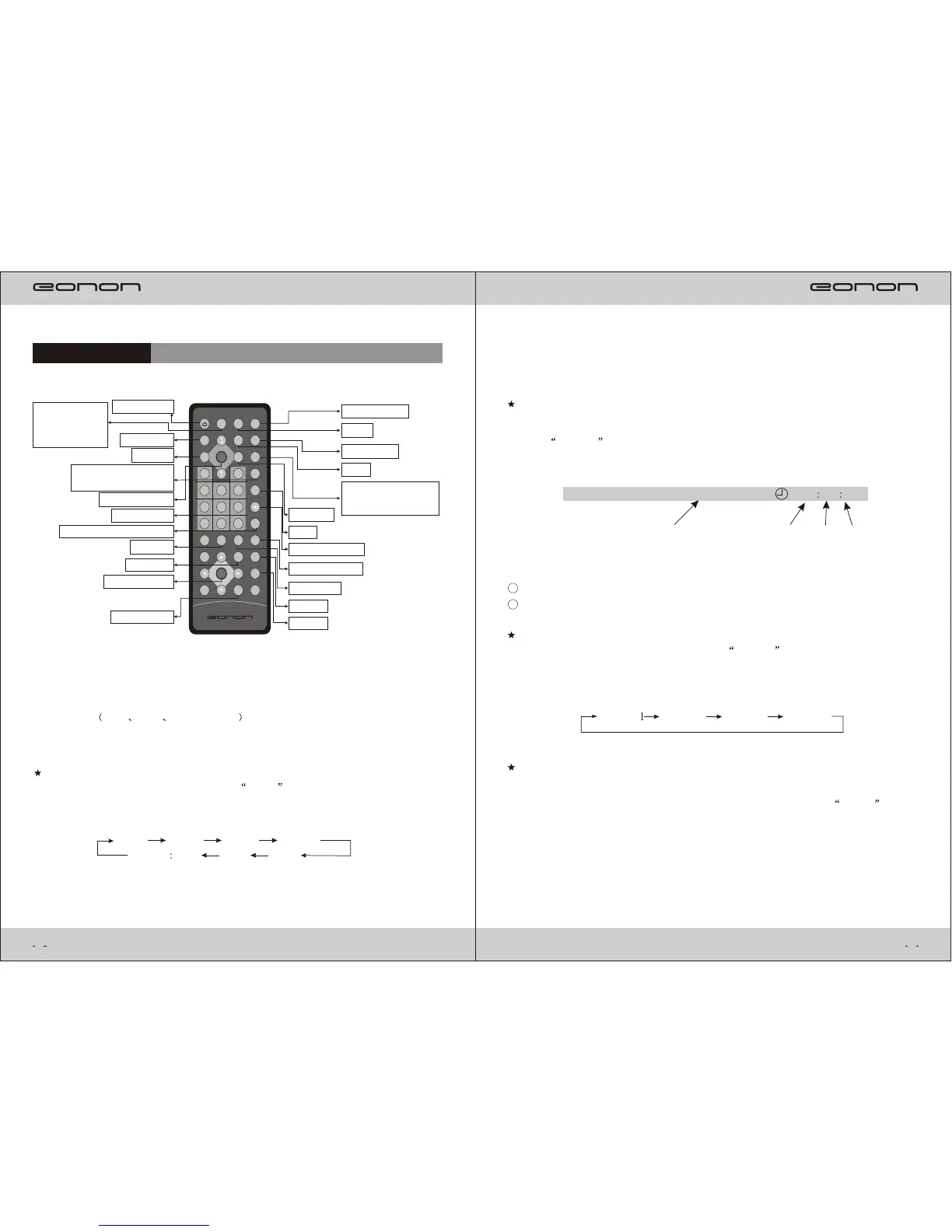
Remote Control
Under Disc DVD VCD CD and MP3 playing,the operation introduction of
some special buttons of remote control as follows:
Zoom Picture Size
Under Playing status,repeatly press Zoom button on the remote control,
it will appear:
Example:
X 2
ZOOM OFF
X 3
X 4 X 1/2
X 1/3
X 4/1
POWER MODEMUTE CLOCK
BAND
P/N
RND
SEL
VOL+VOL-
LOUD
MENU
A.PS
0 10+
4
5
6
7
8 9
1 2
3
GOTO
STOP
REP
SUB-T
ENTER
OSD
ANGLE
TITLE
LOC
PROG
AUDIO
SETUP
PBC
ZOOM
INT
A-B
Power on/off
Main Menu
Clock
Radio Band
Loud
Volume -
Audio Selection
Numeric Key
5
Subtitle
Enter/Confirm
Volume +
Radio Auto Scan,DVD
Programming Play
Stop
Audio/Channel
DVD Zoom in
Disc Angle
Repeat
DVD PBC
Preview
Shortly press for
Mute and Long
press for turning
off screen
Mode Change
Local/Distance Radio
Selection,DVD
Random Play
Dsic Play/Pause
Disc Time Searching Play
3
Selective Play
Under playing status,press GOTO button on the remote control,it will appear the
following menu of selective playing.Input chapter or time in appointed place and
press Confirm .Chapter and Time could not input together.
Example:
Chapter
DVD
Subtitle 2/2
Chapter
6/12
00 24 58
Hour: Minute: Second
Multi-Angle Play
Under playing condition,repeatly press ANGLE button on remote control
it will appear pictures with different angles,such as Long,Close,Left and
Right angle.
Example:
ANGLE
ANGLE 2
ANGLE 3
ANGLE 4
Programming Play
Under playing condition,it can play in sequence by Programming Play function
To set up the order of programmes.Operation method:Press PROG button
on remote
Control,the unit will show the programming menu.Input programme
number into the
blue color shadow frame.Press cursor UP,DOWN,LEFT and
RIGHT,move shadow frame in right direction to input another programme number.
Press PLAY button to enter playing status.It is same operation for inputing more
Programme numbers ,Use 0-9 as numbers.
Notice:
.The inputed time and chapter should not exceed the ones of Disc content.
1
.This function is available only under DVD,VCD,MP3,CD,SD,USB playing mode.
2
4



 To Next Page