23
Operation
Centrifuge 5424/5424 R
English (EN)
5 Operation
5.1 Overview of operating controls
The Centrifuge 5424/5424 R is available in two versions: keypad or rotary knobs. This operating manual
generally describes how to operate the keypad version. However, it also applies to the rotary knob version.
Before using the Centrifuge 5424/5424 R for the first time, familiarize yourself with the operating controls
and the display.
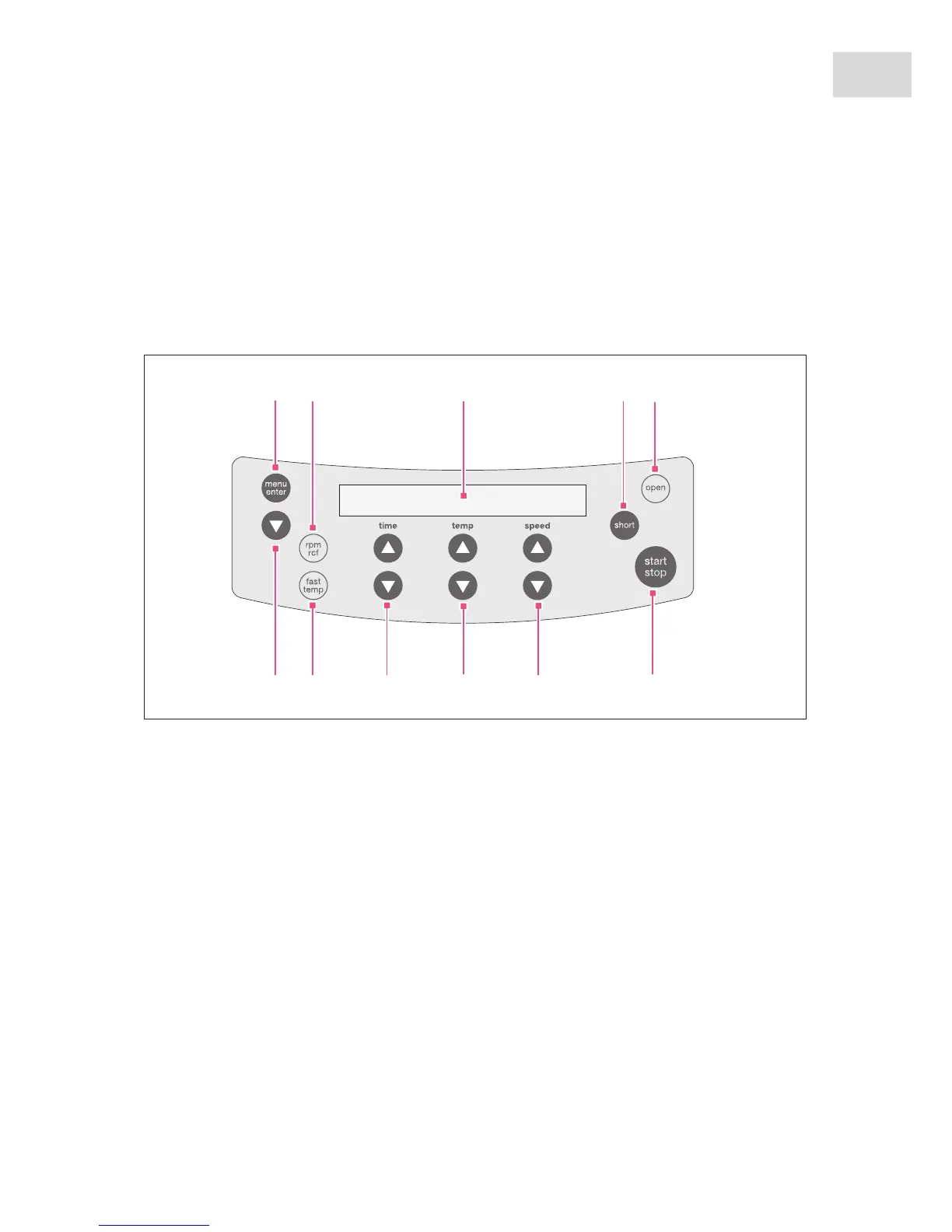
Abb. 5-1: Co ntrol panel of the C entrifuge 5424/5424 R
Fig. 5-1: Control panel of the Centrifuge 5424/5424 R
Please also read the precise description of the individual menu functions (see p. 25).
1 Call and select the menu parameters
(see Device menu on p. 25)
2 Switch the displayed centrifugation speed
(rpm/rcf)
(see Rcf display and calculation on p. 19)
3Display
4 Short spin centrifugation
(see Short-spin centrifugation on p. 32)
5Release lid
6 Start and stop centrifugation
7 Set centrifugation speed
Dependent on device version designed as a key or
dial.
8 Adjust temperature (only 5424 R)
9Set centrifugation time
Dependent on device version designed as a key or
dial.
10 Start the temperature control run fast temp
(only 5424 R)
11 Select the menu item
(see Menu navigation on p. 26)



 To Next Page