2
Short instructions
Eppendorf Xplorer
®/
Xplorer
®
plus
English (EN)
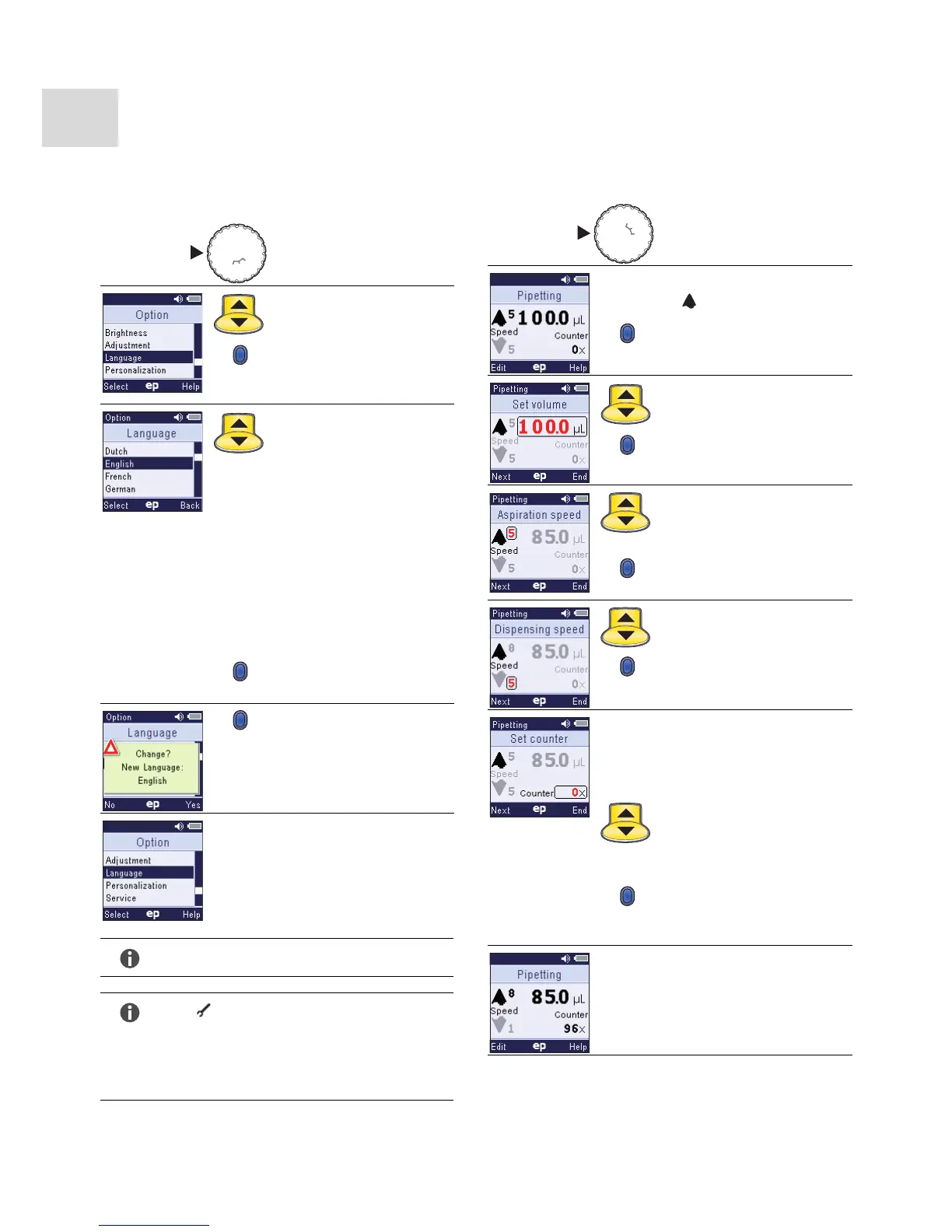
Option: Language selection
The language English is set by default on delivery.
1. Move the selection dial
to Opt.
2. Use the rocker to select
the Language option.
3. Press the Select softkey
to open the Language
option.
4. Select your language
with the rocker.
The following
languages are available:
•Chinese
•Dutch
•English
•French
•German
•Italian
•Japanese
•Portuguese
•Spanish
5. Press the Select softkey
to select your language.
6. Press the Yes softkey to
confirm the change.
The new language is
activated.
Note!
Turn the selection dial to exit the options.
Note!
The symbol in the left part of the header
indicates that the factory settings have been
changed.
If the factory setting is active, no symbol will
appear in the header.
Edit the pipetting mode (Pip)
Editing has a very similar procedure in all modes.
1. Turn the selection dial to
Pip.
Piston is in basic position
.
2. Press the Edit softkey.
3. Select the volume with
the rocker.
4. Press the Next softkey to
select the next parameter.
5. Select
the aspiration speed with
the rocker.
6. Press the Next softkey to
select the next parameter.
7. Select the dispensing
speed with the rocker.
8. Press the Next softkey to
select the next parameter.
Optional parameter:
Counter indicates the
number of performed
pipetting steps.
9. Optional: Use the rocker
to correct the number of
performed pipetting
steps.
10.Press the End softkey to
save the changes and exit
the editing mode.
The pipette is ready for
liquid aspiration with new
parameters.
P/M



 To Next Page