24 Printing From Start to Finish
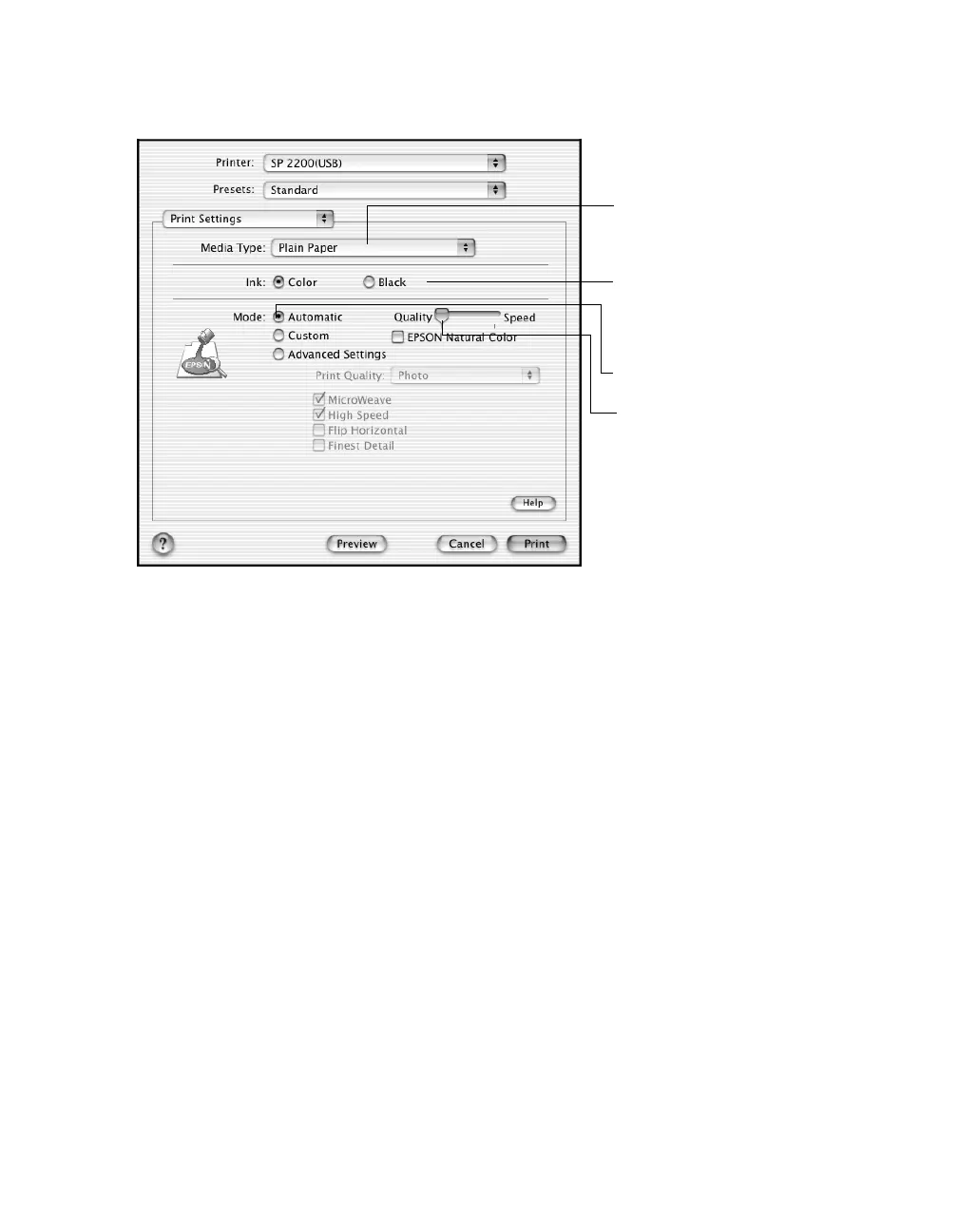
7. Select the following Print Settings:
Note: For more information about printer settings, click Help. The OS X printer
driver contains a subset of the settings available with the OS 8.6 to 9.x Macintosh
printer driver described in this book.
8. You can also choose other print settings by selecting these options in the
pull-down menu:
■ Copies & Pages, to select the number of copies or a page range
■ Layout, to select page layout options
■ Output Options, to save your print job as a PDF file
■ Color Management, to select ColorSync,
®
adjust the color controls, change
the gamma setting, or turn off color adjustments by the printer software
■ Ink Configuration, to change the ink density and drying time
■ Summary, to view a list of all your selections
■ Save Custom Setting, to save your selections for future use. (Not available
with Mac OS X 10.2.x.)
9. Click Print.
4 Select Quality or Speed
(for faster printing)
1 Select your paper type
(see page 32)
3 Select Automatic mode
2 Select Color (for color
documents and black
and white photographs)
or Black for black text
documents










 To Next Page