18 Setting Up the Projector
Connecting the Cables
You can connect the projector to any type of video equipment, such as a VCR, DVD player,
digital tuner, cable or satellite box, video game console, camcorder, or digital camera. You can
also connect it to a desktop or laptop PC or Apple
®
Macintosh
®
system.
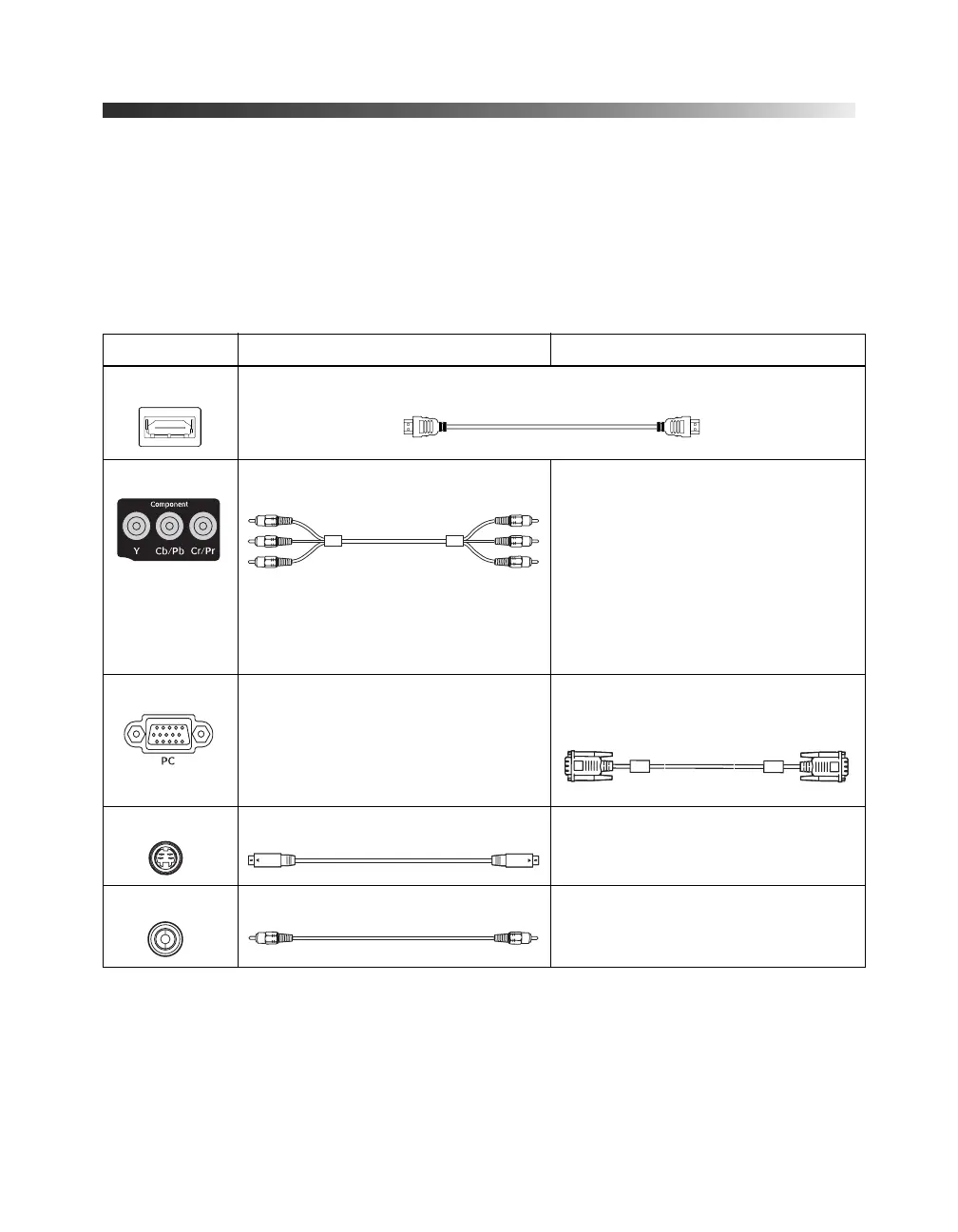
You can connect up to five pieces of video equipment at the same time, using any of the
commercially available cables shown below:
* For details on compatible video formats, see page 63.
Port name Video equipment connection* Computer connection*
HDMI Use an HDMI cable:
Component Use a component video cable (with
RCA-style connectors):
Connect the cable to the three
component video ports. Match
corresponding colors between the
cable and the ports.
—
PC — Use a Mini D-sub, 15-pin monitor cable
to connect to a computer RGB
(monitor) port:
S-Video Use an S-video cable: —
Video Use an RCA video cable: —
Component
video ports
RGB port
PowerLite Cinema Pro 810.book Page 18 Thursday, December 6, 2007 11:25 AM


 To Next Page