EH-TW3500/4500/5500 Disassembly and Assembly CONFIDENTIAL
SEIKO EPSON 85 Revision A
3.3.11 INT Fan (assembly)
1. Remove the Lamp. (p.55)
2. Remove the Side Cover L/Side Cover R. (p.57)
3. Remove the Upper Case (assembly). (p.59)
4. Remove the MA Board (assembly). (p.68)
5. Remove the DR Board (EH-TW4500/5500 series only). (p.73)
6. Remove the Optical Engine (assembly). (p.75)
7. Peel off the heat-resistant tape that secures the INT Fan cable to the MA-DR Plate.
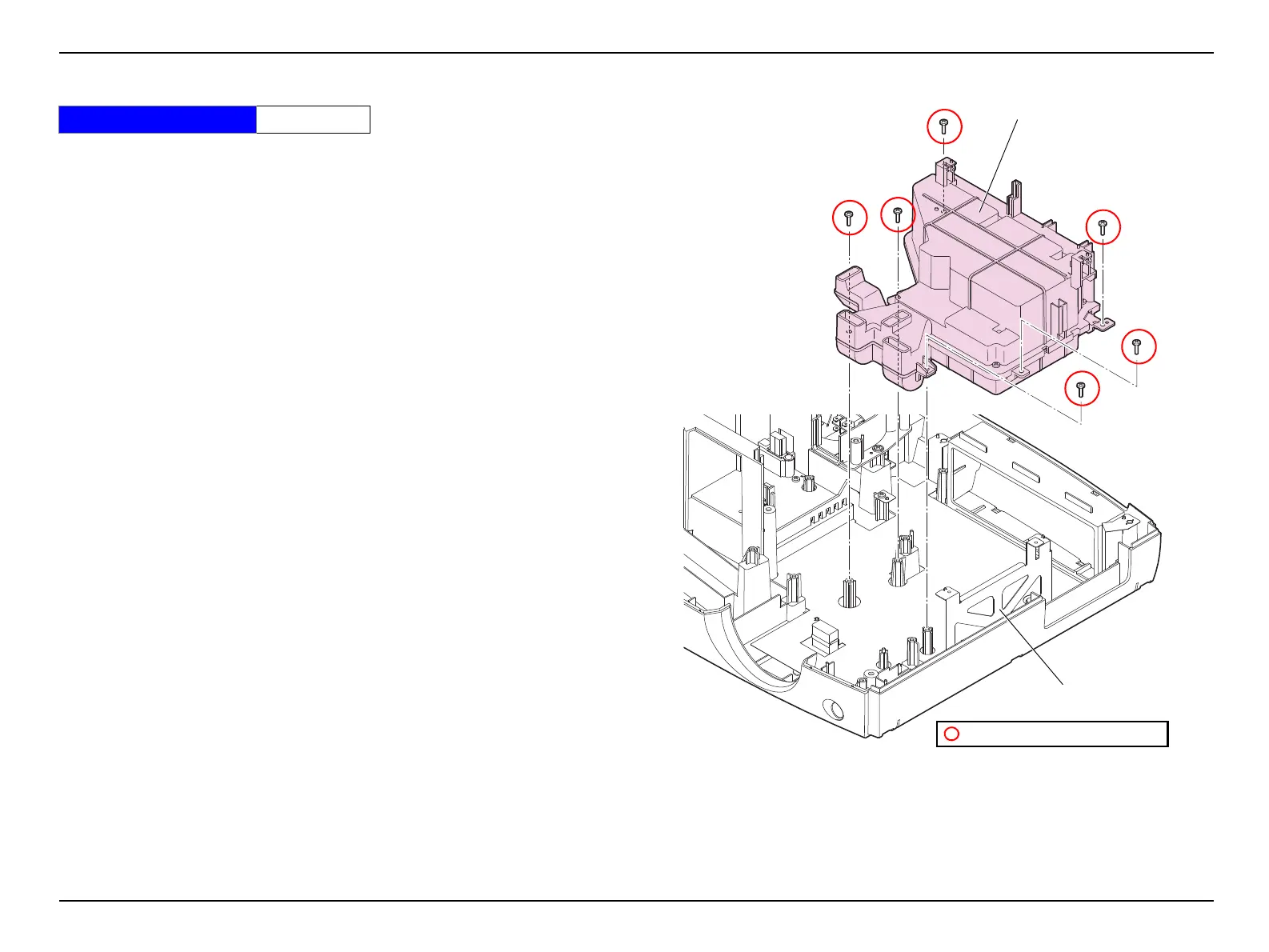
8. Remove the six screws, and remove the INT Fan (assembly).
Figure 3-33.
Standard Operation Time 16 Min.
INT Fan (assembly)
C.B.P-TITE SCREW,3X10,F/ZB-3C
MA-DR Plate


 To Next Page