Need help?
Do you have a question about the Epson SC-P9500 Series and is the answer not in the manual?
Explains symbols, illustrations, screenshots, and product descriptions.
Details front, inside, back, control panel, and home screen operations.
Covers printer features, usage, storage, and handling guidelines.
Lists and describes printer software and utilities.
Covers Web Config, software updates, and uninstallation.
Guides on loading, removing, and cutting various paper types.
Covers paper settings, auto cut, media installer, and driver configurations.
Explains how to print and cancel jobs on Windows and Mac.
Details printable margins and printer power saving modes.
Summarizes hard disk unit functions and print job management.
Explains how to save, view, and print jobs using the hard disk.
Guides on opening the driver and accessing help features.
Covers saving settings, adjusting ink density, and arranging display items.
Covers accessing driver settings, help, presets, and utility functions.
Guides on saving presets and using the Epson Printer Utility.
Explains modes like dark black tones, color correction, and B&W printing.
Details borderless printing and roll paper cutting methods.
Covers enlargement, reduction, poster, multi-page, and banner printing.
Explains color management principles and profiles.
Details settings for applications and printer drivers.
Lists settings for roll paper and cut sheets.
Covers display, sound, language, and timer settings.
Includes paper source, cleaning, status, and PS3 menu settings.
Covers nozzle checks, cleaning, and alignment.
Guides on replacing ink cartridges, maintenance boxes, and cutters.
Details cleaning the printer's exterior and interior parts.
Provides solutions for displayed error messages.
Addresses issues like printer not working, driver problems, and connectivity.
Helps diagnose and fix poor print quality, color discrepancies, and alignment problems.
Covers paper jams, scuffing, and feeding issues.
Step-by-step guides for cleaning print heads, caps, and wipers.
Lists available printer options and consumables.
Details specifications for various Epson special media types.
Provides recommendations for using non-Epson papers.
Covers moving, transporting, reusing, system requirements, and web config.
Provides links to Epson's support website for drivers and FAQs.
Lists information needed for contacting support.
Provides contact details for different geographical regions.
Explains symbols, illustrations, screenshots, and product descriptions.
Details front, inside, back, control panel, and home screen operations.
Covers printer features, usage, storage, and handling guidelines.
Lists and describes printer software and utilities.
Covers Web Config, software updates, and uninstallation.
Guides on loading, removing, and cutting various paper types.
Covers paper settings, auto cut, media installer, and driver configurations.
Explains how to print and cancel jobs on Windows and Mac.
Details printable margins and printer power saving modes.
Summarizes hard disk unit functions and print job management.
Explains how to save, view, and print jobs using the hard disk.
Guides on opening the driver and accessing help features.
Covers saving settings, adjusting ink density, and arranging display items.
Covers accessing driver settings, help, presets, and utility functions.
Guides on saving presets and using the Epson Printer Utility.
Explains modes like dark black tones, color correction, and B&W printing.
Details borderless printing and roll paper cutting methods.
Covers enlargement, reduction, poster, multi-page, and banner printing.
Explains color management principles and profiles.
Details settings for applications and printer drivers.
Lists settings for roll paper and cut sheets.
Covers display, sound, language, and timer settings.
Includes paper source, cleaning, status, and PS3 menu settings.
Covers nozzle checks, cleaning, and alignment.
Guides on replacing ink cartridges, maintenance boxes, and cutters.
Details cleaning the printer's exterior and interior parts.
Provides solutions for displayed error messages.
Addresses issues like printer not working, driver problems, and connectivity.
Helps diagnose and fix poor print quality, color discrepancies, and alignment problems.
Covers paper jams, scuffing, and feeding issues.
Step-by-step guides for cleaning print heads, caps, and wipers.
Lists available printer options and consumables.
Details specifications for various Epson special media types.
Provides recommendations for using non-Epson papers.
Covers moving, transporting, reusing, system requirements, and web config.
Provides links to Epson's support website for drivers and FAQs.
Lists information needed for contacting support.
Provides contact details for different geographical regions.
 General
| Ink Type | UltraChrome HD pigment ink |
|---|---|
| Number of Ink Colors | 10 |
| Connectivity | USB 3.0, Ethernet, Wi-Fi |
| Operating System Compatibility | Windows, macOS |
| Number of Inks | 10 |
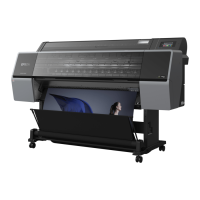
| Printer Type | Large Format Inkjet Printer |
| Media Thickness | Up to 1.5 mm |
| Operating Systems | Windows, macOS |
| Media Size | Up to 44" wide |
| Print Width | 44 inches (1118 mm) |
| Print Technology | PrecisionCore MicroTFP Print Head |
| Maximum Print Resolution | 2, 400 x 1, 200 DPI |
| Media Sizes | Up to 44 inches (1118 mm) wide |
| Weight | 440 lbs (200 kg) |




 To Next Page