14
Installing or Replacing the Roll Paper
!CAUTION:
❏
Be sure to use the specified roll paper. (U “TM-L90-i Specifications” on page 20)
❏
If you change the paper type from linerless label paper to thermal roll paper, cleaning around the
paper path is recommended. (U
“Cleaning Inside the Printer” on page 15.)
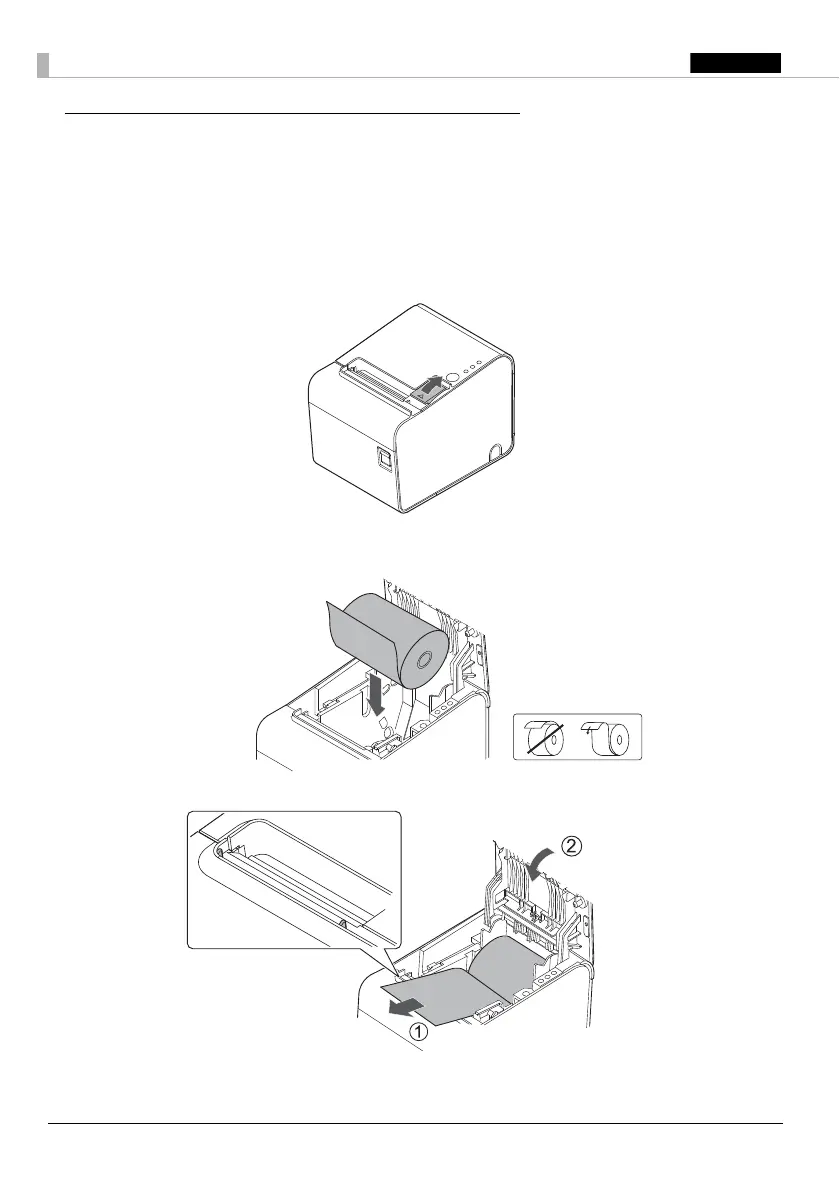
1. Open the roll paper cover using the cover open lever.
2. Remove the used roll paper core if there is one.
3. Insert a roll of paper in the correct direction.
4. Pull out a small amount of paper, aligning the paper with the paper guides on both sides.
5. Be sure to close the roll paper cover completely by pushing on the middle of the cover.
When the printer is powered on, the paper will feed and cut automatically.


 To Next Page
 Loading...