20
Specifications
*1: For information on how to change paper width, see Technical Reference Guide.
*2: Mounted interfaces vary by the printer model.
*3: 500 mA at maximum for one port. 600 mA at maximum for total of the two ports.
*4: Available when the PHP function is enabled. For information on how to setup PHP environment, see TM-i Series PHP Setup
Manual. Be sure to use a micro SD card with the wear leveling function.
*5: Be sure to use a safety-standards-applied power source that meets the following specifications.
Rated output: 24 V, 1.5 to 10.0 A
Maximum output: 240 VA or less
*6: Reference data: In case of using the Epson power supply, PS-180 (Model: M159D)
*7: Based on Epson operating conditions.
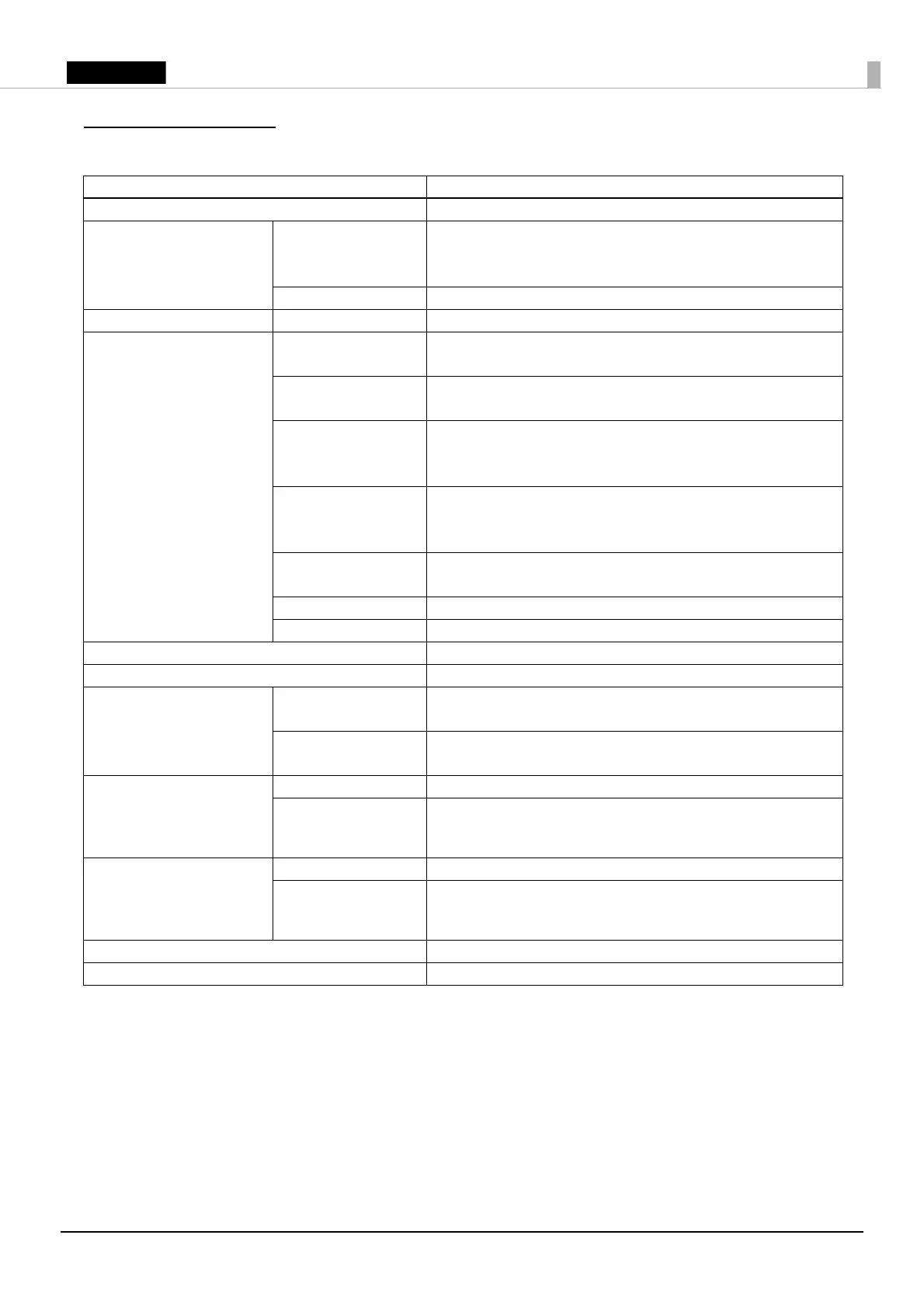
Item Specification
Printing method 9-pin serial impact dot matrix
Roll paper dimensions Paper width*
1
57.5 mm ±0.5 mm {2.26” ±0.02”}
69.5 mm ±0.5 mm {2.74” ±0.02”}
76 mm ±0.5 mm {2.99” ±0.02”}
Diameter 83 mm {3.27"} maximum
Ribbon cassette Model ERC-38
Interface
*2
Ethernet × 1
10BASE-T/100BASE-TX
Serial × 1
D-sub 9 pin male
VGA × 1
D-sub 15-pin female
DDC is not supported.
USB (host) × 2
USB 2.0, Type A
5 V, 500 mA*
3
USB (device) × 1
USB 2.0 High speed, Type B
micro SD card*
4
× 1
Drawer kick × 1
Power supply*
5
24 V DC ±7%
Current consumption (at 24 V) 1.3 A
AC power consumption*
6
Operating*
7
Serial: 23.3 W
VGA: 26.5W
Standby Serial: 2.9 W
VGA: 3.3W
Temperature Operating 0 to 50°C {32 to 122°F}
Storage
(excluding paper and
ribbon)
–10 to 50°C {14 to 122°F}
Humidity Operating 10 to 90 %RH
Storage
(excluding paper and
ribbon)
10 to 90 %RH
Overall dimensions (W × D × H) 160 mm × 248 mm × 138.5 mm {6.3” × 5.5” × 9.8”}
Mass (excluding paper, ribbon, and AC adapter) Approx. 2.5 kg {5.51lb}













 To Next Page