45
EN
USE
Cooling Mode
In this mode, the exhaust hose must be connected to the outside of the home.
1 - Press the button on the control panel or on the remote control to turn on the device
2 - Press button on the control panel or remote control several times to light up LED .
3 - Adjust the setpoint temperature (desired temperature) using buttons and .
4 - Press the button several times to set the fan speed .
Fan mode
1 - Press the button on the control panel or on the remote control to turn on the device
2 - Press button on the control panel or remote control several times to light up LED
3 - Press the button several times to set the fan speed .
Dehumidification mode
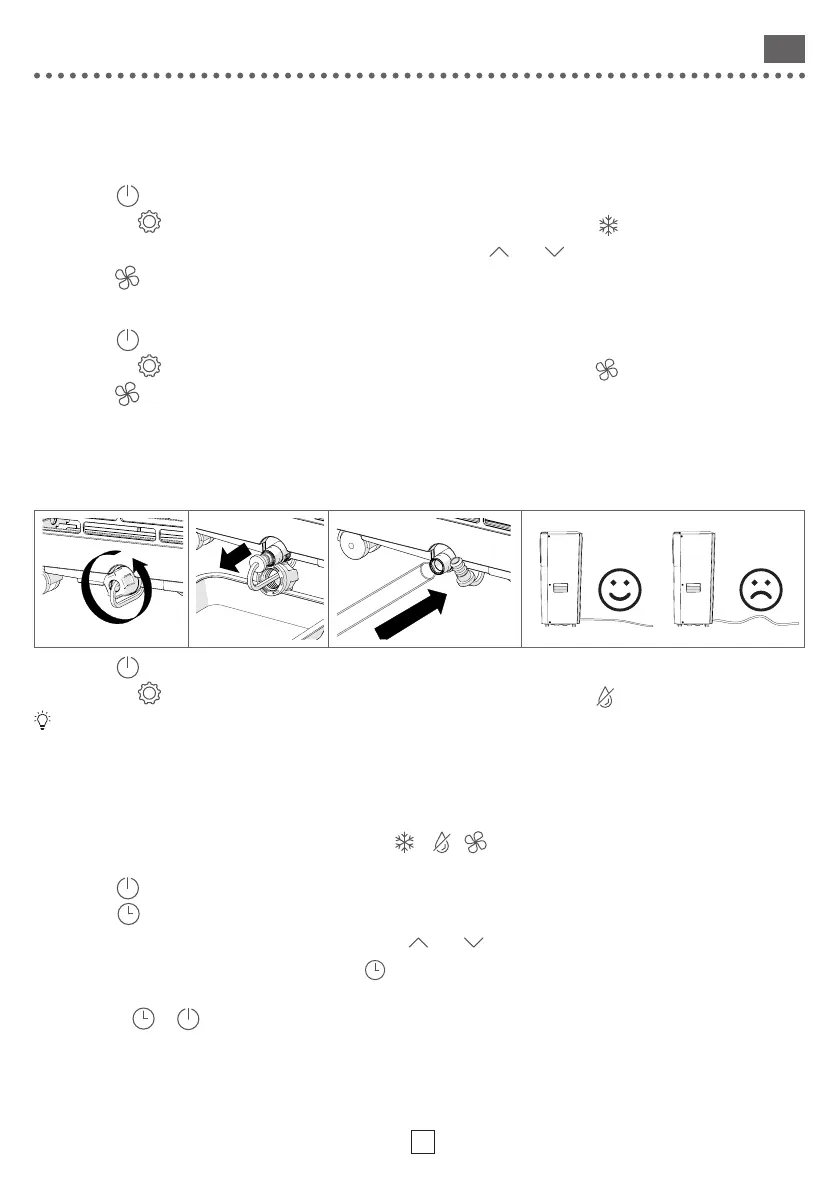
In this mode, the continuous drainage pipe must be connected to drain the water into a container or to
the sewage system.
1 - Press the button on the control panel or on the remote control to turn on the device
2 - Press button on the control panel or remote control several times to light up LED
Fan speed and temperature adjustment are not available in Dehumidification mode.
Timer
The timer is used to start or stop the device after a time set between 0.5 h (30 min) and 24 h
• Switch on the appliance with the timer
1 - Switch on the appliance, choose the operating mode ( , , ) and adjust the setpoint temperature and fan
speed
2 - Press the button on the control panel or on the remote control to turn o the device
3 - Press the button
4 - Set the time until the desired switch-on time using keys and (in number of hours).
5 - After a few seconds, the setting is saved and LED lights up.
6 - When the set time has elapsed, the air conditioner will turn on with the settings.
7 - Press again or to cancel the Timer.



 To Next Page