46
EN
• Switch o the appliance with the timer
1 - Switch on the appliance, choose the operating mode ( , , ) and adjust the setpoint temperature and fan
speed
2 - Press the button
3 - Set the time until the desired switch-o time using keys and (in number of hours).
4 - When the set time has elapsed, the air conditioner will turn o automatically.
Sleep function
The Sleep function can be used in Cooling or Dehumidifier mode. This function provides a more comfortable
environment for sleeping.
1 - Switch on the appliance, choose the operating mode
( ,
) and adjust the setpoint temperature and the fan speed
2 - Press the button on the remote control to activate the Sleep function.
3 - The function is automatically deactivated after 8 hours of operation and returns to the previously set mode.
Turning o the display
• Press button on the remote control to turn o the display.
• Each time you press a button, the display will temporarily turn on and then turn o after a few seconds.
• Press button on the remote control again to switch the display on permanently.
Flow adjustment
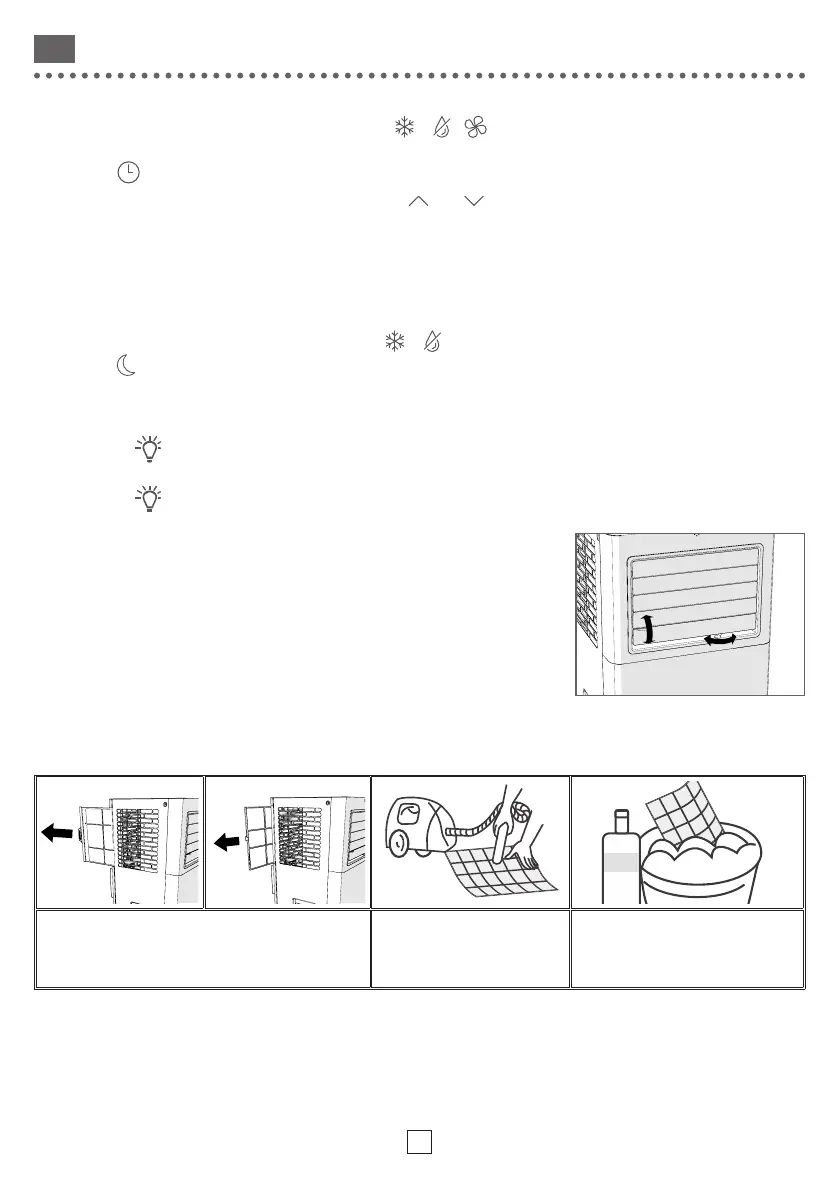
Manually move the horizontal and vertical deflectors to orientate the
airflow correctly.
CARE
Cleaning the dust filters
It is advisable to clean the dust filter each month of use to promote proper air circulation and optimum
performance of the air conditioner.
Remove the side filter, then the rear filter Remove dust from the
filter using a vacuum
cleaner
For strong stains, use soapy
water and dry before replacing
the filter.
Cleaning of exterior parts
Use a soft, dry cloth. For strong stains, use a cloth dampened with soapy water and wipe immediately with a dry
cloth.



 To Next Page