www.prolight.co.uk MaxiPar Quad User Manual
9
Operating instructions
BLACK
O U T
AUTO S O UND
STROBE S P EED
SE NSI-
T I VIT Y
%
DMX
MA NUAL
FADE
UNIT
R
B
G
A W
P
UV
0
31 2
4 5 6
8 9
+
7
07
01
02
04
08
10
11
05
09
03
06
12
11
A B C
D
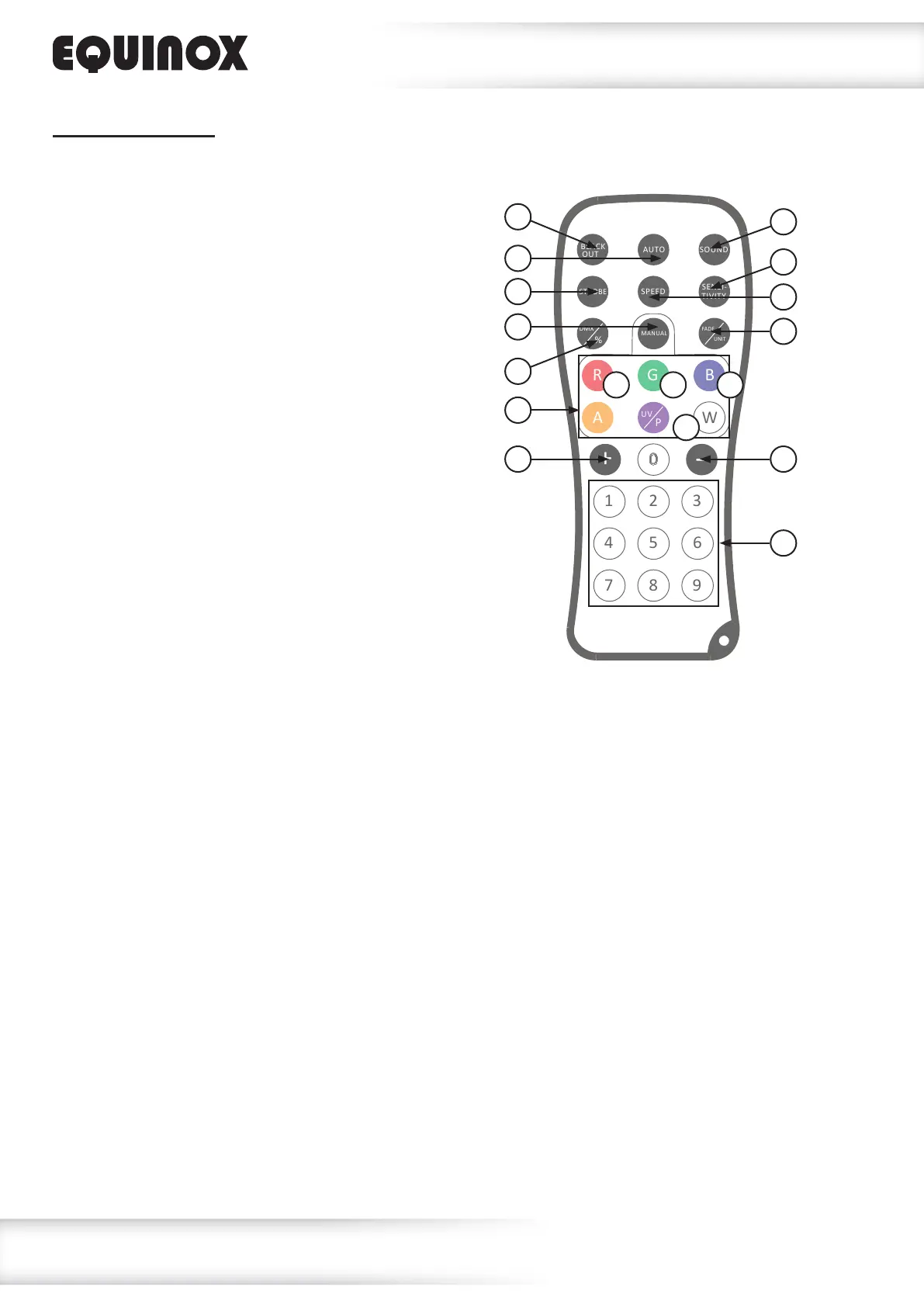
IR remote functions:
A - Red B - Green C - Blue D - White
01 - Sets the unit into blackout off/on (LED on/off)
02 - Activates the built-in programs, use the ‘+’ and ‘–’
buttons to select the auto mode. Pressing the ‘Speed’
button followed by the ‘+’ and ‘–’ buttons will then allow
the auto mode speed to be adjusted
03 - Activates the sound modes, use the ‘+’ and ‘–’ buttons
to select the sound mode. Pressing the ‘Sensitivity’ button
followed by the ‘+’ and ‘–’ buttons will then allow the
sound sensitivity be adjusted
04 - Activates the strobe, use the ‘+’ and ‘–’ buttons
to adjust the strobe speed
05 - Sets the auto mode speed. Press this button followed by
the ‘+’ and ‘–’ buttons to adjust the program speed
06 - Sets the sound mode sensitivity. Press this button
followed by the ‘+’ and ‘–’ buttons to adjust the
sound sensitivity
07 - Activates the DMX mode
Please note: the DMX address and channel must
be preset in the menu
08 - Activates the static colour/manual modes, use the
‘+’ and ‘–’ buttons to select a colour from the pre-
programmed static colours or use the ‘R’, ‘G’, ‘B’ or ‘W’
buttons to create a manual colour. Pressing the ‘Fade/unit’
button allows the chosen colour to enter the fade program
09 - Activates a fade in/out on the manual colour selection
10 - Manual colour selection
11 - Adjusts the auto mode, sound mode, speed,
sound sensitivity, strobe speed and static colour/manual
colour modes
12 - Sets the brightness of auto, sound, static colour and
manual modes (1 - low brightness, 9 - high brightness)


 To Next Page