www.prolight.co.uk Viper User Manual
4
Operating instructions & WEEE notice
Correct Disposal of this Product
(Waste Electrical & Electronic Equipment)
(Applicable in the European Union and other European countries
with separate collection systems)
This marking shown on the product or its literature, indicates that it should not be disposed of
with other household wastes at the end of its working life. To prevent possible harm to the
environment or human health from uncontrolled waste disposal, please separate this from other
types of wastes and recycle it responsibly to promote the sustainable reuse of material resources.
Household users should contact either the retailer where they purchased this product, or their
local government ofce, for details of where and how they can take this item for environmentally
safe recycling.
Business users should contact their supplier and check the terms and conditions of the
purchase contract. This product should not be mixed with other commercial wastes for disposal.
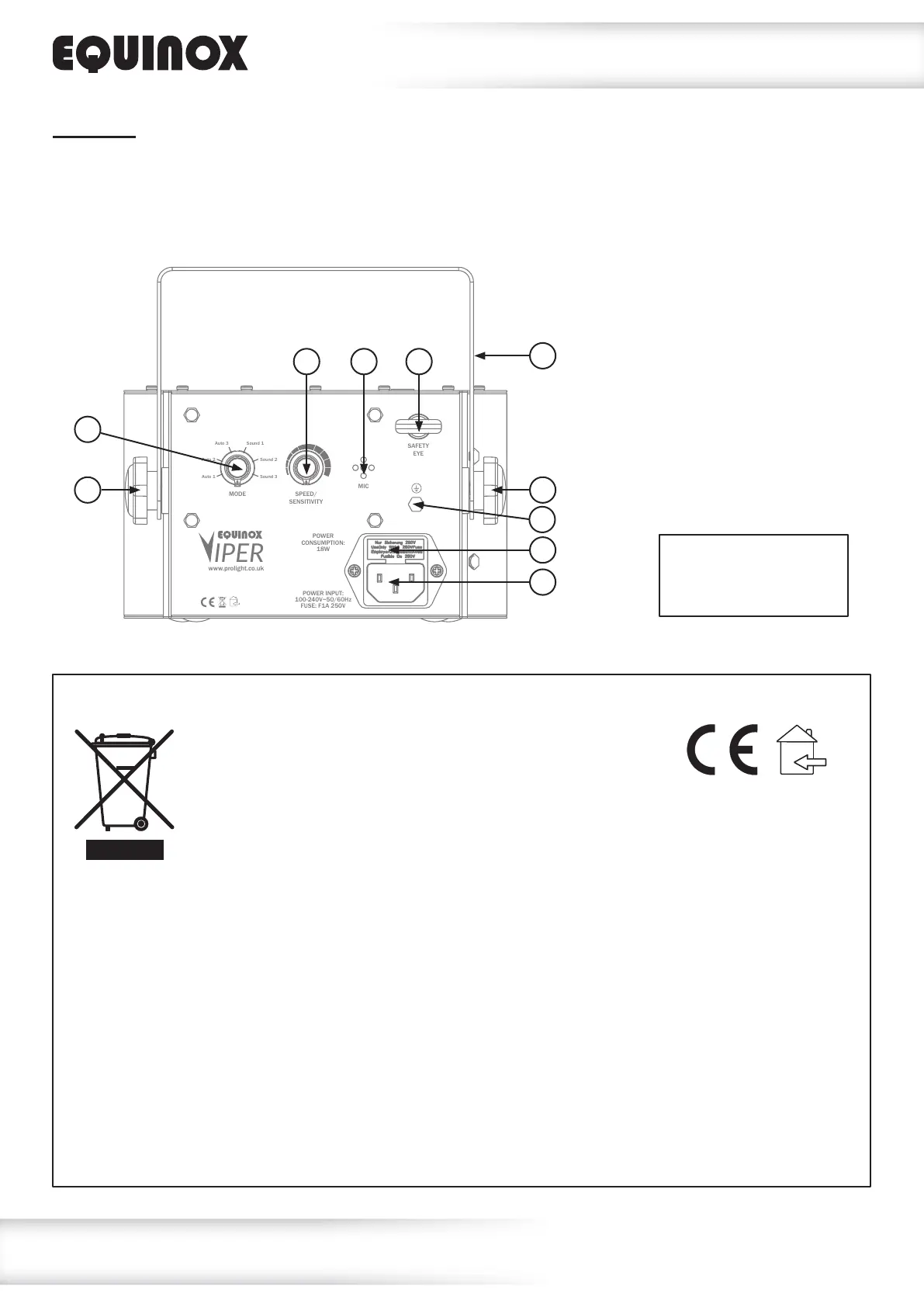
01 - Mode selection
rotary knob
02 - Speed/sensitivity
rotary knob
03 - IEC power input
04 - Fuse F1A 250V
05 - Microphone
06 - Earth point
07 - Hanging bracket
08 - Hanging bracket
adjustment knob
09 - Safety eye
In the box: 1 x xture,
1 x power cable
& 1 x user manual
MODE
MIC
SAFETY
EYE
SPEED/
SENSITIVITY
Auto 1
Auto 2
Auto 3 Sound 1
Sound 3
Sound 2
POWER INPUT:
100-240V~50/60Hz
FUSE: F1A 250V
POWER
CONSUMPTION:
18W
www.prolight.co.uk
IPER
01
06
08 08
07
03
04
02 05 09
Operation:
Connect the xture to a suitable mains outlet using the IEC power input on the rear of the xture.
Use the mode selection rotary knob to choose one of the 3 auto or 3 sound modes, then use the
speed/sensitivity rotary knob to select the auto program speed/sound sensitivity.


 To Previous Page