D2 Series
User Guide, Rev. 00 (Feb 2015)
19
Remote configuration
The configuration software RT415SW allows the complete configuration of a remote unit through
an other radiomodem unit connected to a Personal Computer. To obtain this functionality the local
unit must be configured under the following procedure.
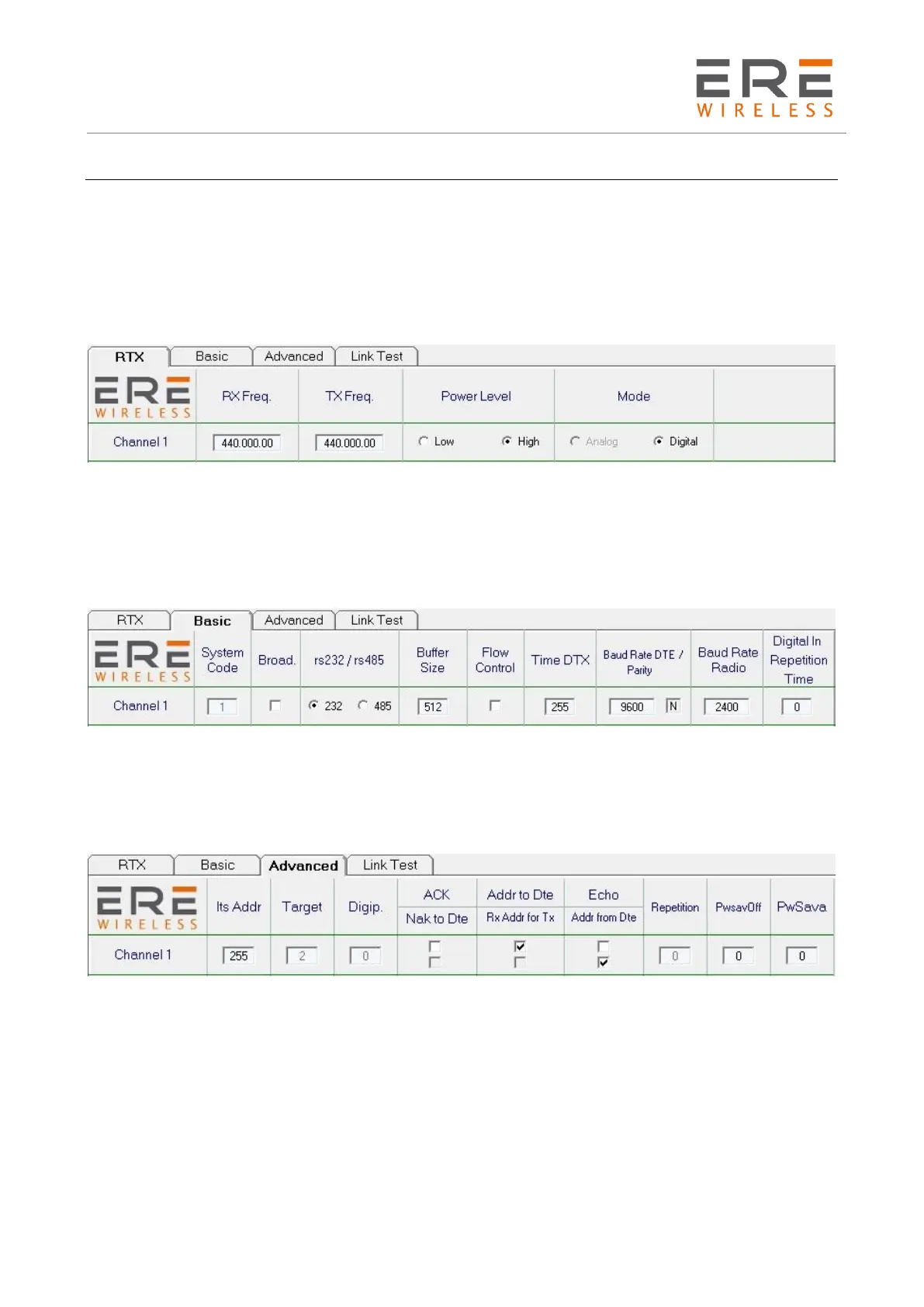
Connect the local unit to a PC, force it into Configuration Mode, as previously explained, and select
the RTX page from the menu. Insert into RXFreq. and TXFreq. the same values used in the remote
unit to be configured. The Power Level must be set to high.
The following Fig. 1 shows a RTX page configuration example for the local unit.
Select the Basic page and set the following parameters: Deactivate both Broad and Flow Control
options, don’t change the Buffer size (it remains of 512 bytes) and select the RS-232 Interface. Set
to 255 the Time DTX and successively set to 9,600 and N (no parity) the Baud Rate DTE. The Baud
Rate Radio must be set to the same value used in the remote unit to be configured. The Digital In
Repetition Time must be set to 0.
The following Fig. 2 shows a Basic Page configuration example for the local unit.
Select the Advanced Page and set the following parameters: Deactivate both ACK and Echo options,
select both Addr from DTE and Addr to DTE options, set Its Addr = 255 and set both PwSavOFF
and PwSava with the same values of the remote unit to be configured. If the remote unit is
configured in Broadcasting and Power Saving Mode, the PwSava field must be set to 20.
The following Fig. 3 shows an Advanced Page configuration example for the local unit.
Turn off the local unit and set it on the channel N° 1, or in the channel configured for the process,
connect the antenna and turn on the local unit. In the Options menu select the Remote option and,
in the lower side of the page, push the Power On button. To show the remote unit parameters push
the Read button and a dialogue box appears. In this box must be inserted the remote unit
parameters: System Code, the digipeaters addresses in the correct sequence of use, the remote
unit address and, finally, the PwSavOff time used in the remote unit. The value to be inserted in
the System Code depends on the operating mode of the remote unit. If the remote unit is
characterised with the Addr from DTE option, the System Code must be 0 only if no one message
has been sent, otherwise it must be the same of the communication network. In all other operating
modes the System Code must be the same of the network.
Push the Ok button to send the reading request and wait. After few seconds, depending on the total
number of digipeaters, all the remote unit parameters will be shown on the PC.



 To Next Page