11
remote control
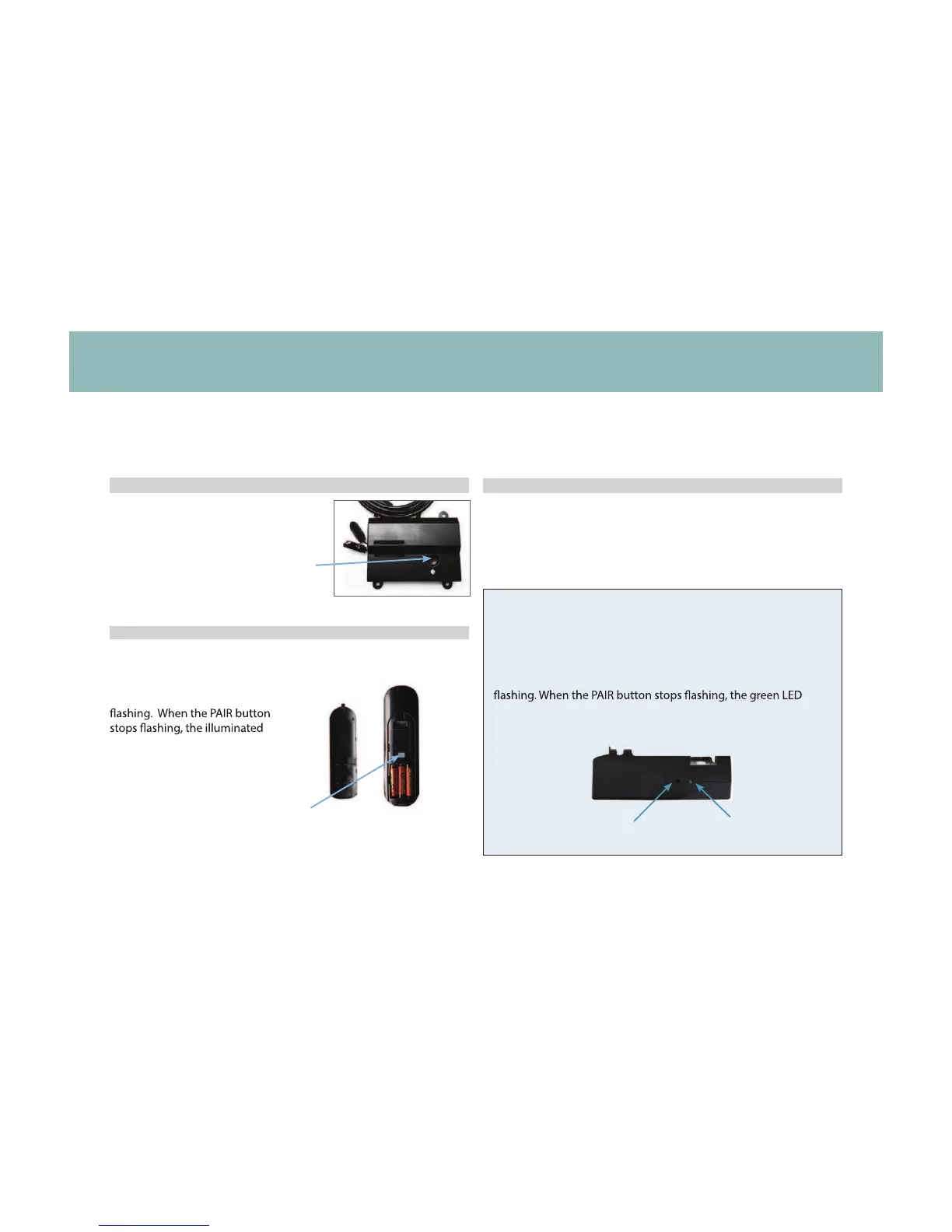
Remote Pairing
*ALTERNATE REMOTE PAIRING PROCESS!
Locate the Control Box (see base overview and quick
reference guide on pages 6-7) and press the Reset/Pairing
button twice. A pairing LED light will illuminate green on the
Control Box. On the back of the remote, press and hold the
PAIR button. The PAIR button will illuminate blue and start
light on the Control Box will go out. Release the PAIR button.
The remote is now paired to the adjustable base.
Pairing
LED Light
Reset/Pairing
Button
POWER DOWN
Button
Test all remote functions. If the remote buttons do not impact the
adjustable base movements, please repeat the process again
STEP 1
The original remote that comes in the box is already paired to the adjustable base. No further action is required. In the event that the remote is
not paired with the base, follow the steps below.
Locate the Power Down Box and
press the button TWICE. A light
on the Power Down Box will
illuminate.
STEP 3
PAIR
Button
STEP 2
Remove the back cover of the
remote, press and hold down
the PAIR button. The PAIR button
will illuminate blue and start
light on the Powerdown Box will
go out. Release the PAIR button.
The remote is now paired to the
adjustable base.



 To Next Page