12
bluetooth® remote control setup (optional)
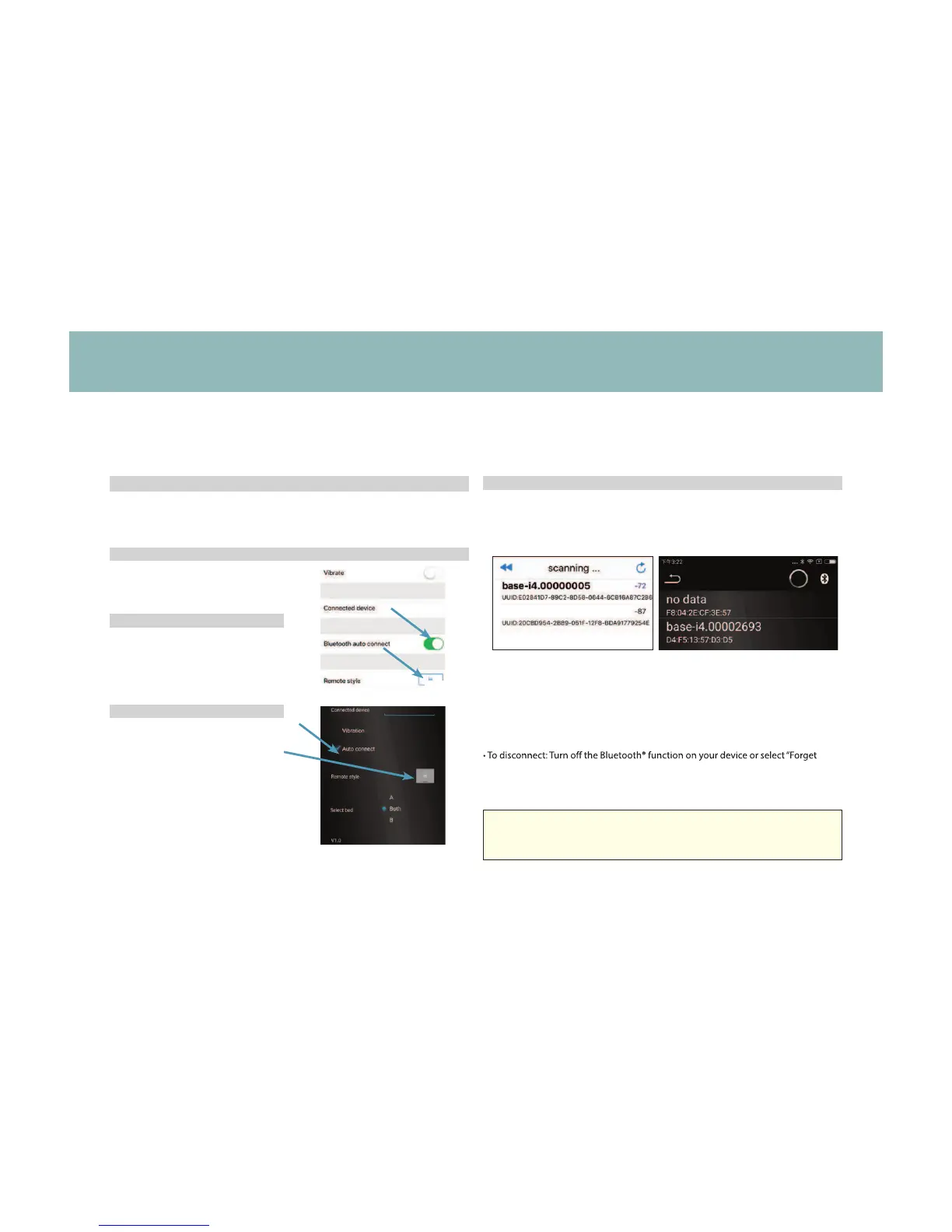
STEP 1
Plug the bed into power source.
STEP 2
STEP 3
STEP 4
STEP 3
Select Menu icon.
Select Bluetooth
V4.0 and "auto
connect".
Tap Select device.
Select desired base. Tap back arrow to return to settings and
select Remote to return to remote control screen.
*See page 10 for remote instructions.
NOTES:
tIf operating multiple bases: the Unique ID number will be listed on the sticker
located on the adapter
tPress and hold RESET for 5 seconds to reset customized presets back to factory
default settings.
this Device” from your Bluetooth® settings menu.
tFor assistance establishing a Bluetooth® connection please refer to your
device’s owners manual or contact the manufacturer directly.
To operate the base from a smart device, the“Ergo Slim” application must be downloaded to
the desired smart device from the App Store (Apple) or Google Play Store (Android).
For assistance setting up a Bluetooth® connection, refer to your smart
device's owners manual or contact the manufacturer directly.



 To Next Page