4.2 Operating panel strapping system
- 17-
4.3 Operating panel sealing head
Fig. 5
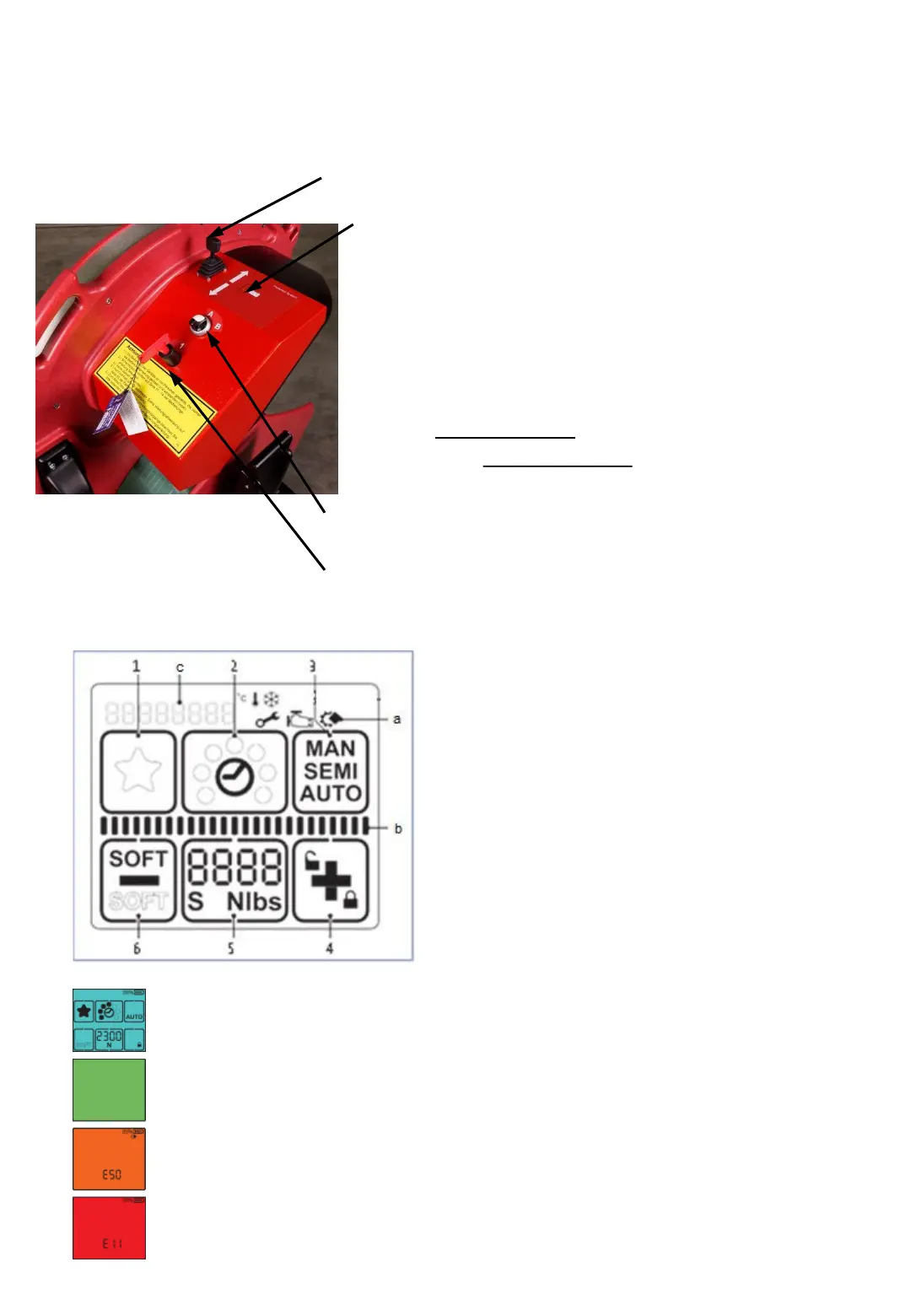
Joystick to move “ChainLance“ in and out
with precision speed control.
LED display
Permanent light green = battery full
Permanent light
green + yellow = battery will soon be empty
permanent yellow light = battery empty, control unit
switches off
(Control unit switches off when battery voltage ≤ 23,7V)
Flashing green + yellow = teaching mode
Flashing light green or yellow = setup mode
Quickly flashing red = sliding window open
Rotary switch: A = strapping mode
B = setup mode
Main switch “power supply 1/0“
1 "Favorite"
2 "Welding time"
3 "Operating mode"
4 "Plus & Keylock"
5 "Tensioning force"
6 "Minus & Soft tension"
a Display "Information symbols„
b Status indicator bar “Tensioning/Welding“
c Display "Messages"
Fig. 6
Display activated.
Welding process is finished, tool can be removed
Application error: temporary system error, can be rectified by the operator
Tool fault: static system error, rectify error.If the error cannot be rectified
-> Service department ErgoPack



 To Next Page