EasyManua.ls Logo

Ericsson T28 - User Manual

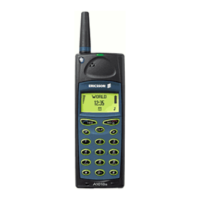
Ericsson T28
126 pages
Print Icon
To Next Page IconTo Next Page
Loading...
N
o
t
f
o
r
C
o
m
m
e
r
c
i
a
l
U
s
e
E
r
i
c
s
s
o
n
M
o
b
i
l
e
C
o
m
m
u
n
i
c
a
t
i
o
n
s
A
B
Contents
at a Glance
Getting Started 3
Preparing Your Phone for Use 4
Turning Your Phone On and Off 9
Display Information and Key Functions 11
Making and Receiving Calls 14
During a Call 17
Functions and Settings 19
T28 WORLD Features 20
Using the Menus 21
Your Personal Phone Book 27
Using the Call Log 35
Your Voice Mail Service 37
Personalizing Your Phone 39
Sending and Receiving Text
Messages (SMS) 46
Diverting Incoming Calls 56
Security for Your Phone and Subscription 58
Handling More than One Call Simultaneously 65
Setting Network Preferences 70
Knowing the Call Time/Call Cost 73
Using Two Voice Lines 75
Voice Control 76
Calling Card Calls 79
Sending and Receiving Fax and Data Calls 81
Extras 83
The Profile Concept 87
Accessories 90
Online Services 98
Additional Information 101
Quick Keys 102
Troubleshooting 104
Ericsson Mobile Internet 106
Technical Data 107
Glossary 108
Guidelines for Safe and Efficient Use 113
Limited Warranty 119
Declaration of Conformity 121
Index 123
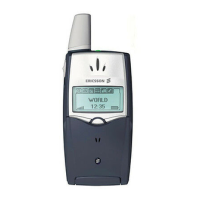
Ericsson T28 WORLD
First edition (September 1999)
This manual is published by
Ericsson Mobile Communications AB,
without any warranty. Improvements and
changes to this manual necessitated by
typographical errors, inaccuracies of
current information, or improvements to
programs and/or equipment, may be made
by Ericsson Mobile Communications AB
at any time and without notice. Such
changes will, however, be incorporated into
new editions of this manual.
All rights reserved.
©Ericsson Mobile Communications AB,
1999
Publication number: AE/LZT 108 3026 R1A
Printed in Sweden
INNOVATRON PATENTS

Questions and Answers

  • O
    ohodgesAug 14, 2025
    How to fix 'Insert Card' on my Ericsson Cell Phone?
    • A
      alexis99Aug 14, 2025
      If your Ericsson Cell Phone displays 'Insert Card', it means there is no SIM card in the phone or it has been inserted incorrectly. To resolve this, insert the card correctly.
  • R
    Robert LiAug 17, 2025
    What to do if my Ericsson Cell Phone says 'Wrong PIN'?
    • K
      Karla MorrisAug 18, 2025
      If your Ericsson Cell Phone says 'Wrong PIN, Wrong PIN2', it means you have entered your PIN or PIN2 incorrectly. To fix this, enter the correct PIN or PIN2, and press YES.
  • N
    Natasha KingAug 21, 2025
    Why does my Ericsson Cell Phone say 'No Network'?
    • J
      Julie BryantAug 21, 2025
      If your Ericsson Cell Phone displays 'No Network', it means there is no network within range or the received signal is too weak. To solve this, move to an area with a stronger signal.
  • R
    Rachel VasquezAug 25, 2025
    What does 'Insert Correct Card' mean on my Ericsson Cell Phone?
    • D
      Dalton CarsonAug 25, 2025
      If your Ericsson Cell Phone displays 'Insert Correct Card', it means the phone is set to only work with certain SIM cards. You should insert the correct SIM card to resolve this.
  • S
    sadkinsAug 27, 2025
    Why does my Ericsson Cell Phone say 'Emergency Calls Only'?
    • V
      valeriejordanAug 27, 2025
      If your Ericsson Cell Phone displays 'Emergency Calls Only', it means you are within range of a network but are not allowed to use it. However, in an emergency, some operators allow you to call emergency services.
  • M
    Mitchell JonesAug 31, 2025
    Why is my Ericsson Cell Phone charging slowly with 'Alien Battery' message?
    • J
      Jennifer NguyenAug 31, 2025
      If your Ericsson Cell Phone shows 'Alien Battery - Slow Charging Only', the battery you are using is not an Ericsson-approved battery. For safety reasons, it will charge slowly.
  • A
    Adam AlexanderSep 3, 2025
    Why is my Ericsson Cell Phone not showing any charging indication?
    • M
      Megan GallegosSep 3, 2025
      If there is no indication of charging on your Ericsson Cell Phone, especially when starting to charge an empty battery or one that hasn't been used for a while, it may take some time until the indicator on the top of the phone shows a red light and the battery meter appears.
  • W
    william68Sep 6, 2025
    What happens if I enter the wrong PIN too many times on my Ericsson Cell Phone?
    • T
      Tamara PooleSep 6, 2025
      If you have entered your PIN or PIN2 incorrectly three times in a row on your Ericsson Cell Phone, your PIN/PIN2 will be blocked.
  • N
    Nicole WillisSep 10, 2025
    What to do if my Ericsson Cell Phone is blocked and says 'Contact Operator'?
    • H
      hwrightSep 10, 2025
      If you entered your personal unblocking key code (PUK) incorrectly 10 times in a row on your Ericsson Cell Phone, contact your network provider or service operator.

Summary

Getting Started

Preparing Your Phone for Use

Instructions for initial setup, including SIM card insertion and battery attachment.

Turning Your Phone On and Off

Step-by-step guide to powering the phone on and off, including PIN entry.

Display Information and Key Functions

Explains icons, display elements, and essential phone buttons for operation.

Making and Receiving Calls

Covers the fundamental process of initiating, answering, and ending phone calls.

Functions and Settings

Using the Menus

Guide to navigating the phone's menu system, icons, and shortcuts for accessing functions.

Sending and Receiving Text Messages (SMS)

Procedures for composing, sending, receiving, and managing SMS messages.

Security for Your Phone and Subscription

Features to protect the phone and subscription, like PIN locks and call restrictions.

Additional Information

Troubleshooting

Solutions for common problems and error messages encountered with the phone.

Guidelines for Safe and Efficient Use

Safety precautions, product care, and tips for optimal phone operation.

Ericsson T28 Specifications

General IconGeneral
Display TypeMonochrome graphic
Weight83 g
Released1999
Announced1999
TechnologyGSM
2G bandsGSM 900 / 1800
SIMMini-SIM
Call records10 dialed, 10 received, 10 missed calls
Alert typesVibration; Monophonic ringtones
LoudspeakerNo
3.5mm jackNo
MessagingSMS
GamesYes
NetworkGSM
Internal MemoryNo
WAPNo
Infrared PortYes
Dimensions97 x 50 x 15 mm
Phonebook250 entries
Battery TypeRemovable Li-Ion

Related product manuals