Page 32
Eseye | + 44 1483 802501 | +1 512-813-0599 | +27 87 551 8200 | +33 9 87 67 53 36 | +61 8 9551 5200
Eseye, AnyNet and Eseye Logos are registered trademarks of Eseye Ltd © Eseye 2017 Limited. All Rights Reserved
enquiries@eseye.com | eseye.com
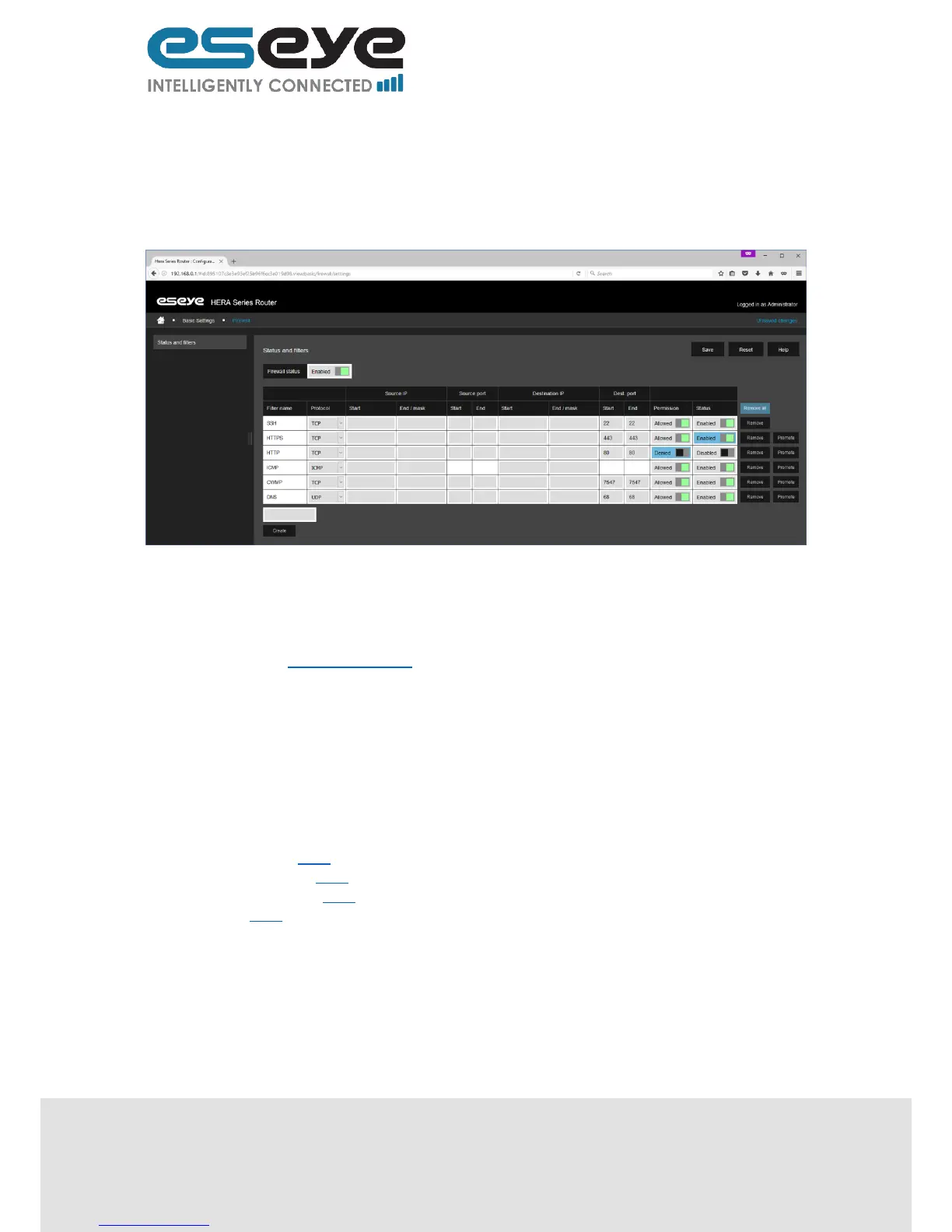
Remove (button, use to delete the row, will change to Reinstate after use, and will only
remove the row from view after clicking Save)
Promote (button, use to re-order the rows)
Create (text box, used to create Name for a new row, must start with a letter, and can only
contain letters, numbers and underscores)
After editing click ‘Save’.
3.6 Advanced Settings
The advanced settings tab provides access to the configuration files, to understand how to edit these
information is found in other documents.
Many of the standard features use adaptations of openWRT services further advice and guidance
may be sourced from https://openwrt.org/
These files should be treated with care as manually editing may render your router and the GUI
described in this document inaccessible.
3.7 Hosted Applications
Coming soon.
3.8 Diagnostics & Maintenance
This page displays links to pages for the following sections:
Health Monitor 3.8.1
File Management 3.8.2
User Management 3.8.3
Restart 3.8.4


 To Next Page