Page 38
Eseye | + 44 1483 802501 | +1 512-813-0599 | +27 87 551 8200 | +33 9 87 67 53 36 | +61 8 9551 5200
Eseye, AnyNet and Eseye Logos are registered trademarks of Eseye Ltd © Eseye 2017 Limited. All Rights Reserved
enquiries@eseye.com | eseye.com
3.8.3 User Management
There is one linked page under the User Management heading:
Administrator password 3.8.3.1
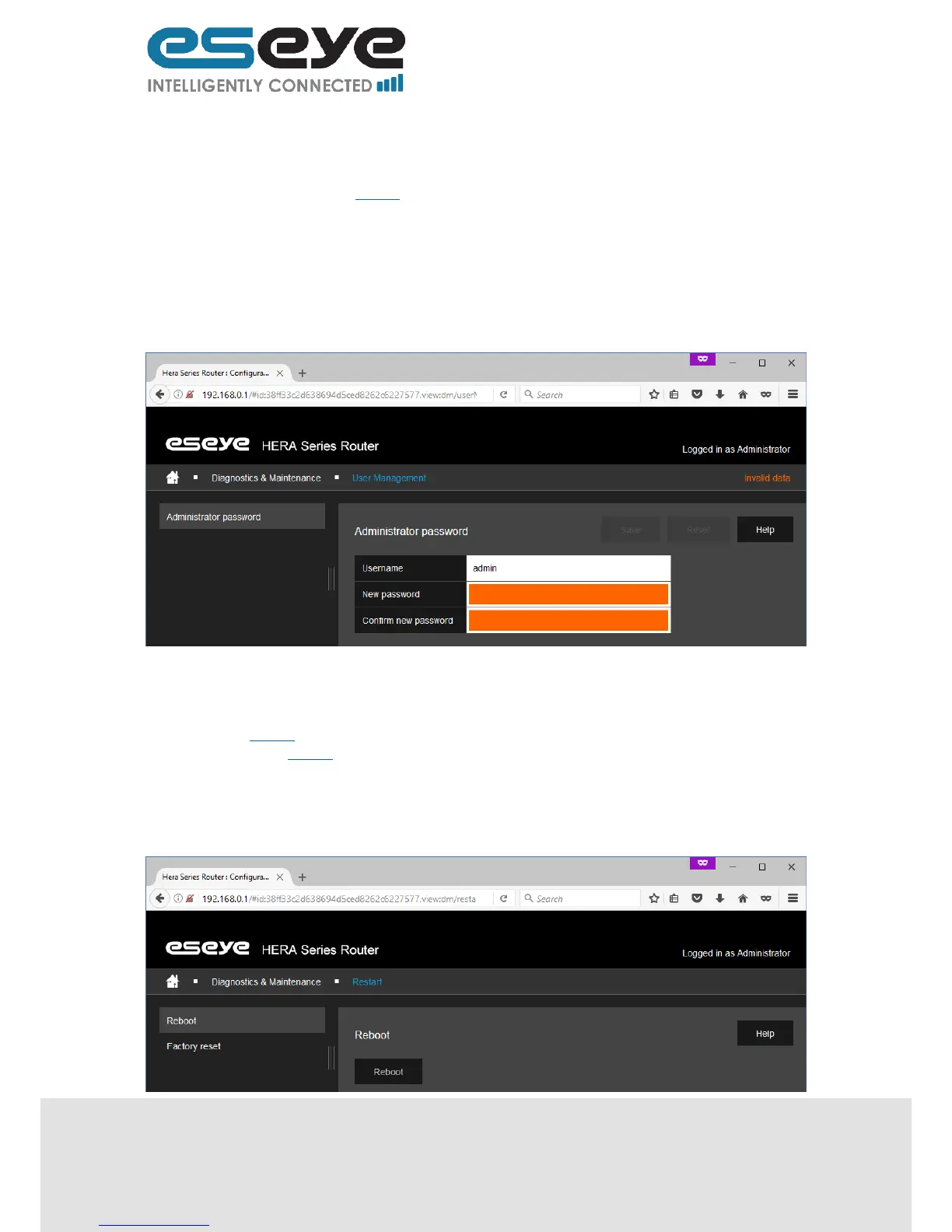
3.8.3.1 Administrator Password
This page displays the following editable and read only information:
Username (read only, username of the login to the router)
New password (text box, must be over four characters in length, it is advised that this is
changed to a secure unique password at first install)
Confirm new password (text box, must be identical to the New password entry)
3.8.4 Restart
There are two linked pages under the Restart heading:
Reboot 3.8.4.1
Factory reset 3.8.4.2
3.8.4.1 Reboot
This page displays the following option:
Reboot (button, press to reboot the router)


 To Next Page