6 CONTROL PANEL
0463 641 001
- 23 -
© ESAB AB 2018
6 CONTROL PANEL
General safety regulations for handling the equipment can be found in the "SAFETY"
chapter of this manual. General information about operation can be found in the
"OPERATION" chapter of this manual. Read both chapters thoroughly before you
start using the equipment!
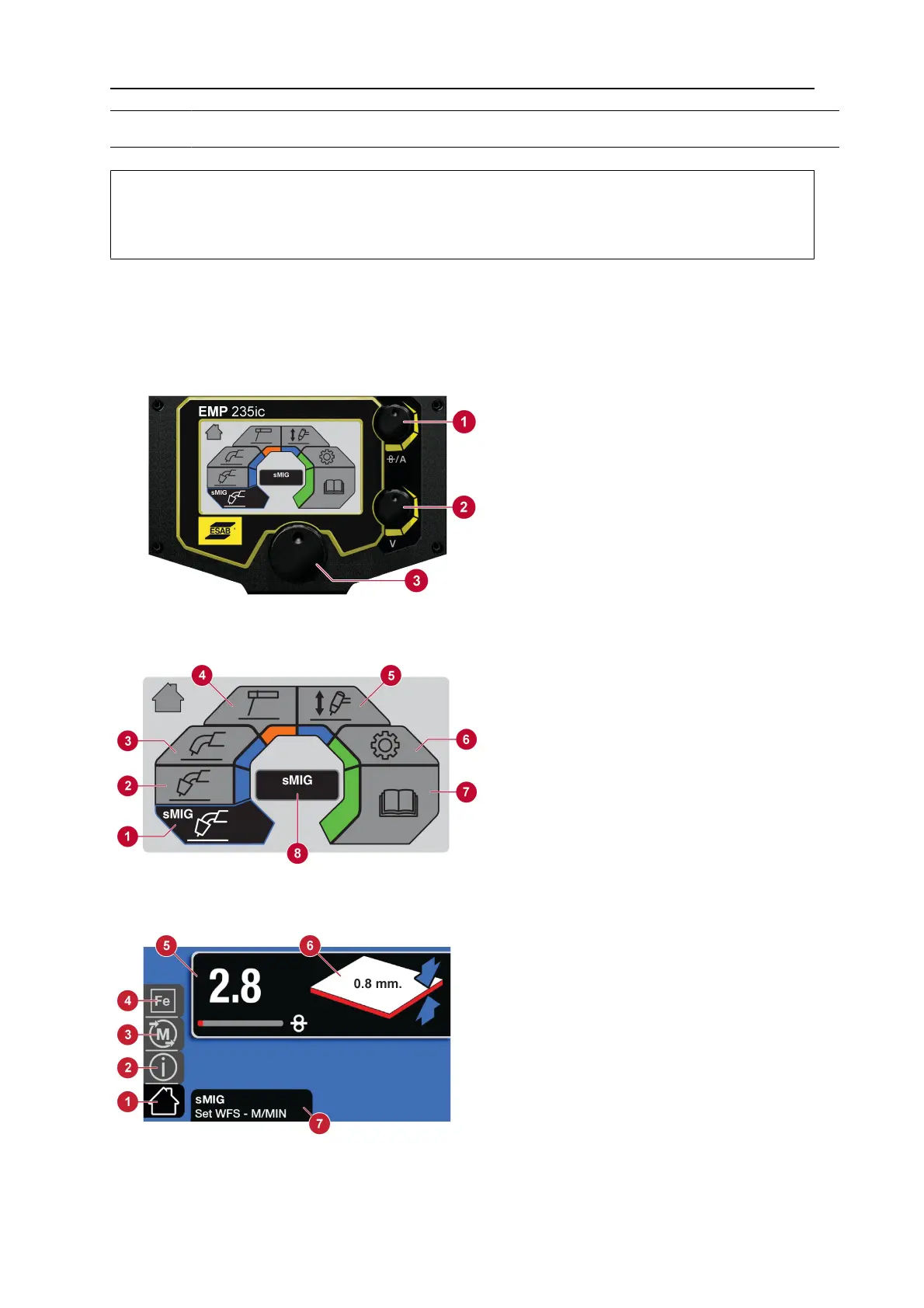
After power on has completed, the main menu appears on the control panel.
6.1 How to navigate
1. Current / Wire feed speed
selection
2. Voltage selection
3. Menu navigation. Rotate and
push to select menu option.
6.1.1 Main menu
1. sMIG mode
2. Manual MIG mode
3. Flux cored wire mode
4. MMA mode
5. Lift-TIG mode
6. Settings
7. User manual information
8. Dialogue box
6.1.2 sMIG mode
1. Home screen
2. Information
3. Memory
4. Material selection
5. Wire feed speed
6. Material thickness
7. Dialogue box


 To Next Page