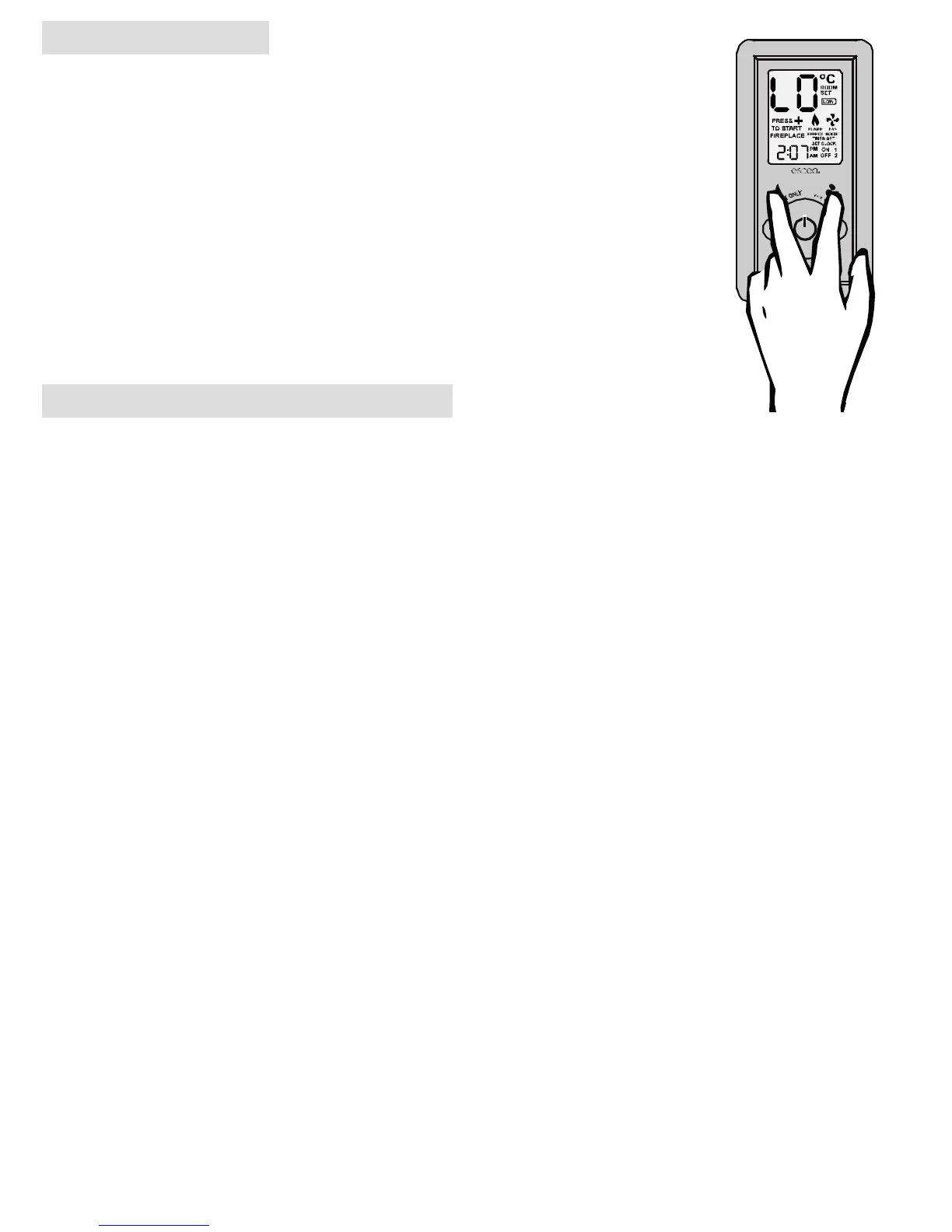
4. Keylock
Should you wish to keep the fire from being tampered with by children or to discourage
people from altering the temperature you can engage a keylock function which stops the
remote buttons from changing any settings. To engage the keylock simply press the “Flame
Eect” and “Fan Boost” buttons (3 + 7) simultaneously until the main temperature digits
display “LO”.
To disengage the keylock again press and hold the “Flame Eect” and “Fan Boost” buttons (3
+ 7) simultaneously until the main temperature digits display “UL” and normal access to the
remote functions will be available.
NOTE: The “power” button (2) will still be able to turn the fire o. But once turned o no func-
tions will be available until the keylock has been removed.
5. Timer Operation
Timers are a great way of starting the fire when you are not around to turn it on. The timers can be set so you can
wake up or come home to a warm environment.
After pressing the TIMER SELECT button (5) the TIMER SET indicator and the hour figure on the clock will
start flashing. On the bottom right of the display you will also see the word “ON” and the number “1”. This indi-
cates that you are currently editing the hour that the fire will turn “ON” for timer “1”. Pressing the PLUS (8) or
MINUS (4) button will change the hour.
Pressing the TIMER SELECT button (5) again will make the minute figures start flashing. You will continue to
see the “ON” and the number “1”. This indicates that you are currently editing the minute that the fire will turn
“ON” for timer “1”. Pressing the PLUS (8) or MINUS (4) button will change the minute.
Pressing the TIMER SELECT button (5) again will make the hour figure start flashing once again. Though now
you will see the “OFF” indicator as well as the number “1”. This indicates that you are currently editing the hour
that the fire will now turn “OFF” for timer “1”. Pressing the PLUS (8) or MINUS (4) button will change the hour.
Again pressing the TIMER SELECT button (5) will start the minutes flashing for you to finish editing the “OFF”
time for timer 1.
Pressing the TIMER SELECT button (5) will begin the cycle all over again for timer “2”.
Note: If you do not wish to set timer ‘2’, using the plus or minus keys, navigate to ‘0:FF’ which you will find between
‘11:00’ and ‘0:00’. Press ‘Timer Select’ (5) again to exit.
− Activate Timer
This option allows you to activate your selected times. Pressing once will activate ‘Timer 1’. Pressing twice will
activate ‘Timer 2’ and by pressing again you will activate them both.
− De-activate Timer
To de-activate the timer, press “Activate Timer” (9) until “TIMER SET” no longer shows on the screen (this will
require between 1 to 3 pushes)
T
I
M
E
R
S
E
L
E
C
T
A
C
T
I
V
A
T
E
T
I
M
E
R
SETTI ME



 To Next Page