Using the Advance Funcon
The ADVANCE funcon allows the user to move to the next ON/OFF
programme for a “one off” event, without having to change the
programme or use the ON or OFF buons.
NB: The ADVANCE funcon is only available when the programme is
in AUTO or ALL DAY operang modes.
6
To Advance Central Heang
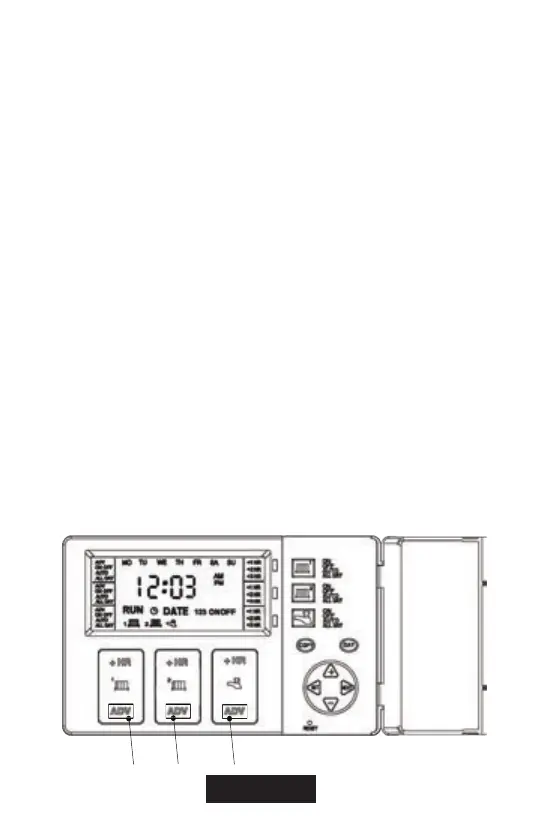
Press ADV on the Central Heang Zone 1 or Zone 2 channel buon (1
or 2 on fig.2). This will turn the Central Heang ON if it is in an OFF
period and OFF if it is in an ON period. It will stay in this state unl
either the ADV buon (1 or 2 on fig.2) is pressed again, or unl a
programmed ON/OFF period commences. The word ADV will appear
in the le hand side of the LCD.
To Advance Hot Water
Press ADV on the Hot Water channel buon (3 on fig.2). This will
turn the Hot Water ON if it is in an OFF period and OFF if it is in an
ON period. It will stay in this state unl either the ADV buon (3 on
fig.2) is pressed again, or unl a programmed ON/ OFF period
commences. The word ADV will appear in the le hand side of the
LCD.
(1)
(2)
(3)
Fig. 2


 To Next Page