5. Repeat steps 3 - 4 for all temperature events.
6. Press A to accept/confirm temperature events and move
to the next day/block of days.
7. Repeat steps 3 - 6 until all days have been set. Then wait
15 seconds to automatically confirm and return to run
mode or press the
Home button.
3.4 All Day Setting
1. Switch the slider to AUTO.
2. Press the A button under the fascia. The display will now
show AL (All Day).
3. Press the +/– button to set the temperature (increments
of 0.5°c).
4. The mode will quit by 00.00 that day. Press the
Home button to cancel and return to Auto Mode.
3.5 Permanent Manual Overrides
1. Switch the slider to MAN. MAN will appear in the display.
2. Press +/– to adjust the temperature to the desired setting.
This will set a constant temperature 24hrs a day.
3. Switch the slider to AUTO to revert back to Auto mode.
3.6 Temporary Manual Overrides
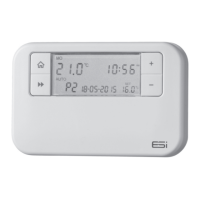
1. To temporarily override the Programmable Room
Thermostat status or temperature press the +/– buttons
The Programme Events Display (e.g. P1) will no longer
be shown.
2. Press the + button to increase the set temperature
in increments of 0.5°c and/or press the – button to
decrease the set temperature in increments of 0.5°c.
14


 To Next Page