8
Connections
V
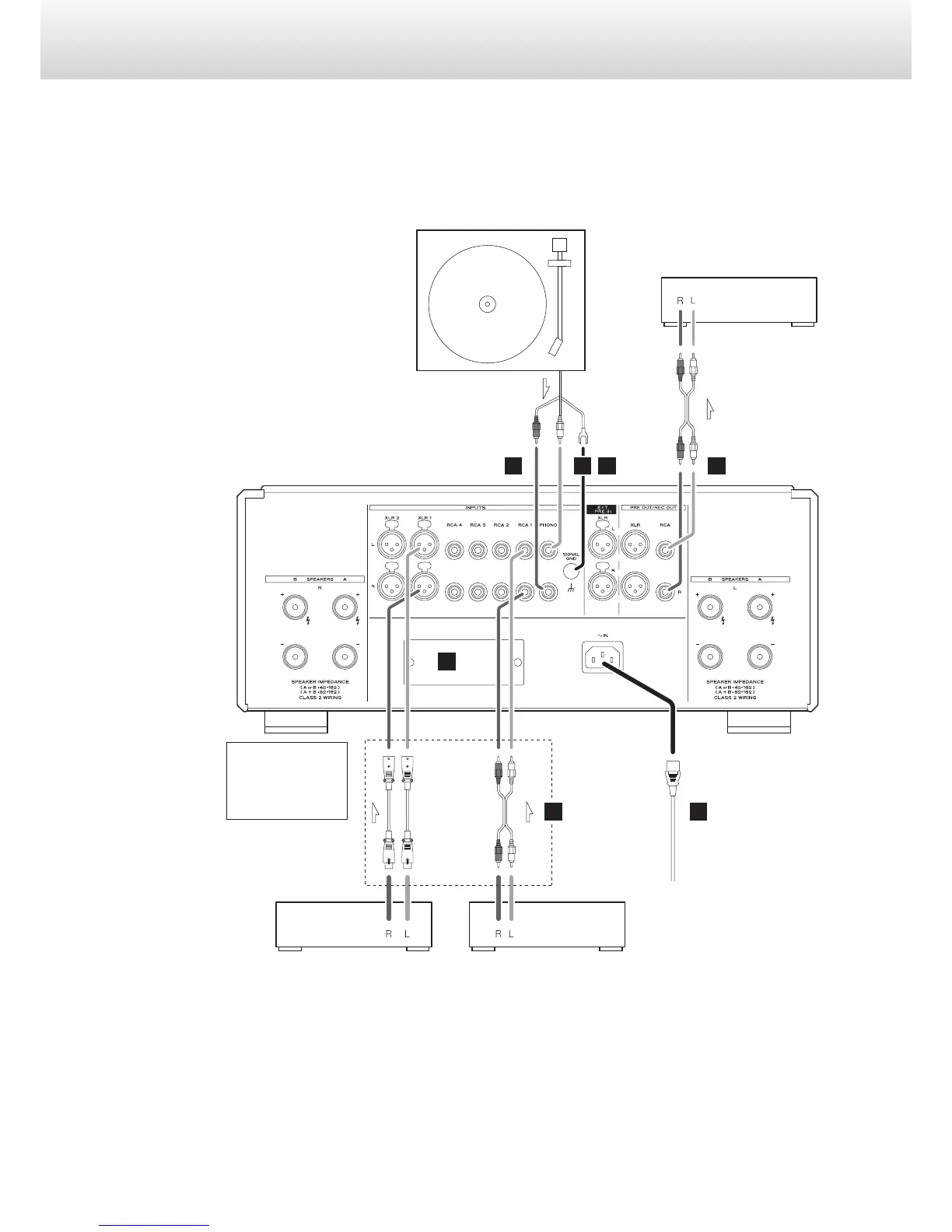
Precautions when making connections
o After completing all other connections, plug the power plug into a power outlet.
o Read the owner’s manuals of all devices that will be connected, and follow their instructions.
o Do not bundle connecting cables with power cords. Doing so could cause noise.
A
DC
B
FA
E
XLR pin assignment
1. COMMON
2. HOT (+)
3. COLD (−)
Included power cord
Record player
RCA audio cables
XLR audio cables
Audio outputs
(AUDIO OUT, etc.)
Audio outputs
(AUDIO OUT, etc.)
Super Audio CD player,
tuner, etc.
Super Audio CD player,
etc.
Audio input
(AUDIO IN, etc.)
CD recorder, etc.
Change the phase inversion set-
ting when connecting a device
with 3 HOT (+) (page 22).
c
wall outlet


 To Next Page