Remote Controller
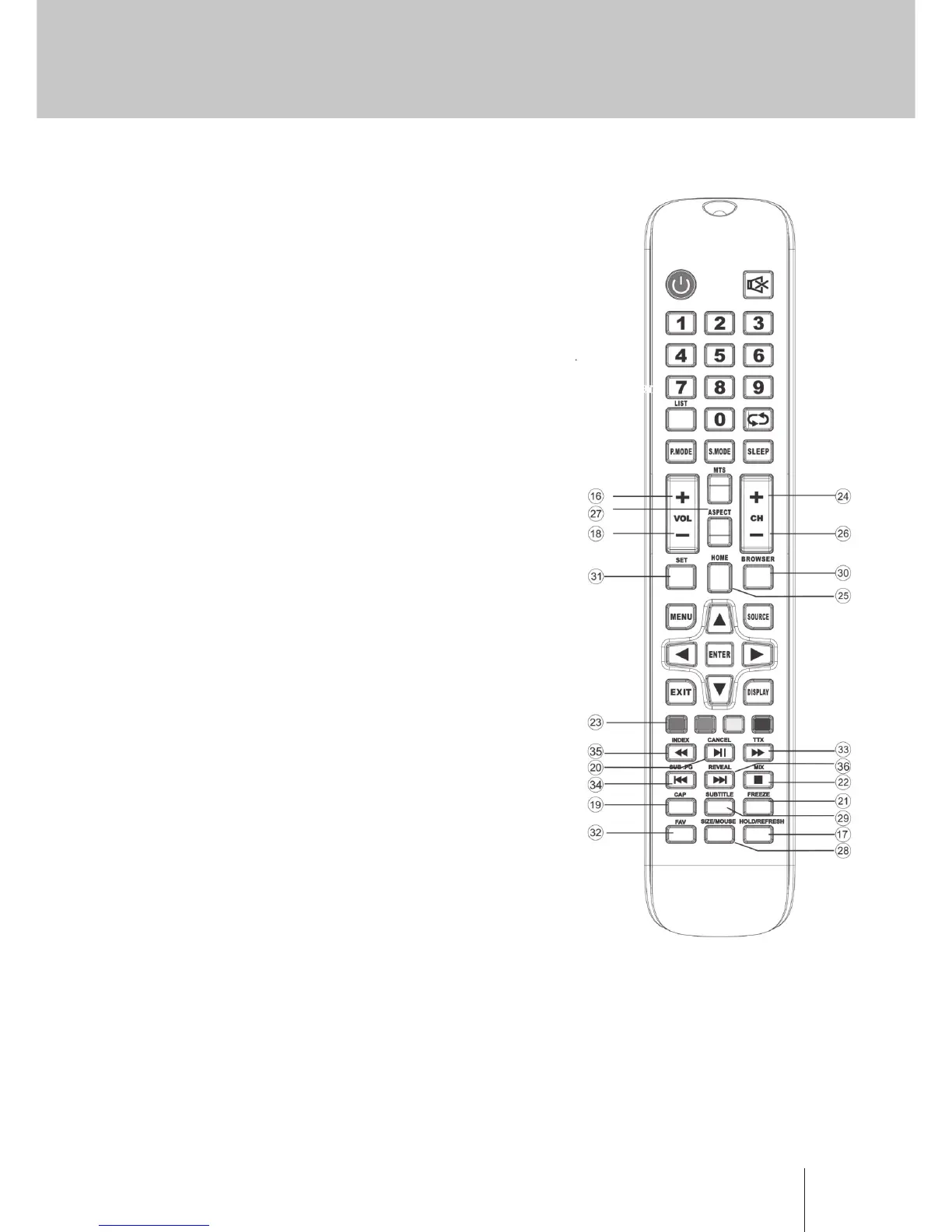
Descriptions of MONITOR remote control
16. VOL+: Increase the volume.
17. REFRESH: Refresh page. HOLD: HOLD On or O for
current page display.
18. VOL-: Decrease the volume.
19. CAP: A key to the current image is saved to the disk.
20. PLAY/PAUSE: Press to PLAY/PAUSE in the USB mode, start
play and PAUSE,in USB mode. CANCEL: When a page
is selected in the mode of text, it may take some time
before it becomes available, pressing the CANCEL key will
return to the MONITOR mode. When the required page
is found , the page number will appear at the top of the
MONITOR picture, press the CANCEL key to return to the
mode of text for you to browse this page.
21. FREEZE: lmage still
22. STOP: Press to STOP in the USB mode. MIX: MONITOR
and TXT pictures are mixed together (transparent
background)
23. GREEN/RED/YELLOW/CYAN button
24. CH+: Increase the program.
25. HOME: A key back to the android home page.
26. CH-: Decrease the program.
27. ASPECT: Aspect function.
28. MOUSE: Mouse switch. SIZE: Change the size of display
in Teletext mode.
29. SUBTITLE: To display subtitle in USB mode.
30. BROWER :Quick button to start Brower.
31. SET: Open the network Settings menu.
32. FAV: Press to add or remove your favorite channels under
monitor menu.
33. FF: Press to fast forward in USB mode. TXT: Switch the
teletext on and o.
34. PREV: Press to skip backwards in USB mode SUB. PG:
Press to access sub page.
35. FR: Press to fast reverse in USB mode. INDEX: Request the
Index page in Teletext mode.
36. NEXT: Press to skip forward in USB mode. REVEAL: Reveal
or Hide the hidden words.


 To Next Page