Remote Controller
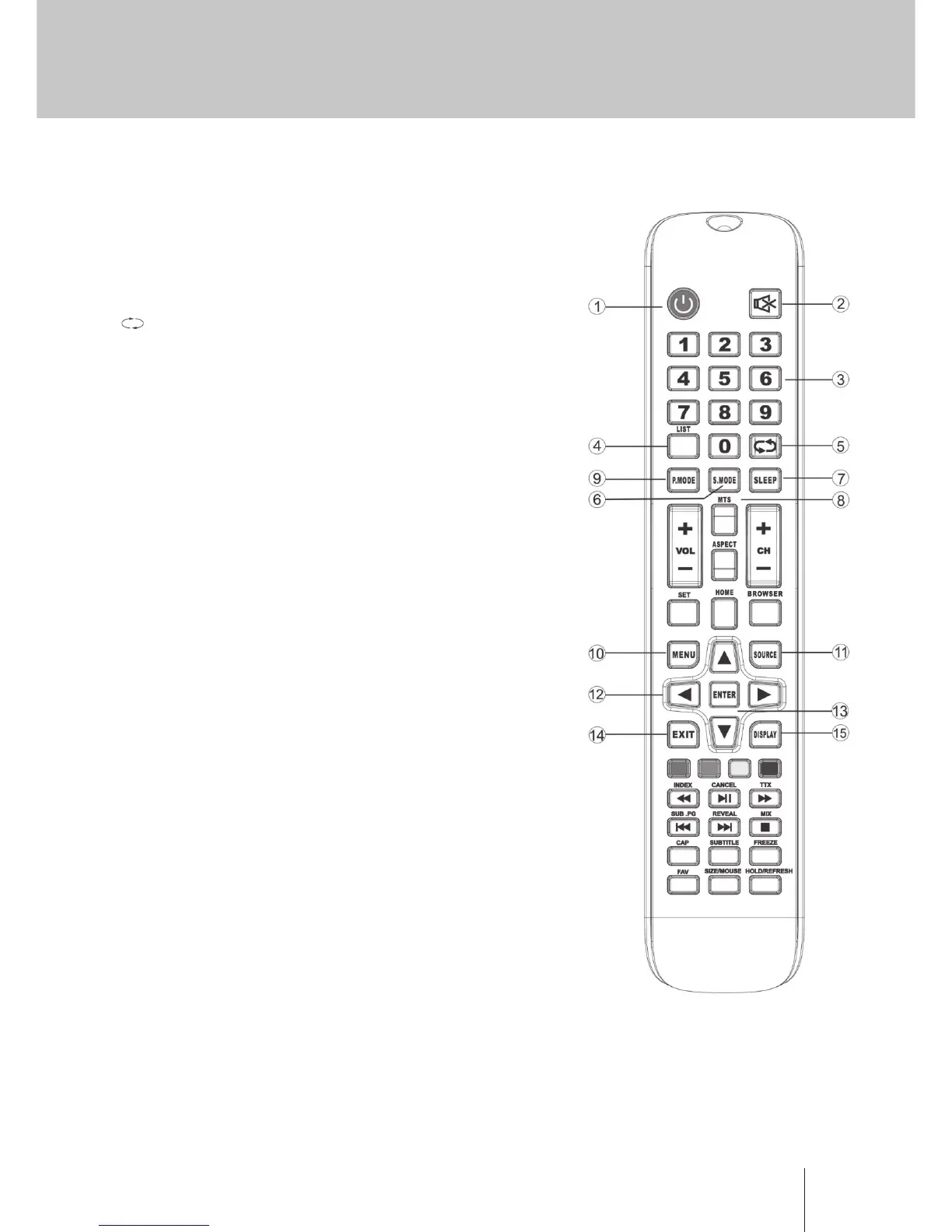
Descriptions of MONITOR remote control
1. POWER: Turn on the MONITOR or enter standby mode.
2. MUTE: Turn o the sound and turn on when press again.
3. 0-9: Figures “0-9” are used to directly input channel
number.
4. LIST: Press to open the channels list.
5. Press this button to toggle between the current and
the previous programme you were you were viewing.
6. S.MODE: Select the dierent sound mode directly.
7. SLEEP: Set the sleep time.
8. MTS: Press to select the MTS mode.(for example, Nicam,
BTSC,MONO,STEREO .eg )
9. P.MODE: Select the dierent picture mode directly.
10. MENU: Start system menu and return to upper menu.
11. SOURCE: Input source selection button.
12. ▼ / ▲ / ◄ / ► Press ▼ / ▲ button to select items.
Press ◄ / ► button to adjust it.
13. ENTER: To conrm the choice with the highlighted menu
item.
14. EXIT: Press to exit the OSD menu.
15. DISPLAY: Press to display the source and channel’s
display.
Battery Installation:
Remove the battery compartment lid on the rear of the
remote control by sliding the lid down, then o. Put two
AAA batteries inside the battery compartment with their
+ and - ends aligned as indicated. Do not mix old and new
batteries or dierent types of batteries Rex the battery
compartment lid.
Slide the lid until you hear it click into place.
Using the Remote Control:
Unless stated otherwise, the remote control can operate all
the features of the MONITOR.
Always point the remote control directly at the remote
sensor in the front of the MONITOR.
CAUTION:
Batteries installed in the unit should not be exposed to excessive heat such as sunshine, re and the like


 To Next Page