4
SETUP
(
CONTINUED
)
1. Check and confirm that water source is in normal working order.
2. Turn the power switch to On to initiate automatic system check. If boiler water level is
not in the green zone, wait until the automatic water replenishment process is complete
before proceeding to the next step.
3. Heating will stop when boiler pressure reaches approximately 1.2 bars (factory default
setting). Do not operate machine until steam pressure gauge reading is in the green zone.
STARTING THE AUTOMATIC MACHINE
• There are two identical button suites on 2 group models and three identical button suites
on 3 group models.
• No default coffee output setting is provided. Settings must be made manually during setup.
• If you are using a multi-cup machine, settings made on the farthest right hand side button
suite will serve as default for the others. So, start from the right hand side and work your
way to the left.
OUTPUT VOLUME AND FREQUENCY SETUP
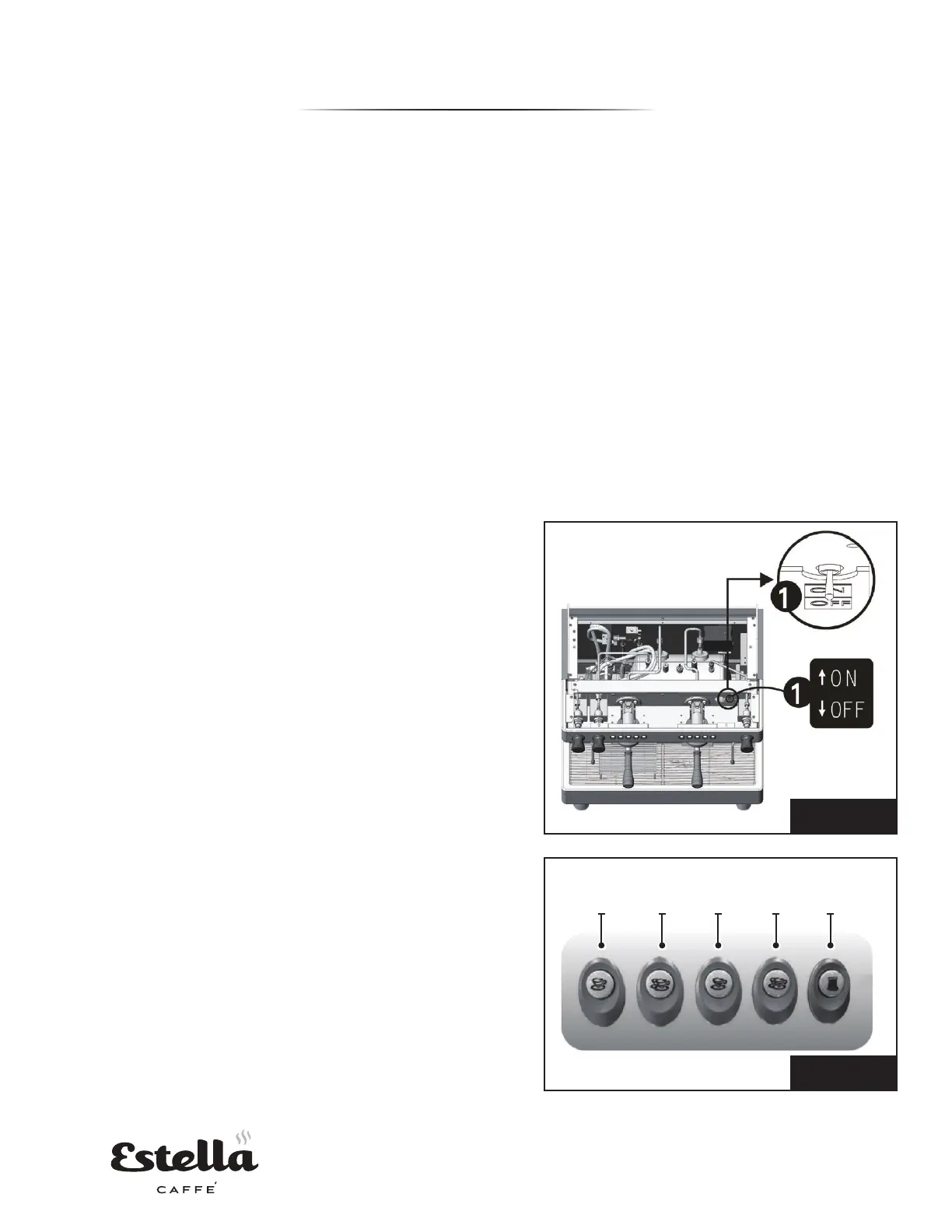
1. To program, turn the output volume setup
switch ON (Fig. 1).
2. The output LEDs (Fig. 2) should be lit with the
5th button flashing, indicating the machine is in
setup mode.
3. To configure output button 1, press output
button 1, which should light LED 1 and switch
off all other LEDs. Press and hold the button until
the desired output is reached. Users can measure
fluid ounces or time dispensed for their settings.
4. At this point, LED 1 should be off and LED's 2, 3
and 4 should be lit.
5. Repeat steps 2 through 4 to set up output
buttons 2, 3 and 4, respectively.
6. The left set(s) of output buttons will mirror the
value settings in the set of output buttons to
its immediate right. Repeat steps 2 through 5 if
different output volumes are desired for different
groups.
7. The fifth button of each group head will remain
continuous flow. This means once you press this
button, it will not turn off until pressed again.
8. After completing setup, turn the output volume
setup switch OFF to return the machine to
normal operational mode.
LED
1
LED
2
LED
3
LED
4
LED
5
Fig. 1
Fig. 2


 To Next Page