The Estella Dough Sheeter is a robust piece of bakery equipment designed for efficiently rolling out dough to a desired thickness. Available in both countertop and floor models, these machines are built to handle the demands of pastry and bakery businesses.
Function Description
The primary function of the Estella Dough Sheeter is to uniformly flatten dough. This is achieved by passing dough through a set of rollers, whose spacing can be adjusted to control the final thickness. The machine features conveyor belts that transport the dough to and from the rollers, with directional controls to facilitate multiple passes. Safety mechanisms are integrated to ensure operator protection during use.
Important Technical Specifications
The manual outlines several models with varying dimensions:
- Countertop Models:
- 348DSC67: 17"W x 67"L Belt
- 348DSC78: 19¾"W x 78"L Belt
- Floor Models:
- 348DSF78: 19¾"W x 78"L Belt
- 348DSF94: 24"W x 95"L Belt
All models operate on a 120V electrical supply. The internal components include a motor (GV28-550-17S for countertop, GH28-550-17S for floor models), various gears (e.g., 15T, 27T, M3 15T, M3 24T, M3 10T), bearings (e.g., 51108 Thrust Bearing, 6004 bearing, 6205 bearing, 6003 bearing, 6206 bearing), and sprockets (e.g., 21T, 24T, 15 axis circlip, 24 axis circlip, 35 hole circlip, 52 hole circlip, 20 axis circlip). The conveyor belts are specified with dimensions, such as 2160x500 for some models. The thickness adjustment handle allows for precise control over the roller spacing.
Usage Features
The Estella Dough Sheeter is designed for straightforward operation, with several features enhancing its usability:
- Setup:
- Countertop Models: Require a solid, horizontally level surface. Users must check the weight capacity of the table/counter and ensure the machine is level using its 4 adjustable feet. Proximity to a 120V outlet is necessary.
- Floor Models: Equipped with 4 casters with brakes for mobility and stability. Installation requires a 120V outlet and sufficient working clearance. Belts should be unfolded and leveled before use.
- Initial Run: A batch of test dough (not for consumption) is recommended for the first run to remove any lubricants from the rollers/belts.
- Operation:
- Power: Ensure the machine is plugged into a 120V outlet and the working area is clear.
- Start-up: Locate and turn on the power switch, ensuring the emergency stop switch is off and safety nets are completely down.
- Thickness Adjustment: The thickness adjustment handle allows users to swing it to the corresponding scale to set the desired dough thickness. It's recommended to start with the highest setting and gradually decrease it.
- Dough Handling: Flour the belt as needed to prevent sticking. The machine will not accept large pieces of dough forced into a small setting.
- Directional Control:
- Tabletop Models: Use left and right levers to change the conveyor belt direction.
- Floor Models: Use foot pedals to change the conveyor belt direction.
- Safety Guards: Keep hands away from rollers and ensure safety guards are down during operation. The machine will immediately shut off if a safety guard is lifted.
- Shut-down: Return the direction control lever parallel to the floor and turn off the machine. Unplug the machine for cleaning.
- Safety Features:
- The most critical safety area is the two superimposed cylinders with convergent rotation. Stainless steel safety bars obstruct entry into this area, allowing visibility of the dough.
- The machine will only operate if the security bars are completely down. An electric protection system prevents operation if the bars are not in the correct position.
- Users are strictly forbidden from removing, modifying, or damaging the security bars.
- An emergency stop button is present for immediate shutdown.
Maintenance Features
Regular maintenance is crucial for the longevity and safe operation of the Estella Dough Sheeter:
- Pre-Maintenance Safety: Always remove the plug from the outlet before performing any maintenance.
- Daily Cleaning: The machine must be cleaned daily, especially areas that come into contact with dough.
- Cleaning Tools: DO NOT use knives, hard brushes, or tools that could damage the cylinders. Instead, use plastic tools, soft sponges, and a soft brush for the canvas.
- Cleaning Agents: DO NOT use toxic products or abrasive agents, as they can damage the machine.
- Cleaning Procedure:
- Use a proper brush and wooden palate to remove flour residue and dough.
- Lift the safety guards and adjust the roller thickness to the largest setting to access the rollers for cleaning.
- Thoroughly rinse and dry with an absorbent wipe.
- Clean all surfaces that contact dough, then clean the entire machine with a smooth cloth and a foodservice-safe disinfectant (e.g., Nobles 147QUIKSAN).
- Dry thoroughly before the next use.
- Troubleshooting: The manual provides a troubleshooting guide for common issues:
- Machine won't start: Check plug, general switch, feeding cable, and voltage input. If issues persist, contact the manufacturer.
- Electric shock: Check for wires touching the machine's structure.
- Only one set of rollers working: Check for broken belt or worn worm wheel.
- Loud noise: Check lubrication points, loose chain, or worn bearings.

 Need help?
 General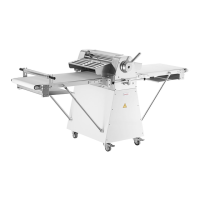

 To Next Page