8
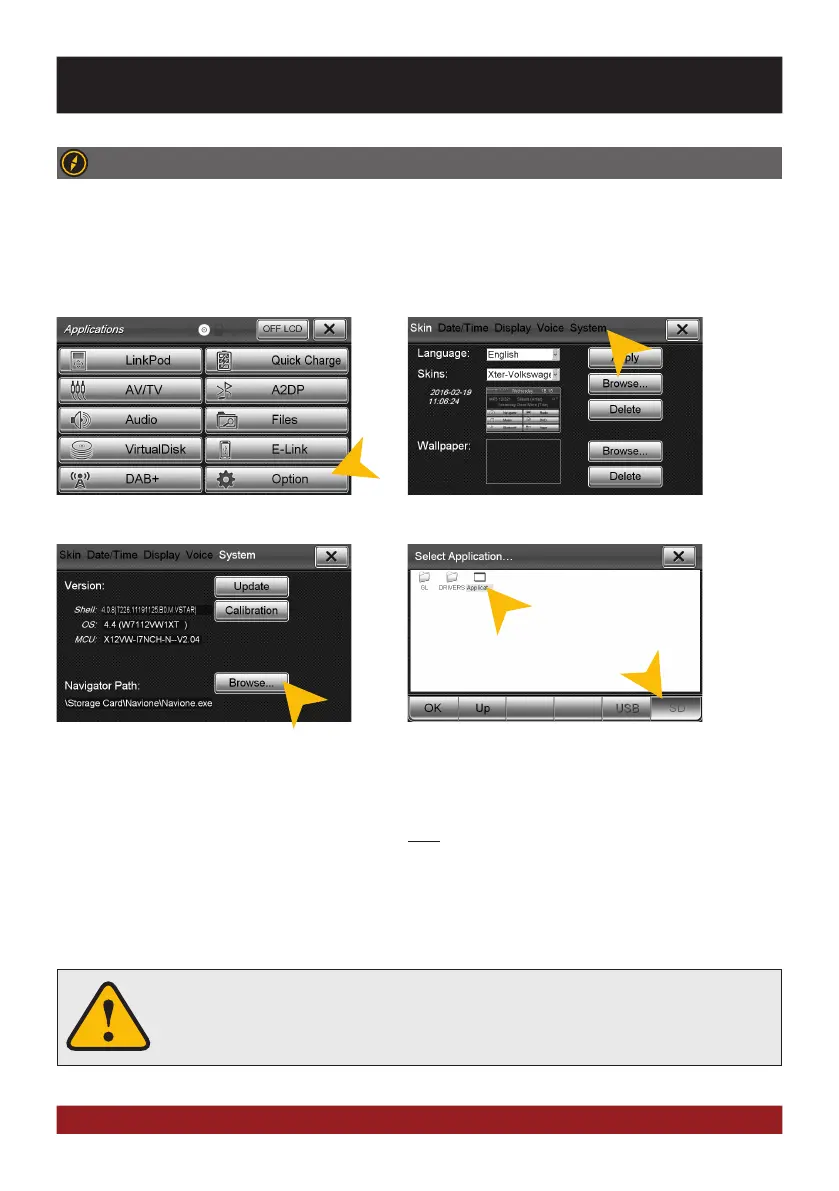
Tap on „SD“ and then select the software on the Mi-
croSD card with a double click. This navigation software
is starting as soon as you tap on „Navigation“ in the main
or push the „NAVI“ buttons on the device.
Note: If you have accidentally changed the path and
want to use the original ESX iGO software, the path must
be always „\Storage Card\NaviOne\Navione.exe“.
Please refer to the separate manual for the navigation software.
The device provides the ability to use any navigation software (Windows CE 6.0 compatible). Patch the naviga-
tion software (on MicroSD card) with the device as follows:
BASIC FUNCTIONS
NAVIGATION
Open the navigation application by tapping „Navigator“ in the main menu or by pressing the „NAVI“
button on the device.
The unit receives GPS satellite signals automatically. In poor weather conditions or
for example while passing a tunnel, these signals may be disturbed. This could lead
to a malfunction of the GPS positioning.
Tap on „System“.Tap on „Option“.
Tap on „Browse“.



 To Next Page