ETC Installation Guide
Echo Inspire Station
Install Button Legends
Inspire Stations ship with standard button legends installed beneath a clear
lens. An additional sheet of standard button legends are provided for field
installation as needed.
Note:
Customize and print your own button legends on standard
transparency. Download the button legend template provided on the
ETC website etcconnect.com.
Each button can have a legend, installed beneath the button lens. To remove,
install, or replace a button legend you must first remove the bezel and button
lens from the station electronics.
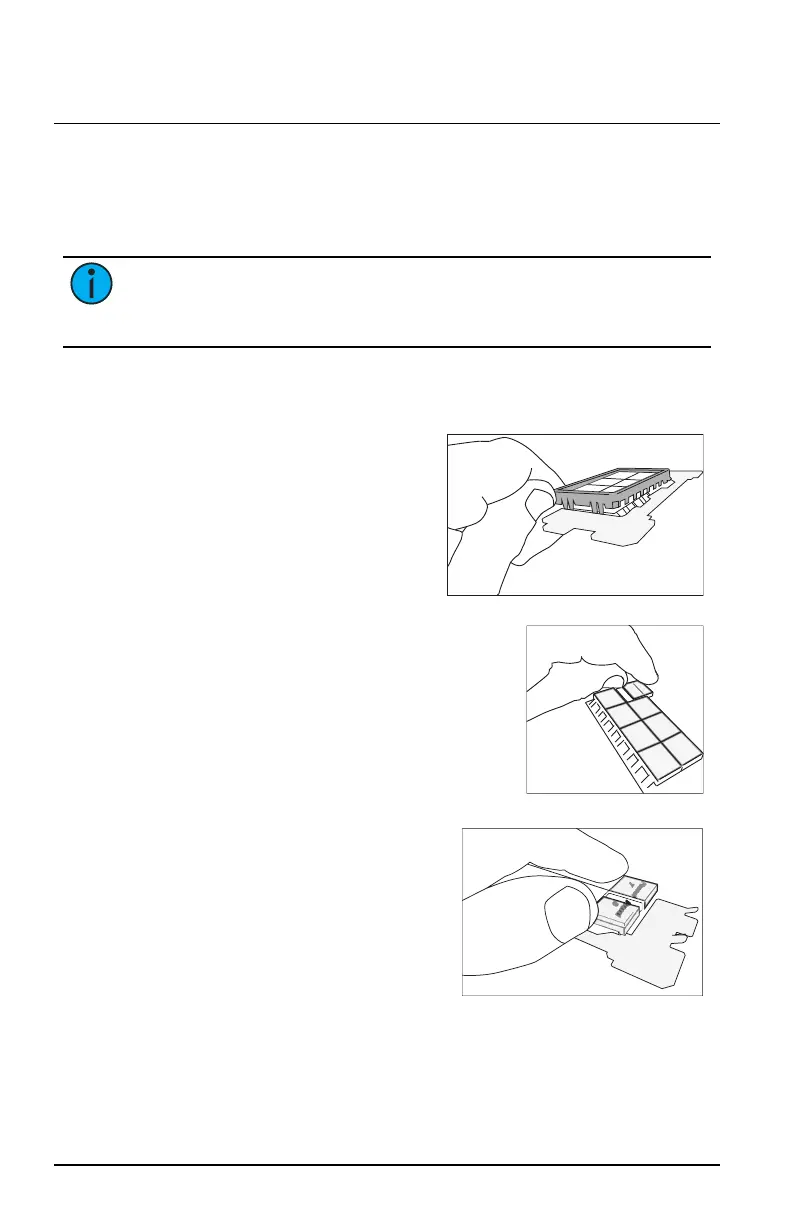
1. Remove the bezel from the
station electronics.
Each corner of the bezel is
provided with a notch to assist
with bezel removal. Use your
thumbnail to lift a corner free,
and then gently remove the
bezel from the station.
2. Remove the button lens.
Using the pads of your thumbs, press on
the lens and slide the lens either left or
right, toward the button hinge points.
3. Once the lens is removed, remove the
existing legend and replace it with
another standard legend as provided with
this station, or insert a custom legend.
4. Reattach the lens onto the button
by first aligning the grooves of
the lens to the button, then
sliding the lens in place starting
at the hinge. Slide the lens until it
covers the entire button and clicks
into place.
5. Replace the bezel when all
legends and lenses are in place.
Echo Inspire Station Page 6 of 8 ETC



 To Next Page