ETC Installation Guide
Echo Inspire Station
Install the Station into the Back Box
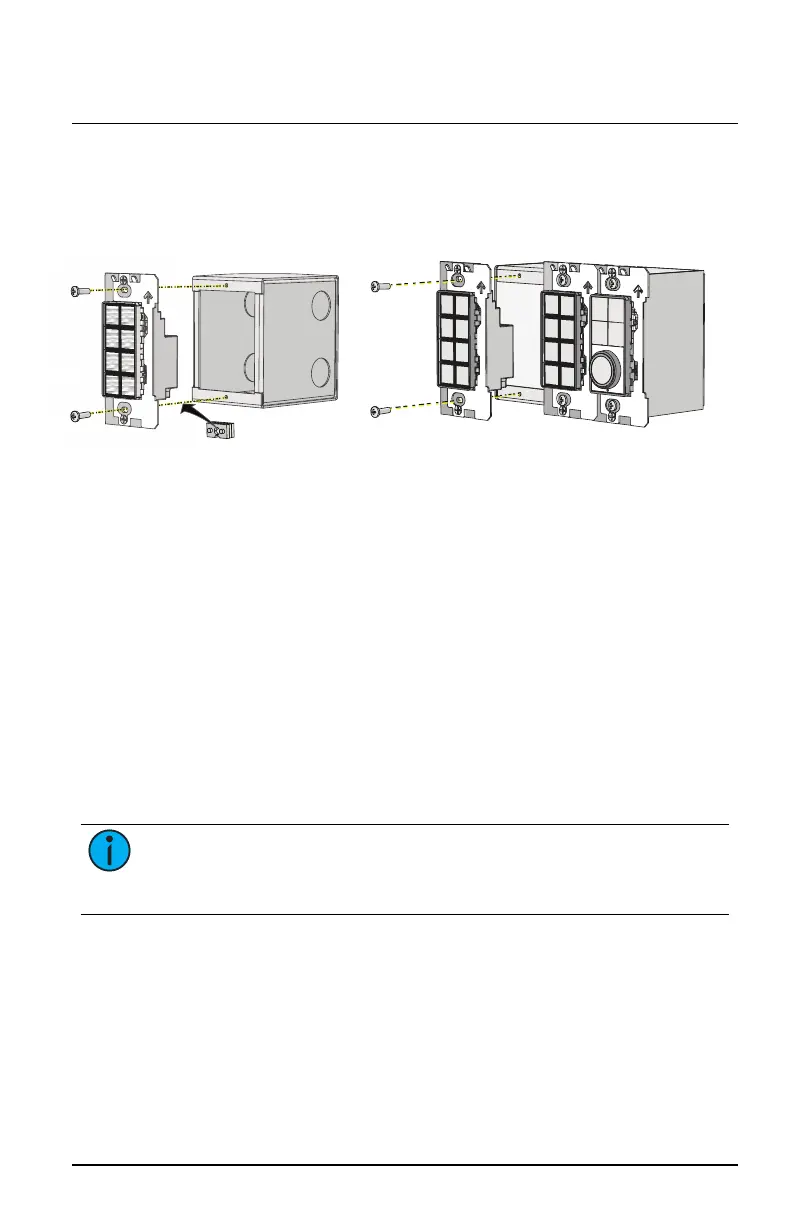
Receptacle spacers are provided to help align the station and cover flush
against the wall in flush- mount applications. The spacers are not required
when installing the station into a surface-mount back box.
1. Insert the station electronics and wiring into the back box. To install
multiple stations (multi-gang), insert the station electronics into the
back box from the right to the left side for the best alignment and fit.
The alignment bracket will slightly overlap the station to the right
when properly installed.
2. Use spacers as needed to provide a flush-mounted station.
a. Fold the spacer in a zig-zag fashion and press the stack together
to achieve the thickness needed to fill the gap between the
station, wall surface, and the back box.
b. Cut off and discard the excess.
c. Place the stack between the station electronics and the flush-
mounted back box.
3. Secure each station electronics in place using the two screws provided.
If using spacers, insert the screws through the spacers as well.
Note:
To ensure successful station and wall plate installation, do not
over tighten the screws. If screws are over tightened, button activation
can be negatively impacted.
Echo Inspire Station Page 7 of 8 ETC



 To Next Page