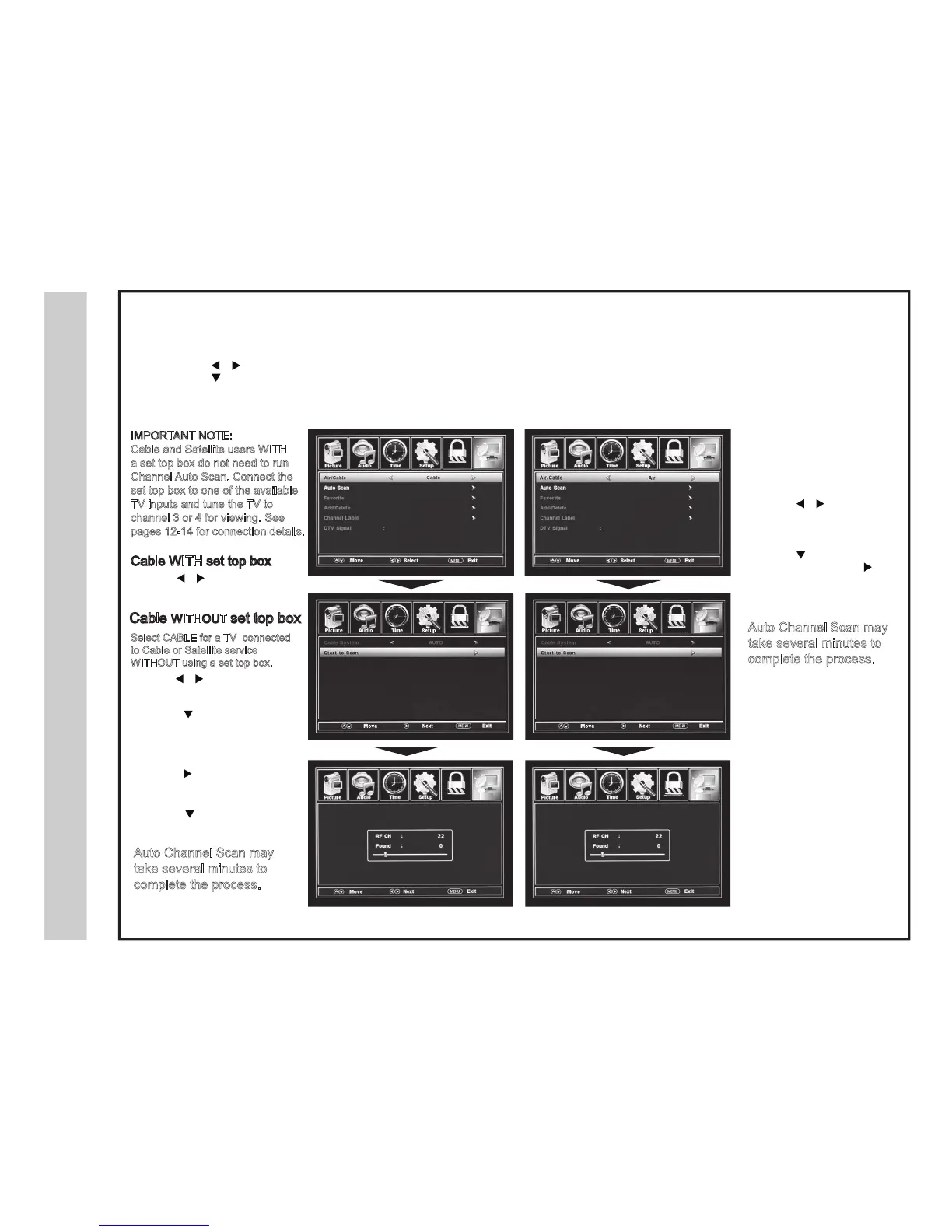
Enter the TV Mode:
Press the MENU button
Using the
buttons
; scroll to highlight the TV mode
Press the
button to
highlight; CABLE or AIR
• Use the button to
highlight CABLE.
• Press the
button to select
AUTO SCAN. Press the ENTER
button and CABLE SYSTEM will be
displayed next.
• Press the
button to
select STD > IRC > HRC > Aut
o
(Auto is recommended).
•
•
Press the button to select
Auto Scan and press ENTER .
Cable WITHOUT set top box
Cable WITH set top box
• Use the button to
highlight CABLE and press ENTER.
Auto Channel Scan may
take several minutes to
complete the process.
IMPORTANT NOTE:
Cable and Satellite users WITH
a set top box do not need to run
Channel Auto Scan. Connect the
set top box to one of the available
TV inputs and tune the TV to
channel 3 or 4 for viewing. See
pages 12-14 for connection details.
Select CABLE for a TV connected
to Cable or Satellite service
WITHOUT using a set top box.
Select AIR when the TV is
connected to an indoor / outdoor
anten
na.
•
Press the
button to
highlight AIR.
• Press the
button to select
Auto Scan then press the
butt
on twice to start the Auto
Chan
nel Scan.
•
Auto Channel Scan may
take several minutes to
complete the process.


 To Next Page