.
stnemtsujdAuneM
s
gn
i
t
t
e
Spu
teS
32A66-22
DLC
DLC
DLC
DLC
DLC
DLC
Lock
Channel
Lock
Channel
Lock
Channel
Lock
Channel
Lock
Channel
Lock
Channel
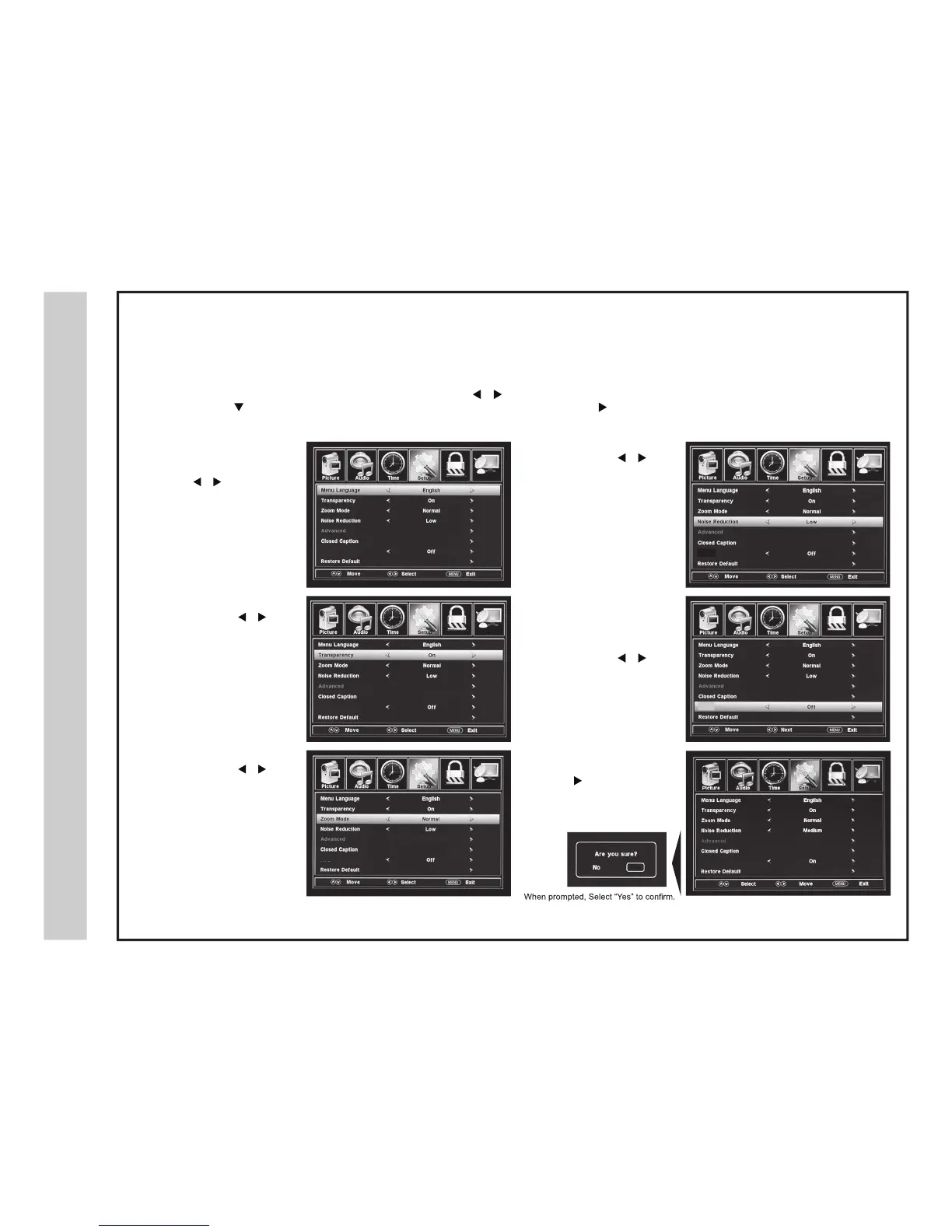
In the SETUP menu, you may change the initial setup preferences that include settings for language, menu display, computer monitoring,
closed captions, enhancement of contrast details in the picture and resetting your TV back to its factory default settings.
How to Navigate:
Press the MENU button on the remote control. Navigate using the
buttons to s
elect SETUP . Enter the display options by
pressing the down
button to
highlight the Menu Language or other options, then press the button to select the menu choice.
• Languages
Other languages include
Spanish and French. Navigate
using the
buttons to
select a different menu language.
• Transparency.
Navigate using the
buttons to turn OFF or ON
the translucent effect of the
User menu.
• Aspect (Zoom Mode)
Navigate using the
buttons to select the viewing
asp
ect to be displayed:
Normal > Wide > Zoom >
Cinema.
The Aspect feature is also
available on the remote control.
(See page
28)
• Noise Reduction.
Navigate using the
buttons to reduce video noise:
OFF > Weak > Middle > Strong.
• DLC.
The DLC feature provides
noticeable contrast detail
enhancement.
Navigate using the
buttons to select; OFF > ON.
• Restore Factory Defaults.
Press the
button to
automatically reset all current
adjustments back to their original
factory settings.
NOTE: Closed Caption and Advanced are features described on the following pages.


 To Next Page