s
tn
em
t
sujd
Aun
e
M
s
n
oit
p
a
Cd
es
o
l
C
32A66-23
Lock
Channel
Lock
Channel
Lock
Channel
Lock
Channel
Lock
Channel
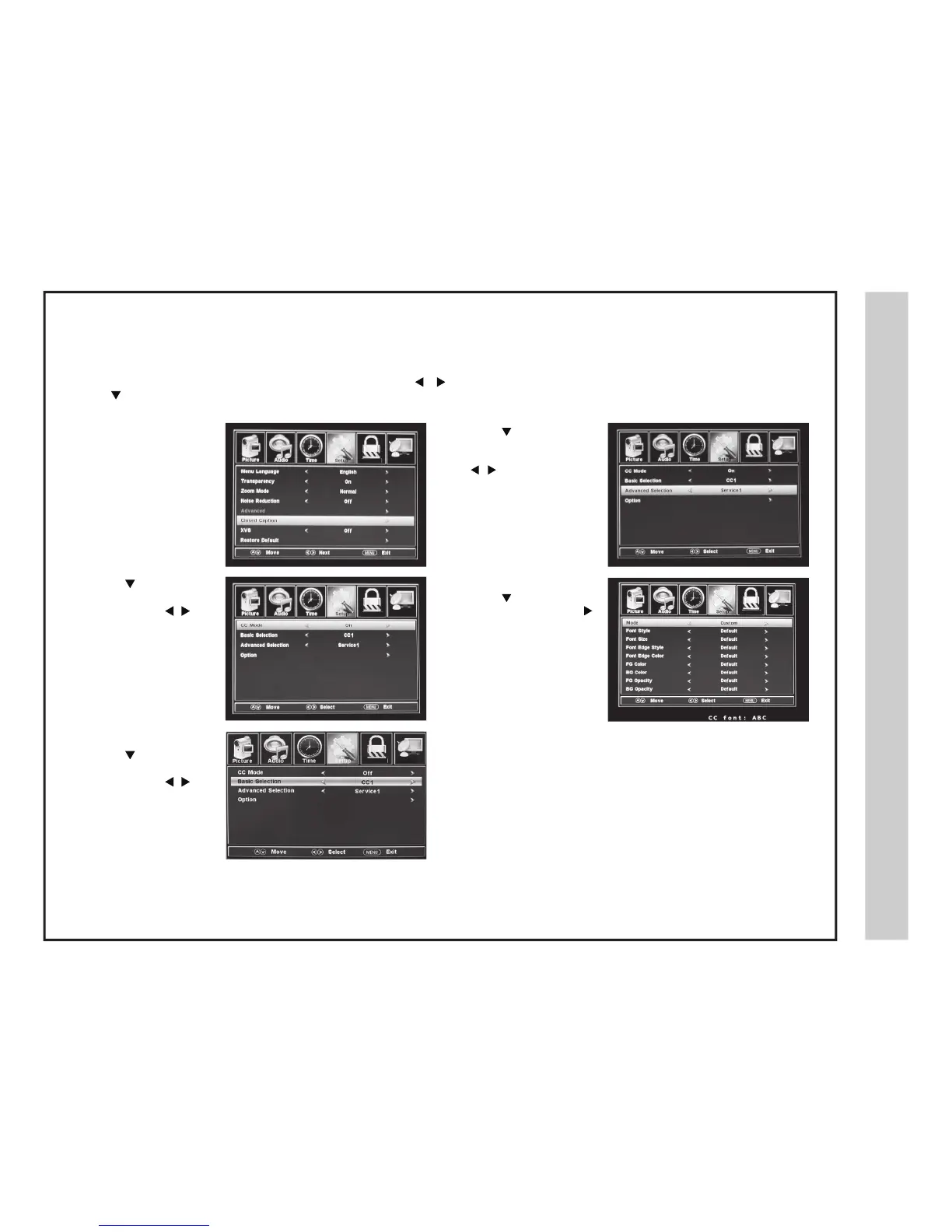
The SETUP menu includes adjustments for activating the Closed Caption (CC) feature for display on the television and customization of the CC display
typ
es and font styles.
How to Navigate:
Press the MENU button on the remote control. Navigate using arrow
buttons to s
elect SETUP .
Press the
arrow button to highlight Closed Caption.
• Press the arrow button
to
highlight Advanced
Selection. Navigate using
th
e buttons to
select Service 1-6.
• Press the button to
highlight Option. Press the
button to enter a menu option to
customize text fonts, colors
and opa
cities.
• Press the
button t
o
highlight the CC Mode.
Navigate using the
buttons. Select Off > On
> CC or Mute.
• Press the button to
highlight Basic Selection.
Navigate using the
buttons and select CC 1-4,
Text 1-4.


 To Next Page