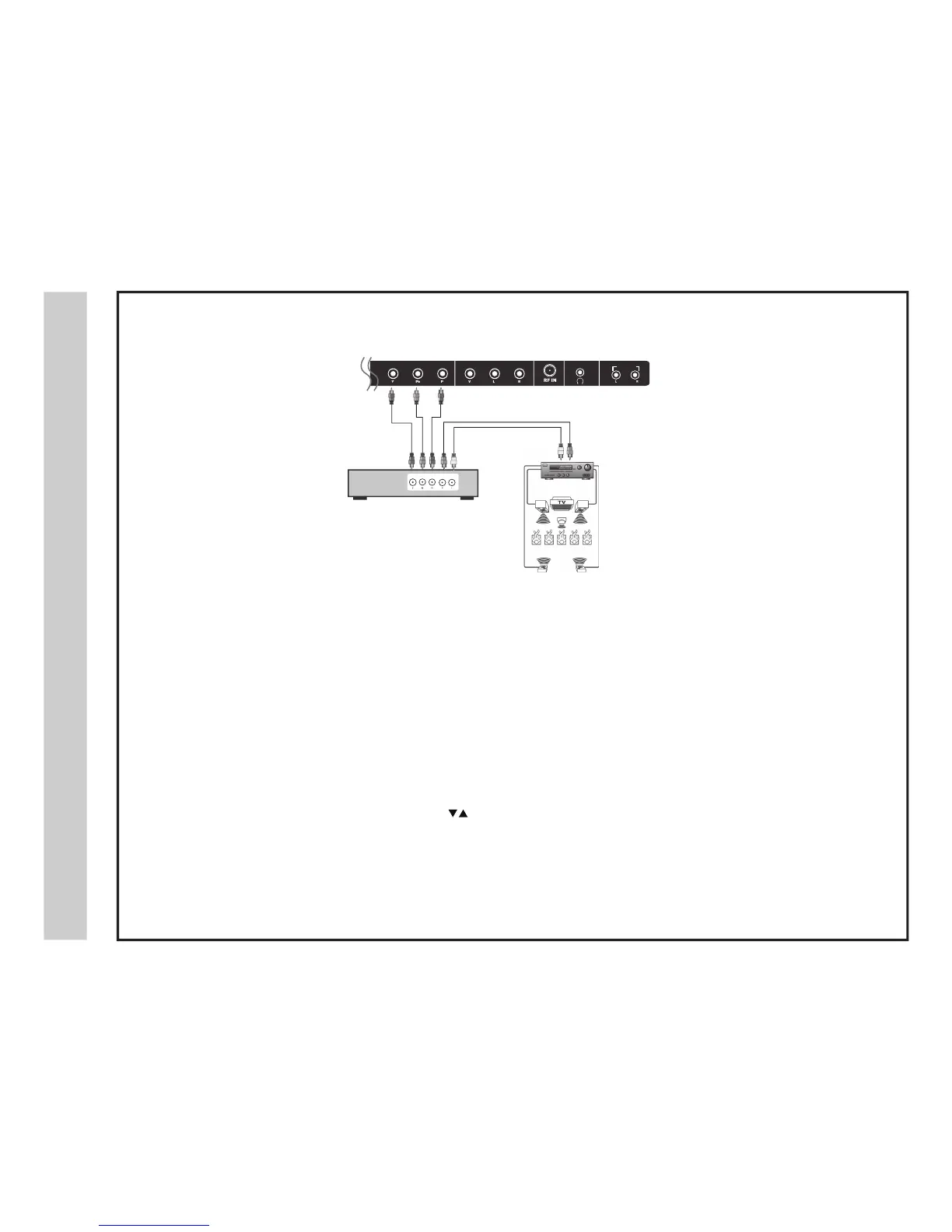
Connection to a Home Theater Audio System
noitallatsnI
*NOTE: Refer to the User Manual from your home theater equipment for recommended audio settings.
em
o
H
aotnoitcennoC
m
e
tsy
S
retaehT
32A66-16
TV REAR PANEL
Front Left
Speaker
Front Right
Speaker
Center Channel
Surround Right
Speaker
Surround Left
Speaker
Dolby Surround
Connection Illustration
Prologic
Surround Receiver
Digital set top box, gaming
console or DVD
optional cables (not included)
Connecting to a Stereo
Enjoy realistic sound from your home theater system through a stereo / receive
r
amplifier or Prologic sound system when connected to your AV
eq
uipment.
Example: The diagram illustrates the connection of audio cables directly from
yo
ur AV equipment (like a cable box) to a stereo receiver instead of using the
au
dio (L/R) jacks on the TV’s rear panel.
NOTE: When audio cables are connected to a stereo / receive
r amplifier, no audio
sound will be heard from the TVs built-in speakers.
How to Use
Press the appropriate INPUT button on the remote control. Use
arrow buttons to highlight the input source to view and then press ENTER .
How to Use (Audio )
(Video )
Select the appropriate input from your audio equipment.
AUDIO OUT


 To Next Page