noi
talla
t
sn
I
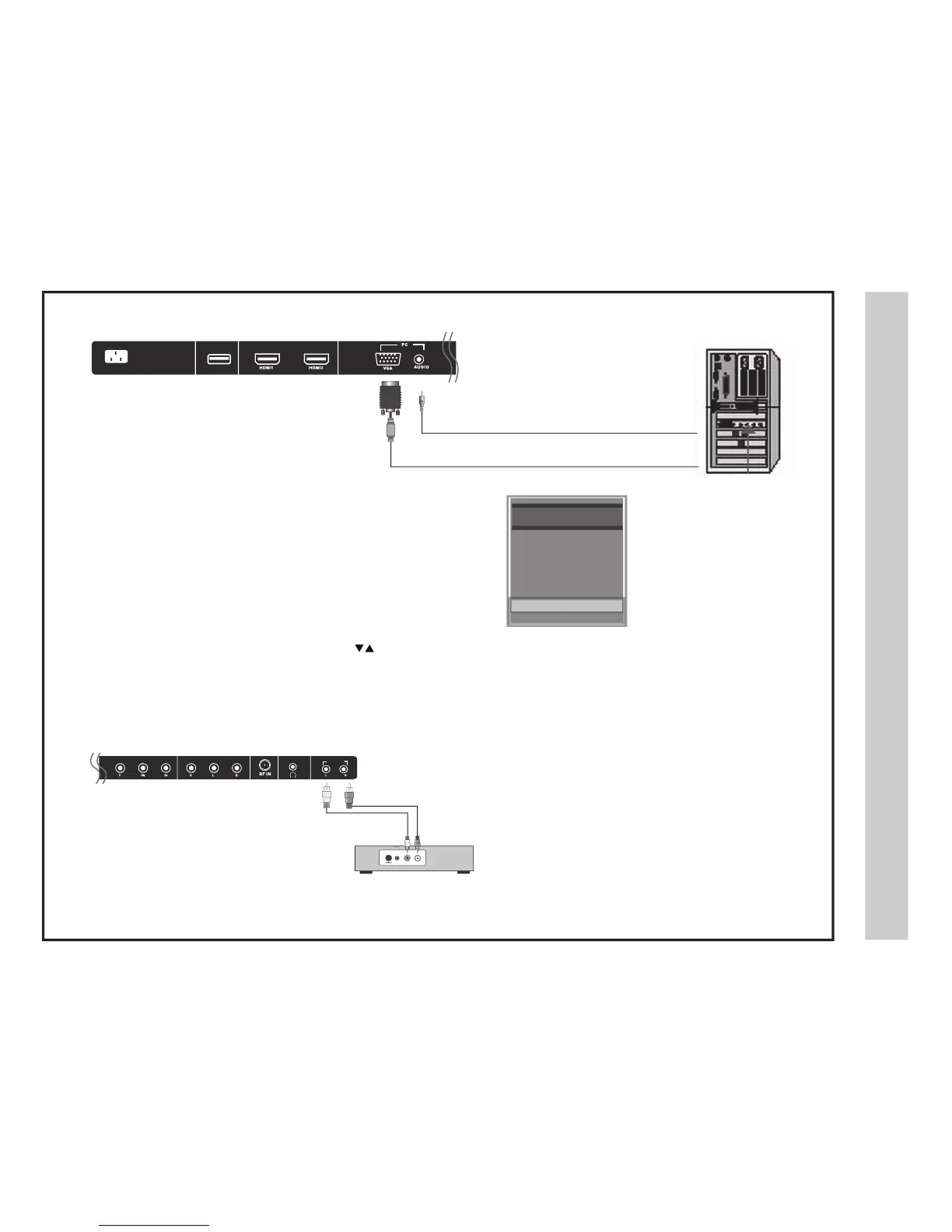
Connecting a Personal Computer with VGA to Your Television
Connecting to an amplifer or home theater system
a
ot
n
o
i
tce
n
n
o
C
r
e
t
u
pm
o
Cl
a
nosr
eP
32A66-15
VGA & Audio Cable (not included)
INPUT SOURCE
INPUT SOURCE
TV
AV
Component
HDMI 1
HDMI 2
VGA
TV REAR PANEL
Audio Amplifier
Audio cables (not included)
Recommended computer display resolution: 1366x768 @ 60 HZ
• Connect using an optional male to male VGA cable (not included
no
t included
) from
yo
ur PC to the VGA input on the TV’s rear panel.
• Connect an optional 3.5mm audio cable ( ) from the computer’s
mini audio output jack to the audio input on the TV’s rear panel.
How to Use
• Press the INPUT button on the remote control. Use the
button
s
to
highlight the VGA input and press the ENTER button.
NOTE: If your PC uses a standard signal mode, the screen will adjust automatically.
How to Connet Audio Outc
Connec
t the TV’S Audio (L/R) output jacks to an Audio Amplifier
u
sing an audio patch cable with RCA cable ends (not included).
NOTE: The speakers of this TV still will output audio at this time.
How to Connect a PC
How to Connect Audio Sound
USB
AUDIO OUT
USB
POWER


 To Next Page