noitallatsnI
TV REAR PANEL
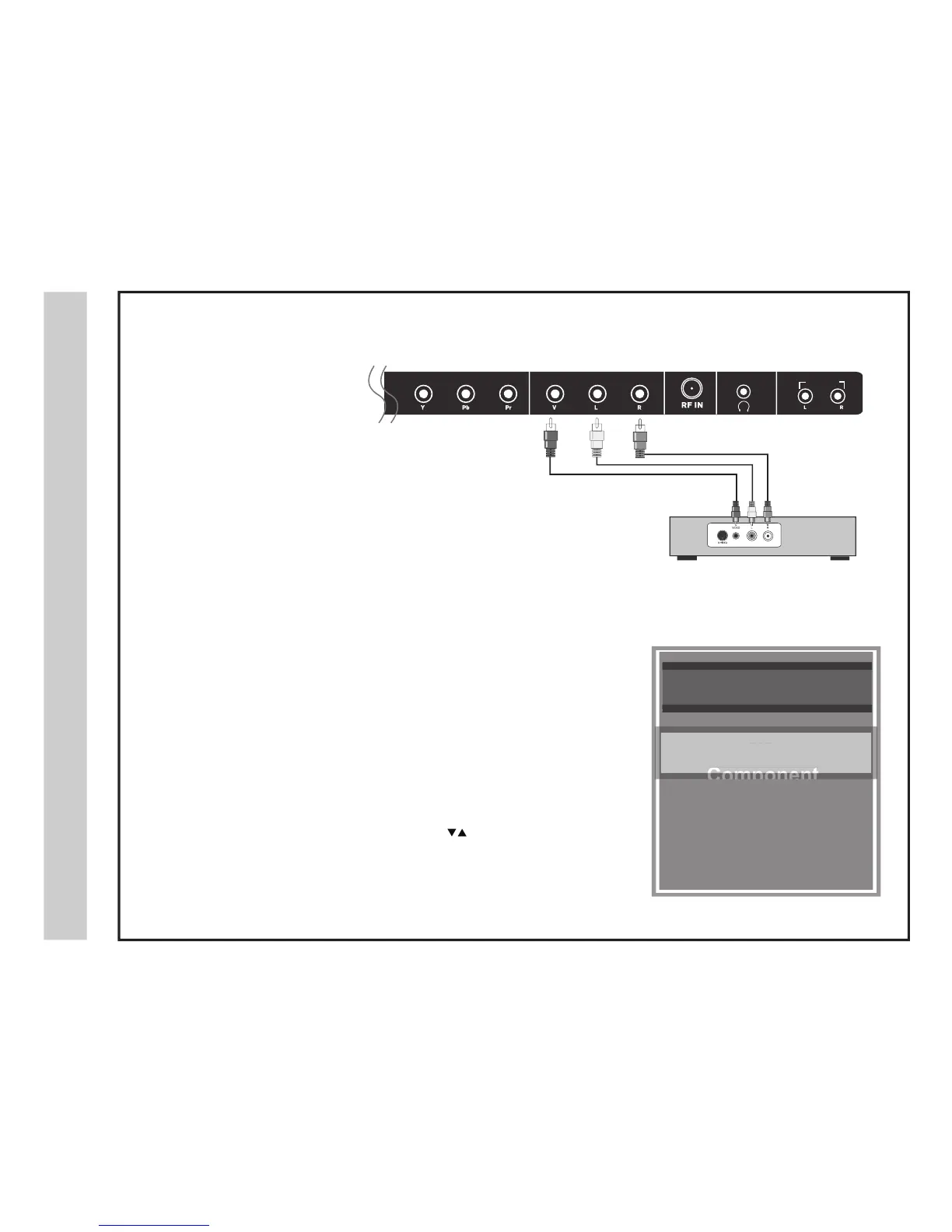
Connecting External Equipment to AV Composite IN on your television
Set top box, gaming console, and DVD
Audio Video Cable (not included)
AVotn
oitc
e
n
n
oC
32A66-14
INPUT SOURCE
INPUT SOURCE
TV
AV
Component
HDMI 1
HDMI 2
VGA
USB
Connect to external equipment using optional video and audio cables.
outpu
t jacks are available on most set top cable/satellite boxes and DVD players.
(HDMI and Component connections are recommended for the best performance).
• When connecting external equipment to your television, match the colors of the
connec
ting jacks (Video: Yellow - Audio: White & Red).
•
•
Connect the y
ellow video cable from the video output jack on your external A/V
eq
uipment (i.e.: DVD player, set top box) to AV input on the TV’s side panel.
Connect the w
hite / red audio cables for sound from the audio (L / R ) output jacks
on yo
ur external equipment (i.e.: DVD Player, set top box) to the AV (L / R) jacks
on the
TV’s rear panel.
Press the INPUT button on the remote control. Use the buttons to
highlight the input to view (AV) then press ENTER .
the included
Composite
How to Connect Composite AV
AUDIO OUT
Composite Input


 To Next Page