lortno
Ce
tomeR
we
ivr
ev
O
32A66-8
The Remote Control
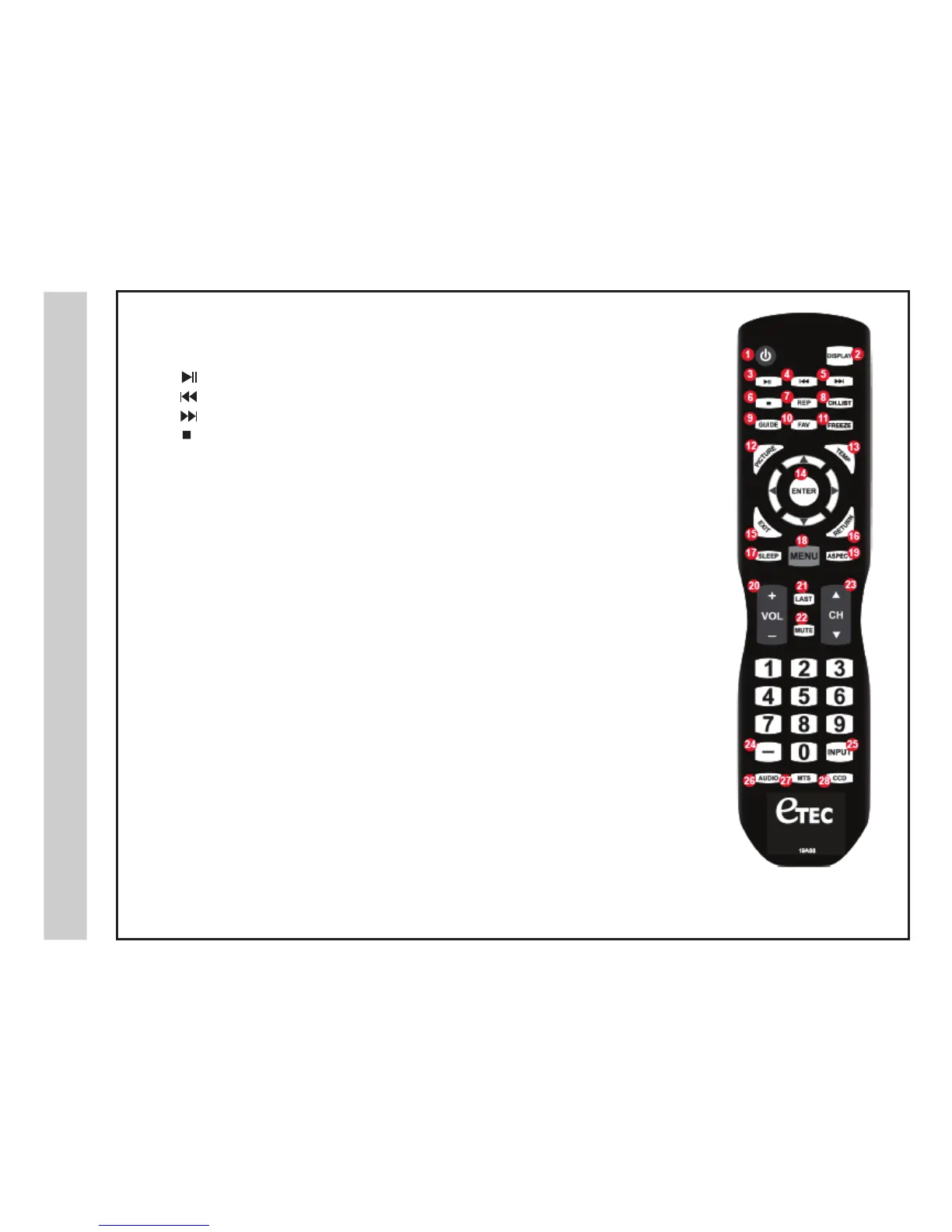
POWER – 1. Turn the LCD display ON or OFF (Standby).
DISPLAY –
2. Provides program information currently viewed.
–
3. PAUSE (USB)
–
4. PREVIOUS (USB)
–
5. NEXT (USB)
– 6. STOP (USB)
7.
8. Press to display a list of channels saved in the TV tuner memory.
Pause and still-frame the current image on the displa
y. Press again for live TV.
GUIDE –
9. Press to review scheduled programming for the currently viewed channel.
FAV –10. Press to display a listing of your favorite TV channels. (pg. 27)
FREEZE –
11.
REPEAT (USB)
REP –
CH.LIST –
PICTU
RE – 12. Select from various preset picture modes: Dynamic > Standard > Movie > Personal. (pg. 19)
TEMP – 13. Select the Color Temperature COOL > NORMAL > WARM. (pg. 19)
14. ARROWS / ENTER – Press the navigation buttons for moving through the menu options.
Press the ENTER button to select / confirm.
EXIT –
15. Press to exit a displayed menu.
RETURN – 16. Press to return to the previous menu.
SLEEP –
17. Press to activate the Sleep function. The TV will automatically turn off after; 5> 10> 15> 30>
45> 60> 90> 120> 180> 240> (minutes)> OF
F.
MENU –
18. Press to display the Main menu.
ASPECT –
19. Select the viewable display aspect options: Normal, Wide, Zoom, or Cinema. (pg. 28)
VOLUME (+/-) – 20. Adjust the volume up (+) or the volume down (-).
LAST –
21. Press to switch between the current channel and previously viewed channel.
MUTE –
22. Press to temporarily turn off the TV audio. Press again to resume.
CHANNEL –
23. / Change the channel up or down.
NUMBE
RS / DASH –24. Select desired TV channel directly. For example: to select digital channel 4-1,
press “4”, press “-”, and press “1” = (4-1).
INPUT –
25. Press to display all of the input sources on screen. (pgs. 10-15)
AUDIO – 26. Press to select from various preset audio modes: PERSONAL> STANDARD> MUSIC> MOVIE (pg. 20)
MTS –
27. Press to select a program’s second audio channel (if available).
CCD –
28. Press to select closed caption subtitles (if available) OFF> ON. (pg. 23)
NOTE: When using the remote
control, point it directly at the TV.
1
3
4
5
6
7
8
9
10
12
15
17
20
18
21
22
24
26 27
28
25
14
13
16
19
23
11
2
19A88


 To Next Page