stnemtsujdAuneM
l - Canada
o
r
tn
o
Cla
tn
eraP
32A66-26
Lock
Channel
Lock
Channel
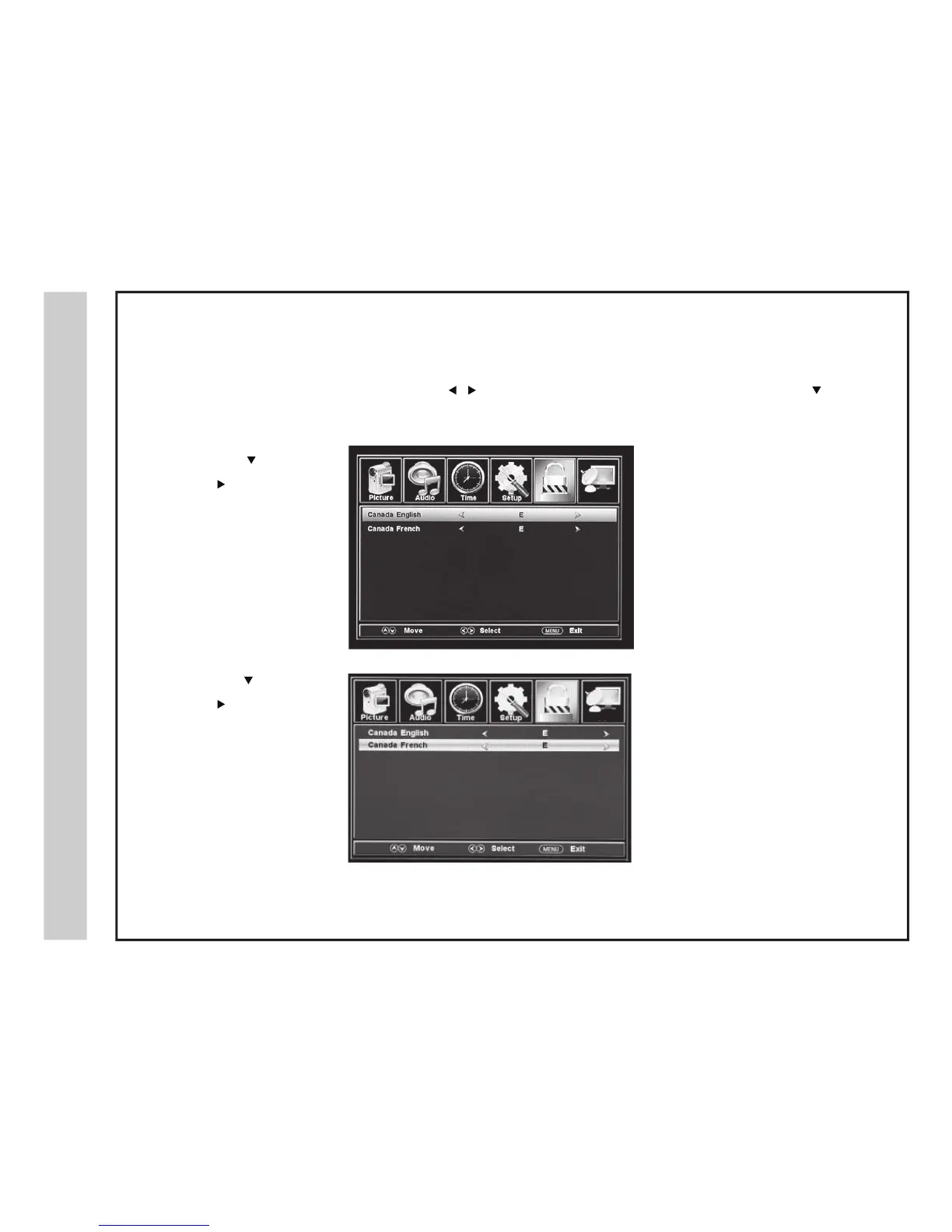
In the PARENTAL menu, you may block television and movie programming based on Canadian TV and movie rating guidelines. To gain access
and s
elect your preferences in the Parental Control menu, make certain your input selection is set to TV.
How to Navigate:
Press the MENU button on the remote control. Navigate using the
buttons to select PARENTAL. Access the rating options by pressing the
button
to
highlight ENTER PASSWORD. Enter your 4 digit password code. The factory default code is “0000” unless you have previously changed it.
See page 24 for information on how to change your password.
• Navigate using the button to
highlight CANADA ENGLISH
then
press the
button
repeatedly to select your ratings
preference.
Appropriate for everyone
Appropriate for all children
Appropriate for everyone 8 years old and up
General Audience
Parental Guidance
Appropriate for Children over 14 years old
Mature Audience Only
• Navigate using the
button to
highlight CANADA FRENCH
then
press the button
repeatedly to select your ratings
preference.
Appropriate for everyone
General Audience
Appropriate for Children 8 years old and up
Appropriate for Children 13 years old and up
Appropriate for Children 16 years old and up
Mature Audience Only


 To Next Page