
 To Next Page

T
Tabitha HartmanAug 17, 2025
What to do if my ETEKCITY ESN00 Scales display shows 'Lo'?
- CCasey FuentesAug 17, 2025
If your ETEKCITY Scales' LCD display shows “Lo”, it means the battery is low. Replace the batteries to resolve this issue.

What to do if my ETEKCITY ESN00 Scales display shows 'Lo'?
If your ETEKCITY Scales' LCD display shows “Lo”, it means the battery is low. Replace the batteries to resolve this issue.
Why my ETEKCITY ESN00 does not turn on?
If your ETEKCITY Scales won't turn on, try these steps: * Replace the batteries. * Make sure you've inserted the batteries with the correct polarity as marked in the battery compartment.
What to do if my ETEKCITY Scales does not turn on?
If your ETEKCITY Scales won't turn on, the batteries may be out of power. Try replacing them. Also, ensure the batteries are correctly installed, matching the polarity markings in the battery compartment.
Why does my ETEKCITY ESN00 Scales LCD display show 'Lo'?
If the LCD display on your ETEKCITY Scales shows “Lo”, this indicates that the batteries are running low. Replace the batteries to resolve this issue.
What to do if ETEKCITY ESN00 Scales display shows 'Lo'?
If your ETEKCITY Scales display shows 'Lo', it indicates that the battery is low. Replace the batteries to resolve this issue.
Why is the LCD display dim on my ETEKCITY ESN00 Scales?
If the LCD display on your ETEKCITY Scales is dim, the scale may be on standby. Place an item on the scale for measurement, or turn off the scale by pressing and holding for 3 seconds. If the issue persists, replace the batteries.
What to do if my ETEKCITY Scales cannot connect to VeSync app?
If your ETEKCITY Scales cannot connect to the VeSync app, ensure your mobile device is within 30 ft (10 m) of the scale. Also, a Bluetooth device can only exchange data with 1 other Bluetooth device at a time. Make sure the scale is not currently connected to any other phone or app.
How to fix ETEKCITY ESN00 Scales that does not turn on?
If your ETEKCITY Scales does not turn on, try replacing the batteries. Also, ensure that the batteries are inserted with the correct polarity as marked in the battery compartment.
What to do if ETEKCITY ESN00 Scales display shows 'Err'?
If the display on your ETEKCITY Scales shows 'Err', it means the weight exceeds 11 lb / 5000 g / 5000 mL. Promptly remove the item from the scale to protect its weight sensors and use a different scale with a higher weight range.
What to do if my ETEKCITY ESN00 display shows 'Err'?
If the display on your ETEKCITY Scales shows “Err”, it indicates that the weight exceeds 5000 g / 5000 mL / 11 lb. Remove the item from the scale immediately to protect its weight sensors. Consider using a different scale with a higher weight range.
How to identify and select your specific nutrition scale model within the VeSync app.
Methods for finding food information in the app, via search or barcode.
How to add custom food entries with nutritional details to the app.
How to view detailed nutrition facts and record food under specific meals.
Manually add food items to meals or adjust recorded food weights.
Steps to link VeSync data with a Fitbit account.
Steps to connect VeSync data with the Apple Health app.
Advice for achieving accurate weight and volume measurements.
How to select units and perform weight/volume measurements.
How to use the Tare function to exclude container weight from measurements.
 General
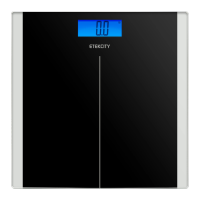
| Type | Digital Scale |
|---|---|
| Capacity | 180 kg |
| Display | LCD |
| Material | Tempered Glass |
| Auto On/Off | Yes |
| Power Source | Battery |
| Auto Shut-off | Yes |
| Backlit Display | Yes |
| Units | lb, kg, st |
| Increment | 0.1 kg |
| Power | 2 AAA batteries |
| Maximum Weight Capacity | 400 lb |
| Accuracy | ±0.1 kg |
| Platform Size | 30 x 30 cm |