19
7.1 NORMAL OPERATION WITHOUT REMOTE CONTROLLER
7.2 NORMAL OPERATION WITH MULTIPLE REMOTE CONTROLLERS INSTALLED
●
●
●
●
●
●
7. NORMAL OPERATION
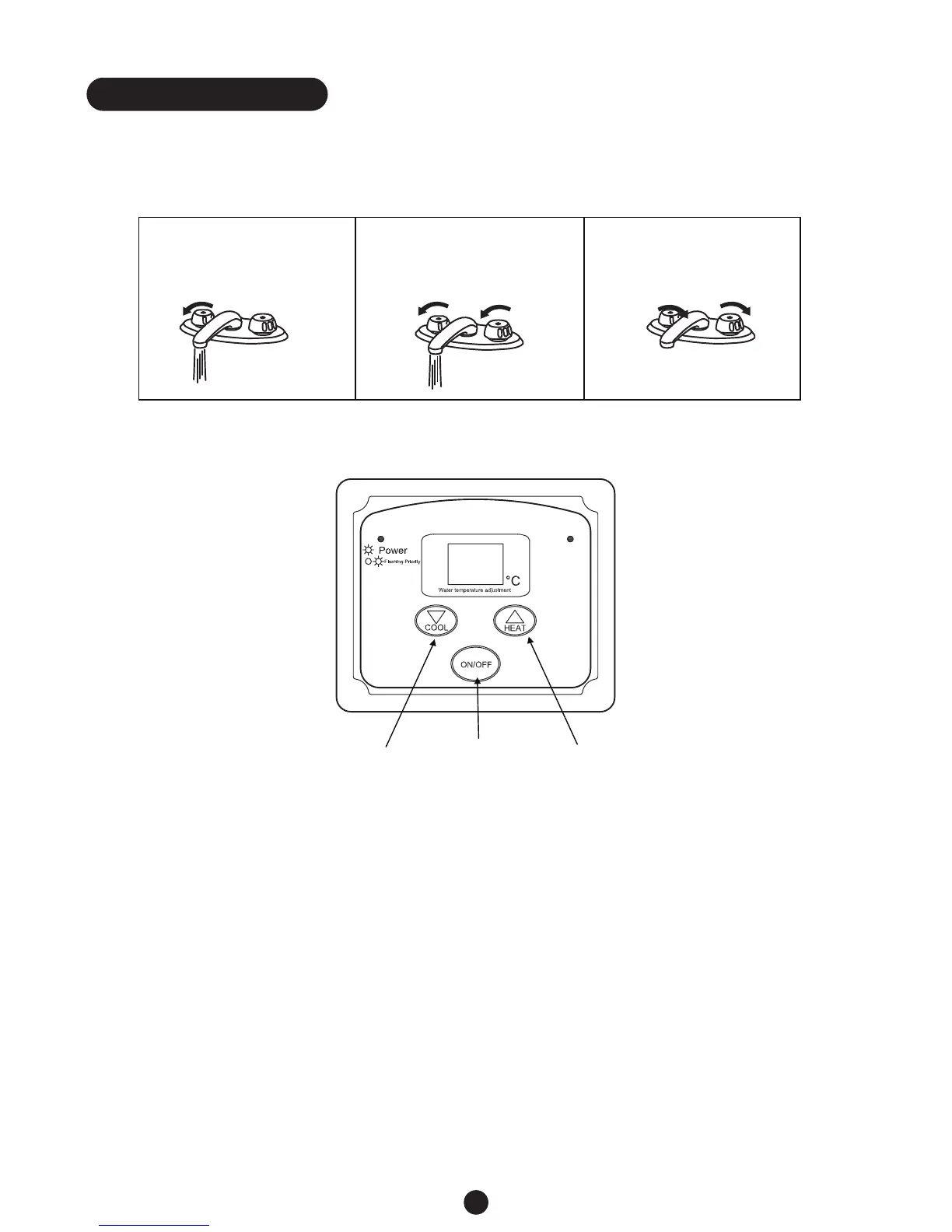
1. Open a hot water tap. 2. Mix cold water with the
hot to get the correct
temperature water.
3. Close the hot water tap.
Flow rate to activate the water heater: 3.0 litre per minute.
Flow rate to keep the water heater running: 2.5 litre per minute.
Press the ON/OFF button. The Power light will become lit on the remote controller with setting
temperature displayed on each of the remote controllers. The controller with PRIORITY function will
have a flashing Power light.
Set the required temperature using the Cool & Heat Buttons. (The temperature setting can only be
changed by the priority controller. (Refer to p. 15 for detail regarding the PRIORITY function)
Open a hot water tap, and ensure the Burner ON light is lit. Mix cold water with the hot as required.
Close the hot water tap. The Burner light will turn off.
Burner
ON/OFF
button
Reduce
temperature
button
Increase
temperature
button
7.3 FREEZE PREVENTION
Only the pipes and heat exchanger inside the water heater will be protected. Any hot or cold water
pipes located outside of the unit will not be protected. Proper protection and insulation of these
pipes will be required to ensure these are protected from freezing.
CAUTION



 To Next Page