EN 16
Using the cooking timer
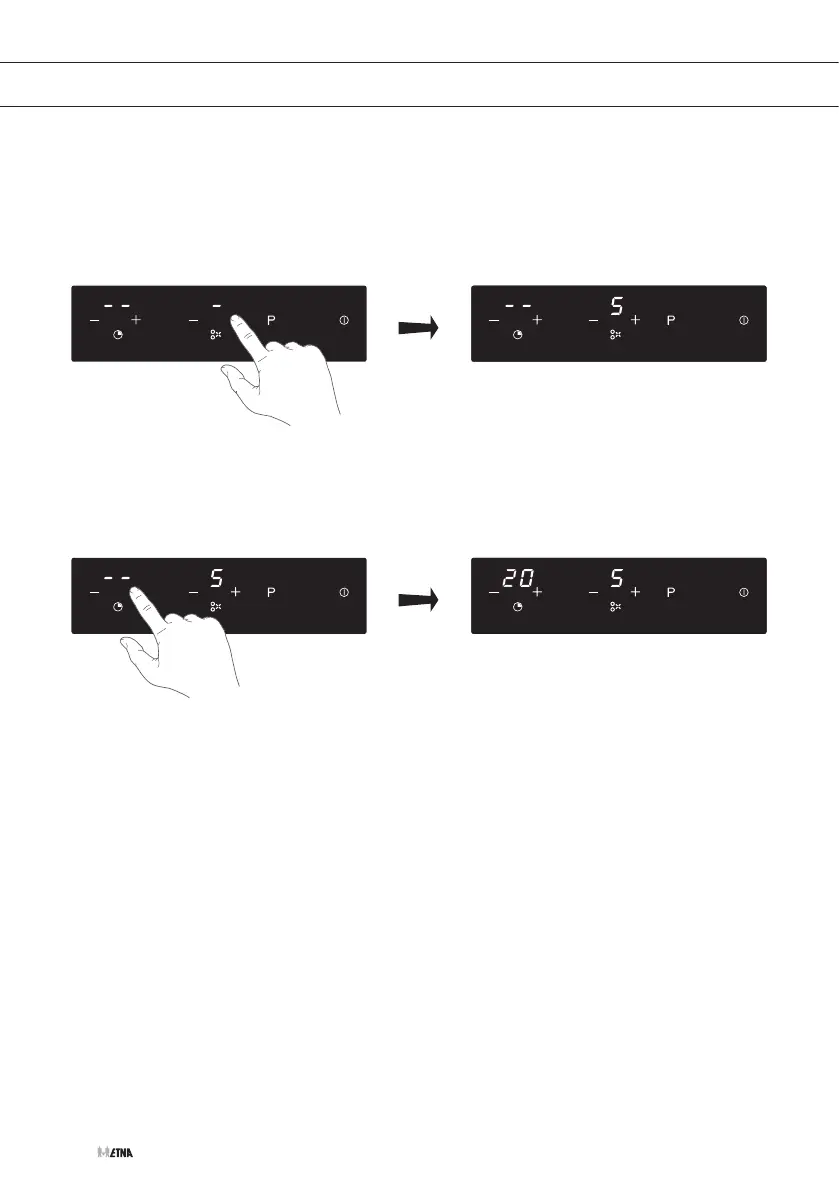
1. Switch on the hob.
2. Touch the minus (-) or plus (+) key of the corresponding cooking zone you want to set the
timer for.
3. Set the time by touching the minus (-) or plus (+) timer key.
▷ Touch the minus (-) or plus (+) key once will decrease or increase by 1 minute.
▷ Touch and hold the minus (-) or plus (+) key will decrease or increase by 10 minutes.
▷ As long as the time is flashing in the display it can be adjusted.
▷ When the time is set, it will begin to countdown immediately.
▷ The display will show the remaining time and the timer indicator will flash for 5 seconds.
▷ The red dot next to the power level display will illuminate, indicating the cooking zone is
linked to the timer.
▷ When the cooking timer expires, the corresponding cooking zone will be switched off
automatically an alarm will sound once.
4. Simultaneously touch the minus (-) and plus (+) key to cancel the timer.
▷ The timer display will show ‘00’.
OPERATION


 To Next Page