16
3.2.11 SNMP (For selected models only)
SNMP, Simple Network Management Protocol, is used to facilitate the exchange of management information
between network-attached devices, and network administrators could use it to monitor those devices.
The SNMP consists of three basic components:
Network-management systems (NMSs) to monitor and control the managed devices.
Managed devices as network nodes to save all network and management information, such as routers, access
servers, switches, bridges, hubs, etc.
Agents as network management software modules on managed devices to provide the status of managed devices
to NMSs.
Note: Before configuring SNMP settings, make sure your NMS is enabled first.
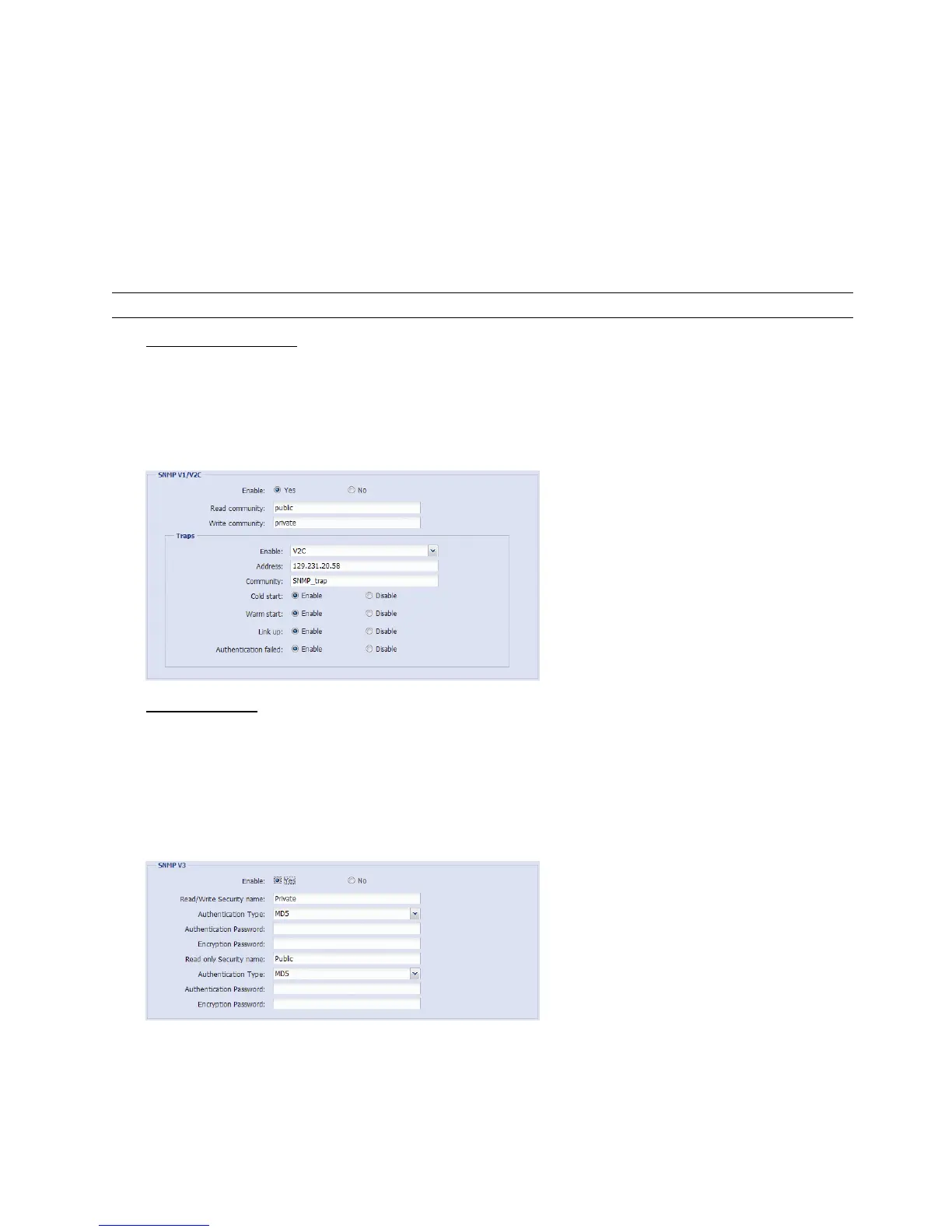
Enable SNMP V1 / V2C
Select “Yes” to enable this function, and enter the names of “Read community” and “Write community” based on
your NMS configurations.
To enable “Traps” to notify the management station of important events, choose “V1” or “V2C” in “Enable”, enter
the address and community name, and select the event type(s) needed.
Enable SNMP V3
SNMP V3 has a higher security level than SNMP V1 / V2C to allow configuring the authentication password and
encryption password.
Choose “Read/Write Security name” or “Read only Security name” based on your NMS settings, and enter the
community name. Then, select the authentication type from “MD5” or “SHA”, and enter the password for
authentication and encryption. The password length is from 8 to 31 characters.



 To Next Page