50
APPENDIX 9 PREREQUISITES FOR NETWORK SHARE
“Push Video” is an active notification system, different from traditional FTP & Email notification methods. It’s more
active and stable, but also easier to be affected by your network bandwidth.
A9.1 Check PC IP Address
Note: The instructions below are taking Windows 7 and 8 for an example.
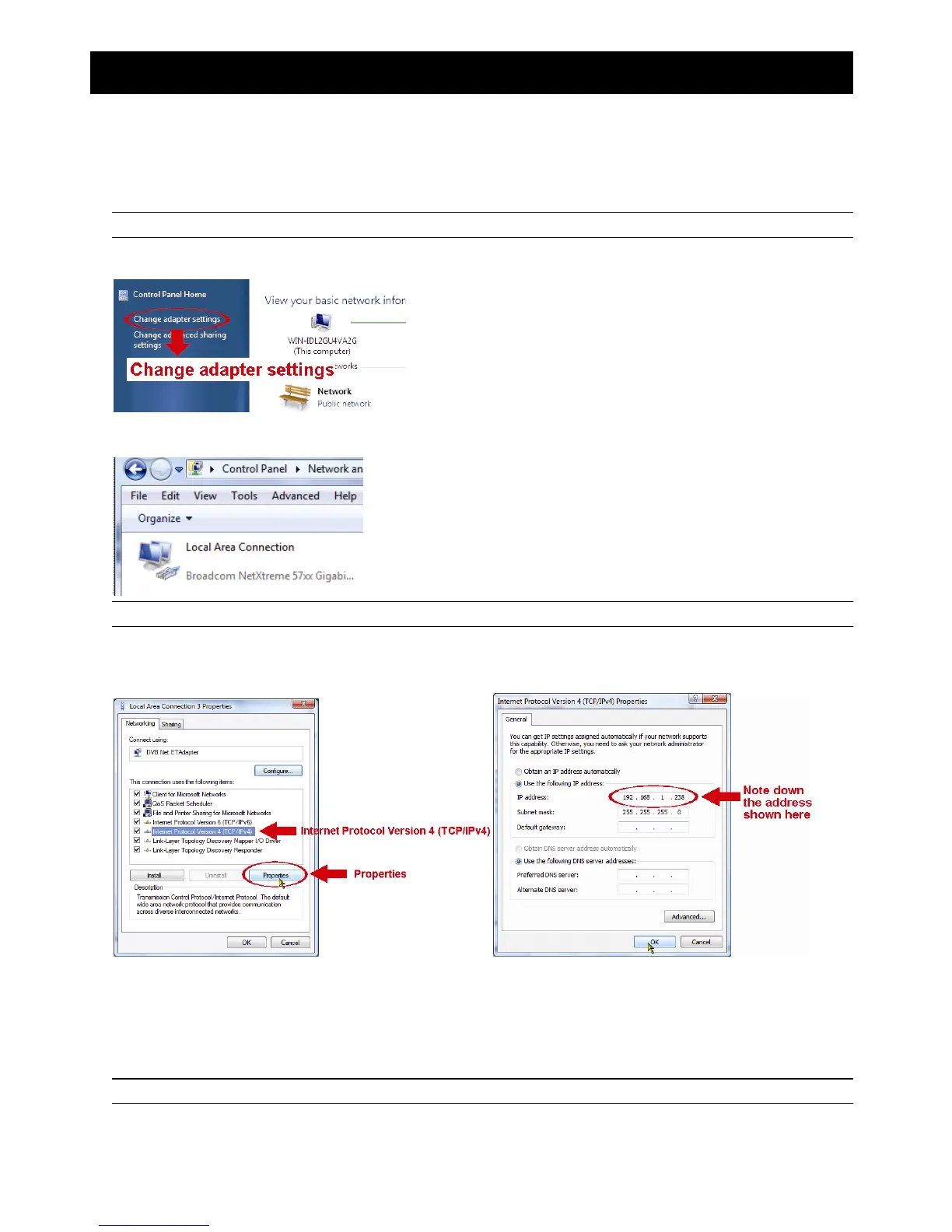
Step1: Go to "Network and Sharing Center”, and select “Change adapter settings”.
Step2: Right-click on “Local Area Connection”, and select “Properties”.
Note: If your local area connection is not enabled, please also enable it.
Step3: In the “Networking” tab, select “Internet Protocol Version 4 (TCP/IPv4)”, and select “Properties”.
Step4: In the “General” tab, note down the IP address in “Use the following IP address”.
A9.2 Create "Administrator" Account
It’s recommended to create a new administrator account on the PC for “Network Share” to use, or user could use the
existing administrator account.
Note: The instructions below are taking Windows 7 and 8 for an example.
Step1: Go to "User Accounts” “Manage Accounts”, and select “Create a new account”.



 To Next Page