8
3. CAMERA CONFIGURATIONS
Users can further configure this network camera by accessing via Internet Explorer.
3.1 System configuration menu
Click “Config.” to enter the configuration page.
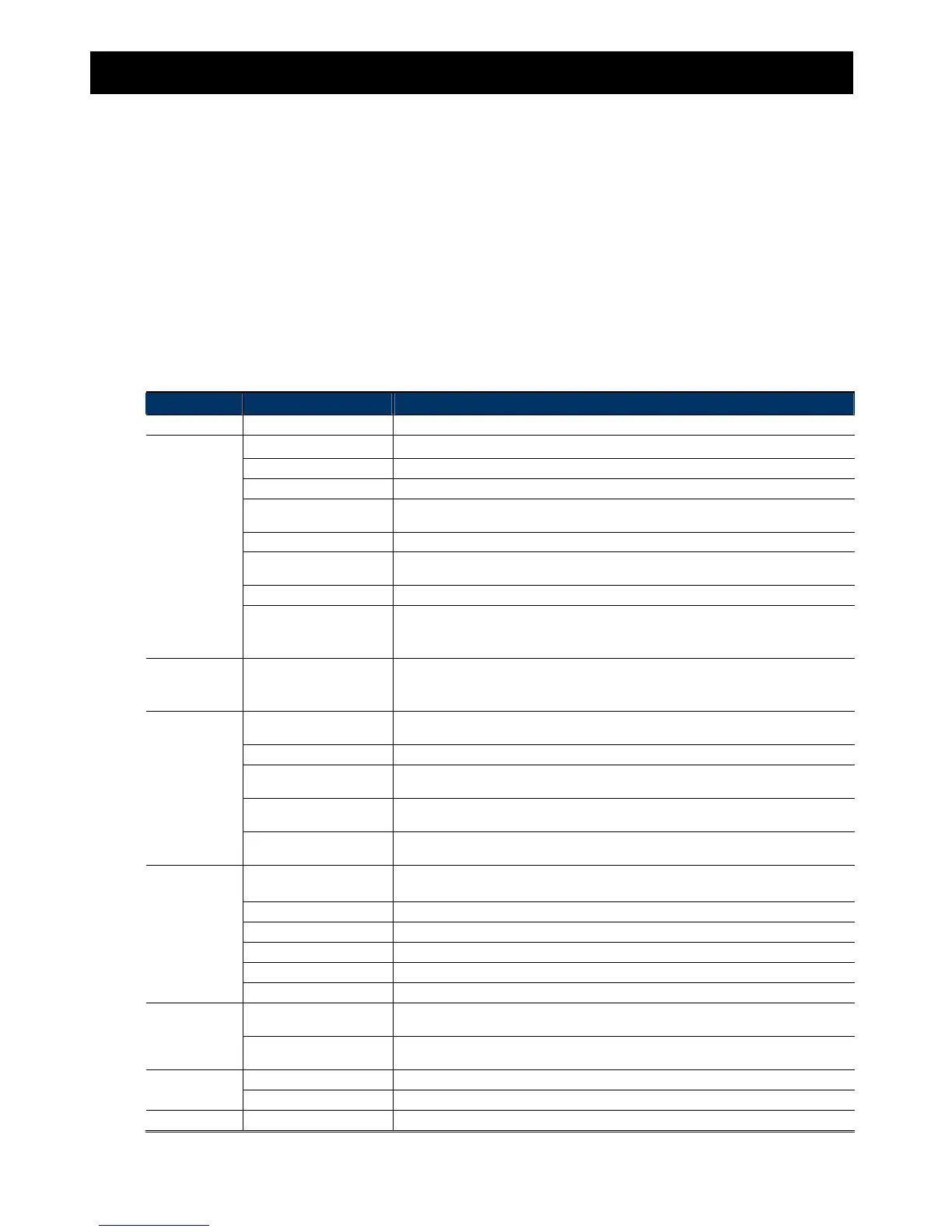
The functions are categorized into seven menus: Network, Camera, VA, Record, Storage, Trigger and General.
For details about “Network”, please refer to “3.2 Network” at page 10.
For details about “Camera”, please refer to “3.3 Camera” at page 17
For details about “VA”, please refer to “3.4 VA (For selected models only)” at page 22.
For details about “Record”, please refer to “3.5 Record” at page 21.
For details about “Storage”, please refer to “3.6 Storage” at page 22.
For details about “Trigger”, please refer to “3.7 Trigger” at page 23.
For details about “General”, please refer to “3.8 General” at page 26.
Main Menu Sub-Menu Reference
Network Network Configure network settings.
QoS Limit the data flow for live streaming.
DDNS Enter DDNS information when the network type is PPPOE or DHCP.
SNTP Synchronize your camera time with the networked computer systems.
FTP
Enter the FTP information for event notifications when “FTP” is chosen in “Trigger” →
“Trigger”.
Mail Enter Email information for event notifications when “Email” is chosen in “Trigger” → “Trigger”.
SMS
Enter text messaging information for SMS notifications when “SMS” is chosen in “Trigger” →
“Trigger”.
Filter Choose to permit or block the IP address(es) which can access this camera.
UPnP
*Suitable for Windows-based operating system.
Allow this camera to be detected among devices within the same network area for easy and
quick usage.
Bonjour
*Suitable for Apple Mac-based operating system.
Allow this camera to be detected among devices within the same network area for easy and
quick usage.
RTP
Set the parameters for video data transmission when you’re using multimedia other than web
browsers and Video Viewer for remote access.
SNMP*
Configure SNMP to remotely manage network devices.
IEEE 802.1X*
The settings here enable the camera to access a network protected by 802.1X/EAPOL
(Extensible Authentication Protocol Over LAN).
Network Share*
Assign a location in the LAN environment to save the snapshot of events when “Network
Share” is chosen in “Trigger” → “Snapshot”.
Network Failure Detection*
Configure this camera to check the network connection of other device periodically, and send
notifications via Email or FTP for disconnection events.
Camera Camera
1. Rename the camera.
2. Change the place where the camera name is shown on the screen.
Video Adjust video-related settings in different video format.
ROI*
Select a specific area to reinforce the image quality of that area.
Color Adjust the color performance.
Advanced Adjust the camera parameters if necessary.
Privacy Mask* Cover certain areas on the camera image.
VA* TA*
This function should be used with the mini-guard control switch for alarm system integration.
For details, please check with your distributor or installer.
DIS*
Enable this function to reduce blurring associated with the motion of a camera during
exposure.
Record Record Configure the record function.
Record Timer Schedule external alarm recording.
Storage Memory Check the current storage capacity and clear all recorded data when needed.
*Selected models only



 To Next Page