EasyManua.ls Logo

EUFAB 16257 - User Manual

EUFAB 16257
40 pages
Go to English
Print Icon
To Next Page IconTo Next Page
Loading...
1
Art.-Nr.: 16257
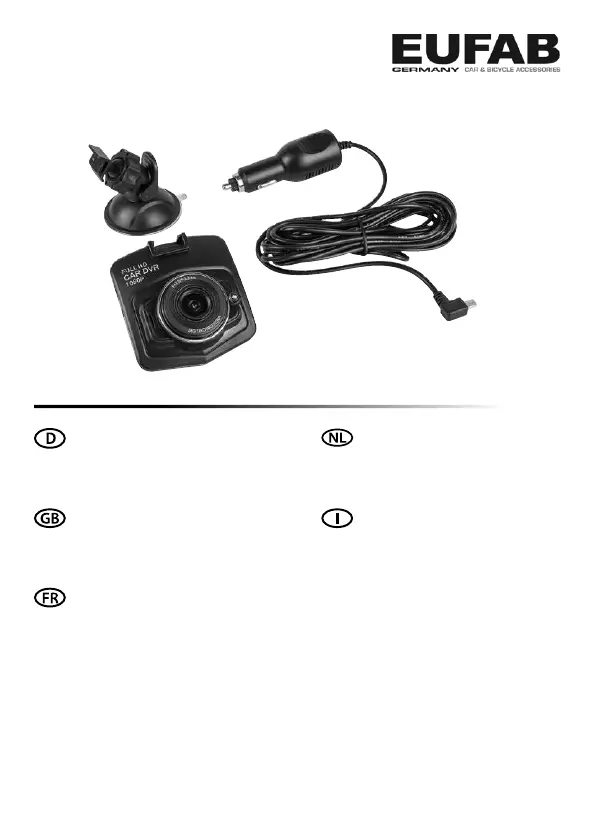
Kfz-Dashboard-Kamera
Bedienungsanleitung . . . . . . . . . . . . . . . . . . 2
Article number 16257
Vehicle dashboard camera
Operating instructions . . . . . . . . . . . . . . . . . . 9
Réf. 16257
Caméra de tableau de bord pour voiture
Manuel de l‘opérateur . . . . . . . . . . . . . . . . . 17
Cod. art. 16257
Dashboard Camera
Istruzioni per l‘uso . . . . . . . . . . . . . . . . . 33
Art. nr. 16257
Dashboardcamera
Istruzioni per l‘uso . . . . . . . . . . . . . . . . . 25

Questions and Answers

  • R
    Randy GuerraJul 28, 2025
    What to do if my EUFAB Dash Cameras has no function?
    • T
      Taylor CrawfordJul 28, 2025
      If your EUFAB Dash Camera isn't working, several factors could be the cause: * The fuse in the monitor cable connector may have blown. Replace it. * The fuse in the vehicle's 12V socket may have blown. Replace it in the vehicle's fuse box. * If you're using the camera without the charging cable, the battery might be empty. Use the charging cable to connect the camera to the 12V vehicle socket. * The memory card may not be inserted correctly. Ensure it is properly inserted. * The memory card's write protection may be enabled. Deactivate write protection on the memory card.
  • P
    Pedro RobinsonAug 3, 2025
    Why does my EUFAB Dash Cameras monitor not show a clean image?
    • T
      Timothy MckenzieAug 3, 2025
      If the monitor of your EUFAB Dash Camera isn't showing a clean image, it could be due to: * Strong light shining directly on the camera lens. The image quality should return to normal once the strong light is gone. * Incorrect light frequency settings. Set the appropriate light frequency for artificial light.
  • T
    Teresa ArellanoAug 9, 2025
    What to do if my EUFAB Dash Cameras has no saving possible?
    • L
      Luis BushAug 10, 2025
      If your EUFAB Dash Camera isn't saving, the memory card may not be formatted. Format the memory card.
  • C
    christopher67Aug 15, 2025
    What to do if EUFAB Digital Camera shows no saving possible?
    • A
      andrewreeseAug 15, 2025
      If your EUFAB Digital Camera isn't saving, consider these potential causes and solutions: * **Memory card not inserted correctly:** Ensure the memory card is properly inserted. * **Write protection activated:** Deactivate the write protection on the memory card. * **Memory card not formatted:** Format the memory card. * **Insufficient memory space:** Delete files to free up space. * **Defective memory card:** Try using a different memory card.
  • A
    Anthony OlsonAug 21, 2025
    How to fix EUFAB 16257 when the monitor does not show a clean image?
    • J
      Jose AndersonAug 21, 2025
      If the monitor of your EUFAB Digital Camera isn't showing a clean image, it could be due to the following: * The camera lens might be dirty. Carefully clean the lens. * Strong light may be directly hitting the camera. Once the strong light dissipates, the image quality should improve. * The light frequency setting might be incorrect. Set the appropriate light frequency for artificial light.

Summary

Proper Use of the Product

Scope of Delivery

Specifications

Safety Precautions

Explanation of Symbols

Operating Instructions

Overview

Details the camera components and their functions, including switches, display, and ports.

Memory Card Handling

Instructions for inserting and removing the micro-SD card, emphasizing data safety.

Camera Installation

Step-by-step guide for mounting the camera on the windscreen using the suction base.

Connecting the Camera

Procedure for connecting the charging cable to the camera and vehicle power socket.

Core Functions

Explains the operation of the ON/OFF switch, OK button, and Menu button for various modes.

Video and Photo Settings

Details settings for resolution, loop recording, lighting, motion detection, video audio, and date stamp.

Advanced Settings

Covers gravity sensor, photo settings, date/time, automatic switch-off, screensaver, and language.

Playback and Recording

Instructions for viewing recorded videos/photos and connecting to a computer.

Fuse Replacement

Guidance on how to safely replace the fuse in the charging cable connector.

Troubleshooting Common Issues

Provides solutions for common problems like 'No function' and 'No saving possible'.

Maintenance and Care

Environmental Protection Notes

Contact Information

EUFAB 16257 Specifications

General IconGeneral
BrandEUFAB
Model16257
CategoryDigital Camera
LanguageEnglish