
 Need help?
Do you have a question about the EUFY L60 HYBRID and is the answer not in the manual?
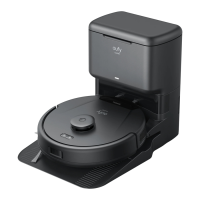
Lists the items included with the RoboVac, such as the main unit, charging station, documents, and mopping module.
Identifies key components of the RoboVac, including bumper, buttons, sensor, charging pins, water inlet, and dust box.
Explains the functions of the power/pause and home buttons for various press durations like power, pause, return, and Wi-Fi reset.
Details the meaning of different LED light patterns and their corresponding RoboVac statuses, such as working normally, charging, and errors.
Provides essential advice before operation, including removing obstacles, handling rugs, and avoiding hazardous areas like fireplaces.
Guides on preparing the device, such as removing foam blocks, protective films, and positioning the charging station.
Guides users on downloading the eufy Clean app, creating an account, and adding their RoboVac.
Provides instructions on how to reset the RoboVac's Wi-Fi connection if issues arise during app setup.
Explains how quick mapping helps the RoboVac learn its environment and create a floor plan for efficient cleaning.
Details how to set up restricted areas like 'No-Go Zones' and 'Virtual Walls' using the eufy Clean app.
Explains how to schedule cleaning times and customize cleaning schedules through the eufy Clean app.
Describes how to select different cleaning modes such as Auto-Cleaning, Zone Cleaning, and Room Cleaning via the app.
Guides users on selecting suction power levels and using the BoostIQ™ feature in the app.
Explains how to integrate and control the RoboVac using voice assistants like Amazon Alexa and Google Assistant.
Provides step-by-step instructions on how to detach, empty, and clean the dust box and its filter.
Details how to remove, clean entangled hair from, and reinstall the rolling brush and brush guard.
Guides on detaching, washing, drying, and reattaching the mopping cloth to the mopping module.
Explains how to remove, clean hair from, and reinstall the side brush using a screwdriver.
Advises on regularly cleaning sensors and charging pins using a cloth or brush for optimal performance.
Provides steps to resolve issues when the RoboVac fails to power on, checking battery and performing a restart.
Offers solutions for unexpected shutdowns, including checking for obstacles, battery level, and error prompts.
Addresses problems with scheduling, checking app settings, time zones, and internet connectivity.
Lists checks for weak suction, such as obstructions, filter condition, brush guard, and app settings.
Guides on troubleshooting charging issues, checking the self-empty station, charging pins, and physical damage.
Provides solutions for failing to return to the station, checking clearances, station power, and sensor cleanliness.
Offers solutions for erratic movements, focusing on sensor cleaning and device restart.
Details steps for Wi-Fi connection issues, checking password, signal strength, router band, and rebooting devices.
Guides on troubleshooting Alexa control, checking app skills, account connection, and voice commands.
Addresses issues with Google Assistant control, checking app actions, account connection, and voice commands.
Provides solutions for mopping water issues, checking water tank level, module installation, and outlet blockages.
 General
| Charging Time | 4-5 hours |
|---|---|
| App Control | Yes |
| Virtual Boundaries | Yes |
| Cordless | Yes |
| Wet and Dry Cleaning | Yes |
| Dustbin Capacity | 0.6L |
| Water Tank Capacity | 0.3L |
| Mapping | Yes |
| Voice Control | Amazon Alexa, Google Assistant |
| Weight | 3 kg |






 To Next Page